EasyManua.ls Logo

Identiv ENTERPHONE MESH IQ - User Manual

Default Icon
16 pages
Print Icon
To Next Page IconTo Next Page
Loading...
PI 2.0.0519 ALL RIGHTS RESERVED. IDENTIV GROUP INC.
ENTERPHONE
TM
MESH INSTALLATION GUIDE
Welcome to your new Enterphone
TM
MESH System by
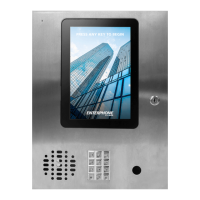
This document is an installation and operational reference guide for Enterphone
TM
MESH 19 and
Enterphone
TM
MESH IQ panels, and Enterphone
TM
MESH Kiosks.
BEFORE installation and/or activation of your new panel or kiosk, please read this guide carefully and consult
your Identiv dealer or selling agent regarding questions or concerns. AFTER activation, you can reach Identiv
Direct Technical Support at 1-604-323-7290 or email inquiries to: support@visount.com
PANEL AND KIOSK MOUNTING AND ENVIRONMENTAL CONDITIONS
Please read the following guidelines regarding regulatory requirements, extreme or extraordinary
environmental conditions, and protocols for normal installation and operation of your panel or kiosk.
Check and follow all building codes, regulations and requirements prior to panel or kiosk installation,
including requirements specific to access for persons with disabilities. Correct installation of your Identiv
Enterphone
TM
panels, kiosks and access control equipment is a regulatory requirement.
DO NOT install or operate panels and kiosks in locations that are subject to constant or prolonged rainfall
or inclement weather conditions without the appropriate protection or covering hardware. CONTACT
YOUR IDENTIV SALES REP FOR HELP DETERMINING CORRECT PROTECTION FOR PANELS OR KIOSKS.
DO NOT install or operate panels and kiosks in locations that are subject to water run-off, significant
water collection, or high-pressure spray.
DO NOT install panels and kiosks in locations that are subject to constant or prolonged direct sunlight
without the appropriate protection or covering hardware. CONTACT YOUR IDENTIV SALES REP FOR HELP
DETERMINING CORRECT PROTECTION FOR PANELS OR KIOSKS.
o Water damage of internal components and processes will void the manufacturer warranty.
o Excessive heat and prolonged temperatures above the stated operating tolerances of the panel or kiosk and its
components will void the manufacturer warranty.
o Please see Table 1 for specifications regarding panel and component standard operating temperature ranges.
All Enterphone
TM
panels and kiosks must be grounded in accordance with all electrical codes and
regulations specific to the region or area in which the panels or kiosks are being installed.
It is strongly recommended that panels and kiosks be regularly maintained to be free of dust and
particulate accumulation. To clean your panel or kiosk, open it using key-granted access and remove
dust and particles using standard 7oz compressed air canisters approved for use with electronic devices.
DO NOT use any wet spray or cleaning agents of any kind to clean the inside of the panel or kiosk,
including its components.
Each Identiv Enterphone
TM
panel and kiosk requires 24VAC, 40VA minimum power measured AT THE
PANEL. Panel and kiosk power supplies MUST be connected to the supplied 24VAC Adapter with 18AWG
minimum, solid core electrical cable.
Question and Answer IconNeed help?

Do you have a question about the Identiv ENTERPHONE MESH IQ and is the answer not in the manual?

Summary

Panel and Kiosk Mounting and Environmental Conditions

Regulatory Requirements and Site Selection

Follow building codes and select installation sites protected from weather and water.

Environmental Tolerances and Warranty

Avoid extreme temperatures and direct sunlight to prevent damage and voiding the warranty.

Grounding and Maintenance

Ensure proper grounding and perform regular cleaning to maintain unit functionality.

Power Requirements

Panels and kiosks require 24VAC, 40VA minimum power via specified wiring.

Panel and Kiosk Modifications

Approved Installers and Upgrades

Hardware options and upgrades must be installed by Identiv-approved technicians.

Unauthorized Modifications

Third-party or unauthorized physical modifications will void the manufacturer warranty.

Internal Component Alterations

Modifying internal components can cause damage and void the warranty.

Component Replacement Procedure

Use only Identiv-approved parts and technicians for component replacements.

Physical Access

Accessing Panels and Kiosks

Physical access is secured via keyed lock mechanisms on panels and kiosks.

Key Management and Security

Copy and secure keys; replacement due to loss requires approved technician.

Connections to Your Panel and Kiosk

Network and Phone Line Connections

Connect network to Processor Board and phone line to Modem Splitter for operation.

Door Release Relay Output

Connect the relay output for the door release functionality.

Powering Up Your Panel and Kiosk

Power Supply Specifications

Use 24v AC, 40VA minimum power supply with 18AWG solid core wiring.

Internal Power Connections

Internal power connections are factory secured and should not be altered.

Virtual Access and Programming

Web GUI for Access Management

Manage tenant and access updates via the Identiv Web Graphical User Interface.

Default Login Credentials

Lists default login credentials for Web App and Linux OS; change these upon configuration.

User Manual Download

Access the Enterphone™ MESH user manual through the system's web interface.

Identiv ENTERPHONE MESH IQ Specifications

General IconGeneral
BrandIdentiv
ModelENTERPHONE MESH IQ
CategoryIP Access Controllers
LanguageEnglish

Related product manuals