Each individual Handset has its own phonebook, independent of each other handset, with a
maximum of 150 entries, each name a maximum of 12 characters, each number a maximum of
20 digits and a melody to be selected between 1 and 10.
Press OK key use the direction keys to access PHONE BK. Then press OK key to conrm.
LIST: The function allows the user to review the phone book record lists by using the direction
keys, and edit, answer, delete or save one of the registered phone numbers on the list.
NEW ENTRY: Press direction keys to select a NEW ENTRY. The function allows the user add
a new contact.
1- If the phonebook is full, the message MEM FULL will be presented to the user as shown. If a
free phonebook entry is available, the cursor for the name will ash.
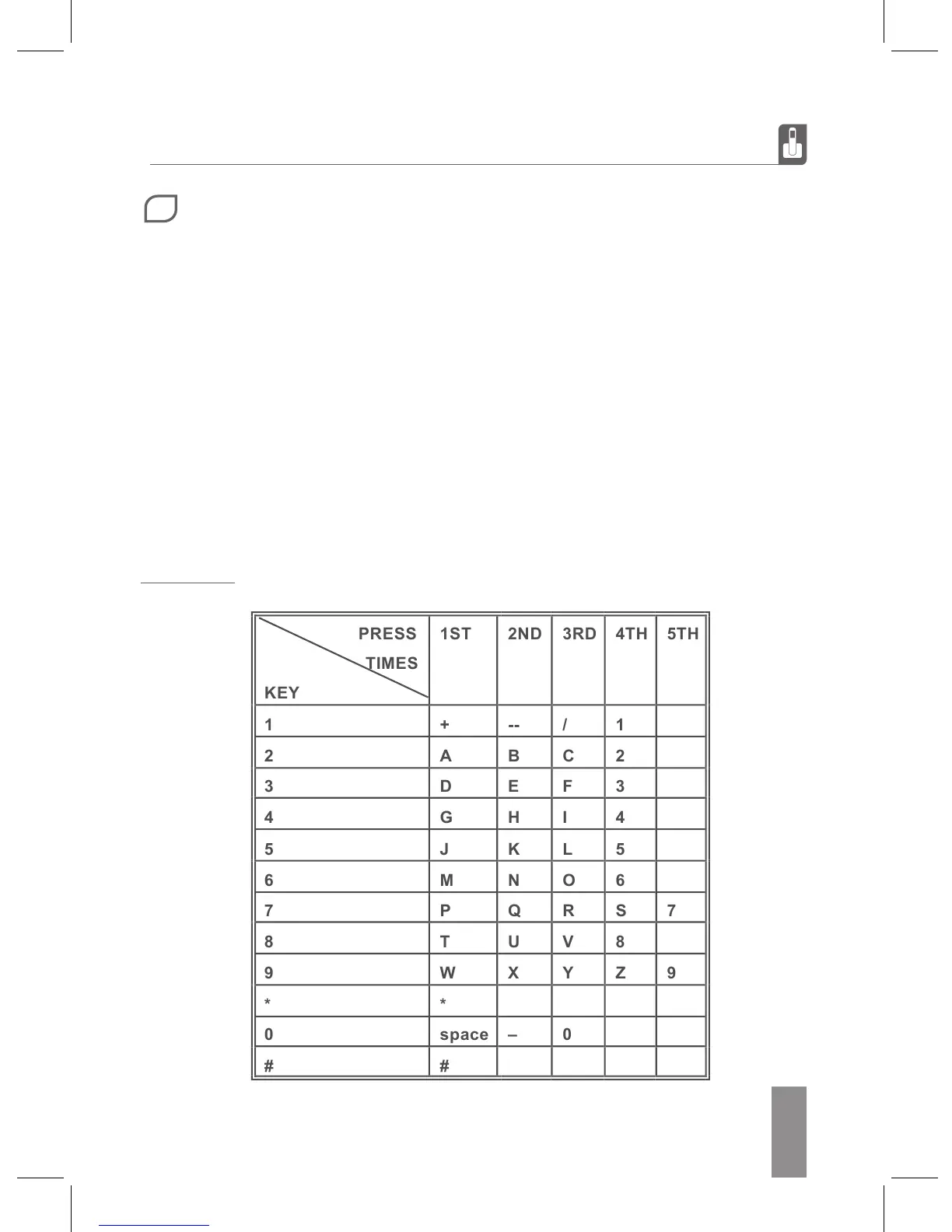
2- Enter the name using the alphanumeric keys. If you entered some character by mistake, you
should be able to erase it by pressing the R/CLR key.
4- Enter the number and press OK key to conrm.
5- Browse the available ringtones by using the direction keys.
6- Press OK to conrm the process and store the new contact.
Typing guide
4
PHONEBOOK OPERATIONS


 To Next Page