Model
ILAN422/485
Manual Connection Guide
2
b. Connection Table
3. Connection via RS232 (for ILAN422/485 converter)
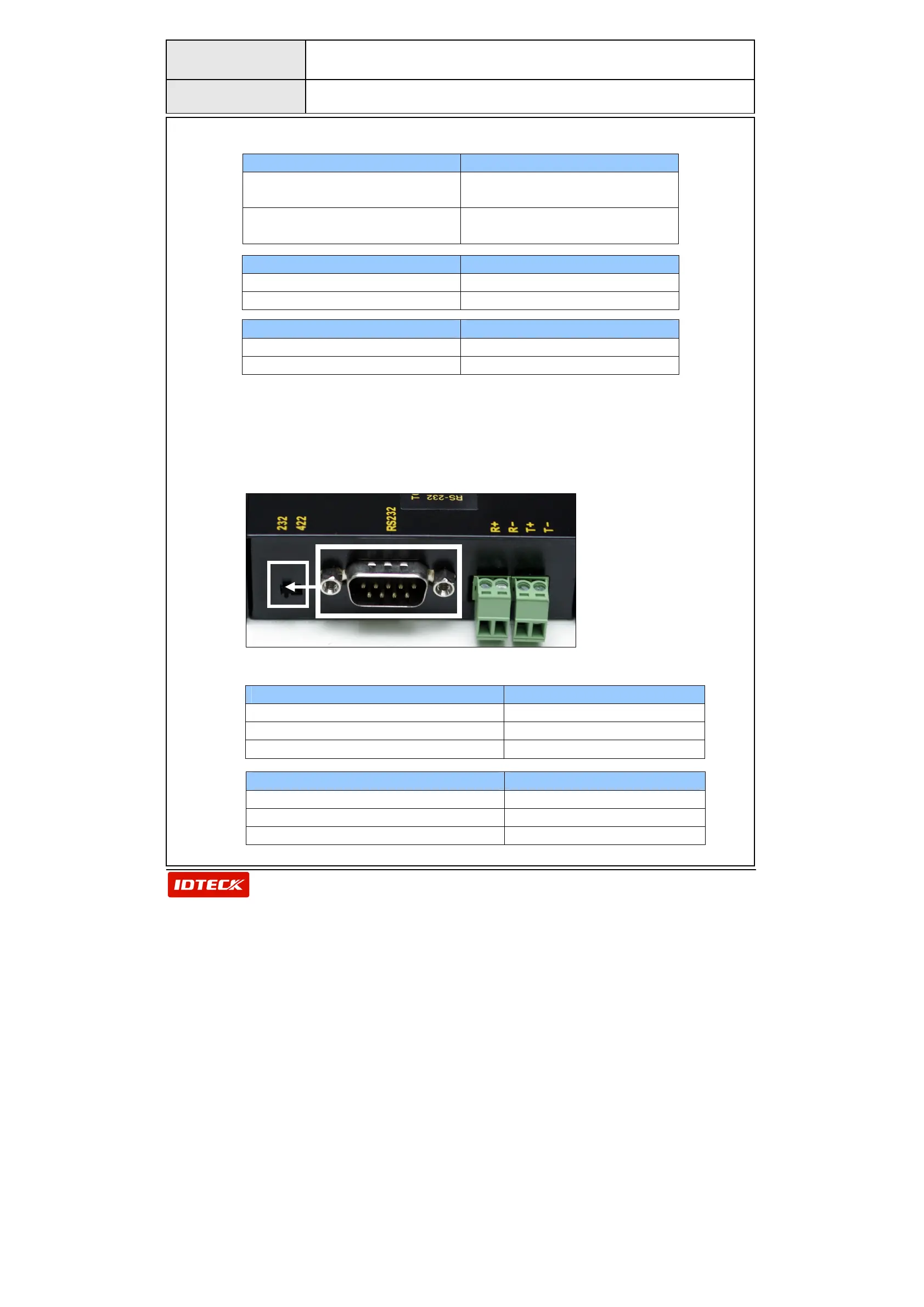
a. Dip Switch Setup
For RS232 communication, you should set the DIP switch to the 232
position as shown in the picture below.
b. Connection Table
Star 505R / Star FINGER007 ILAN485 Converter
Join RX+ (Brown wire)
and TX+
(Gray wire)
485 +
Join RX- (Blue Wire)
and TX- (Yellow Wire)
485 -
ICON100 / iTDC ILAN485 Converter
RX+ and TX+ 485 +
RX- and TX- 485 -
RFL200C ILAN485 Converter
RX+(Gray wire) 485 +
RX-(Orange Wire) 485 -
Star 505R / Star FINGER007 9 Pin Connector (Female)
RXD(Red wire with White Stripe) TXD (Pin 3)
TXD(Black wire with White Stripe) RXD (Pin 2)
GND (Black wire) GND (Pin 5)
iCON100 / iTDC 9 Pin Connector (Female)
RXD TXD (Pin 3)
TXD RXD (Pin 2)
GND GND (Pin 5)


 To Next Page