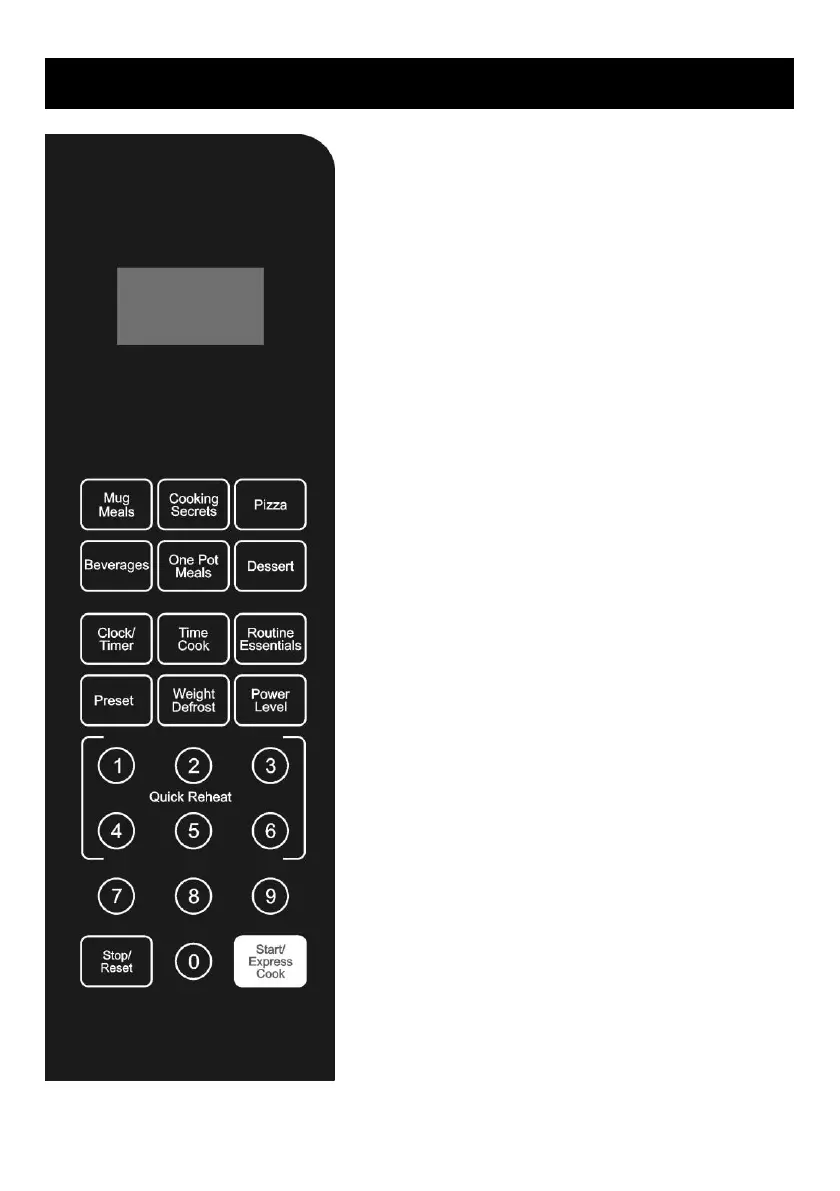
CONTROL PANEL
DISPLAY
Time, power and indicators are displayed.
AUTO COOK MENUS
Instant settings to cook popular foods.
CLOCK/TIMER
Press to set clock time.
Press to set timer function.
TIME COOK
Use to set microwave cooking time.
ROUTINE ESSENTIALS
Press to set disinfection, reheat, steam clean,
deodorization and power saving functions.
PRESET
Use to set the oven to start-up at a later time.
WEIGHT DEFROST
Press to defrost food based on weight.
POWER LEVEL
Press to set microwave power level.
NUMBER BUTTONS (0-9)
Press to set time or food weight. But use the
number buttons from 1 to 6 to set quick
reheat.
STOP/RESET
Press once to temporarily stop cooking, or
twice to cancel cooking altogether.
It is also used to set child lock.
START/EXPRESS COOK
Press to start cooking programs.
Simply press it repeatedly to set cooking time
and cook immediately at full power level.



 To Next Page