EasyManua.ls Logo

IFB 30SC2 - Convenient Features

IFB 30SC2
16 pages
Print Icon
To Next Page IconTo Next Page
To Previous Page IconTo Previous Page
Loading...
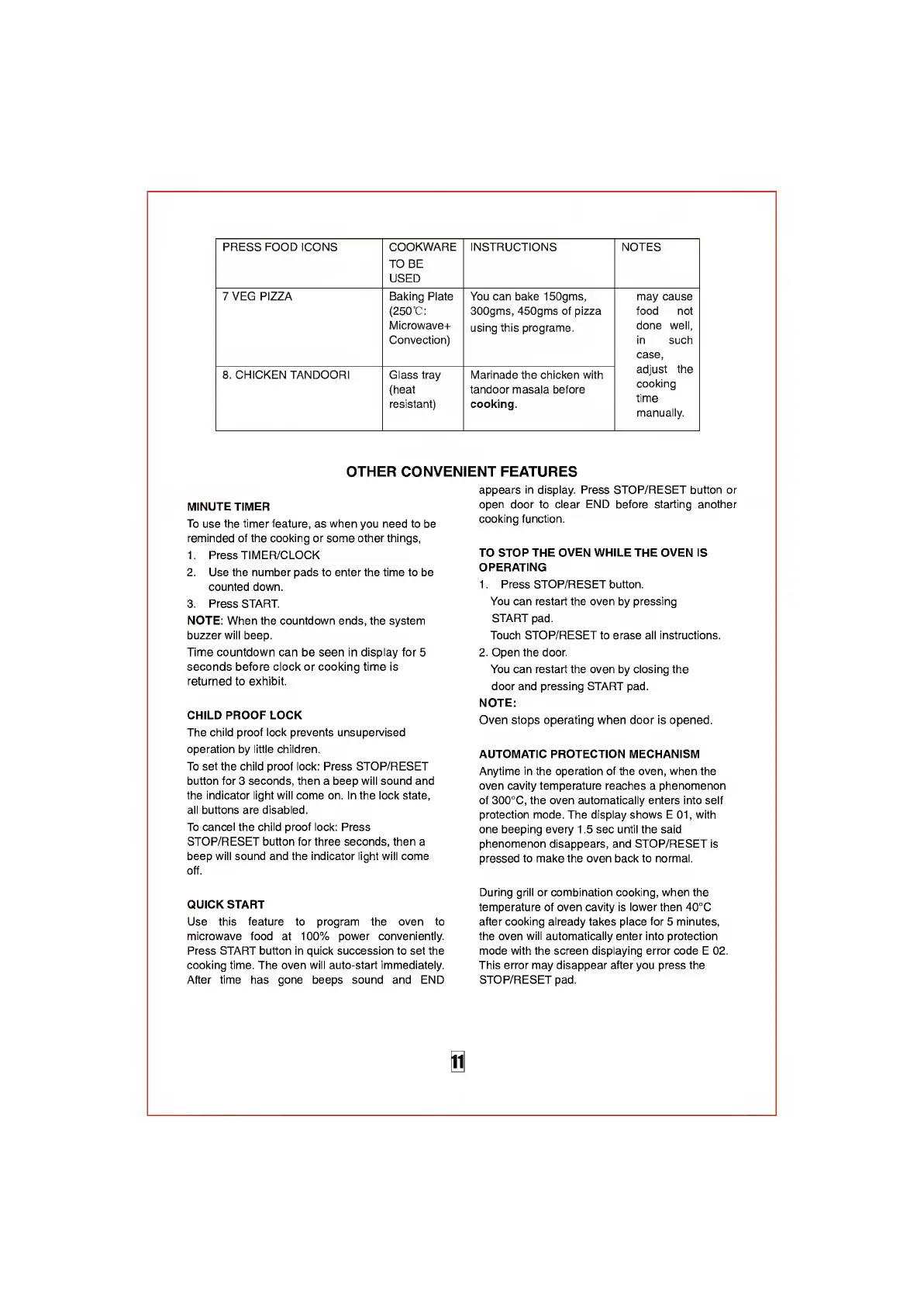
PRESS
FOOD
ICONS
COOKWARE
TO
BE
USED
INSTRUCTIONS
NOTES
7
VEG
PIZZA
Baking
Plate
(250
’C:
Microwave+
Convection)
You
can
bake
150gms,
300gms,
450gms
of
pizza
using
this
programe.
may
cause
food
not
done
well,
in
such
case,
adjust
the
cooking
time
manually.
8
.
CHICKEN
TANDOORI
Glass
tray
(heat
resistant)
Marinade
the
chicken
with
tandoor
masala
before
cooking.
OTHER
CONVENIENT
FEATURES
MINUTE
TIMER
To
use
the
timer
feature,
as
when
you
need
to
be
reminded
of
the
cooking
or
some
other
things,
1.
Press
TIMER/CLOCK
2.
Use
the
number
pads
to
enter
the
time
to
be
counted
down.
3.
Press
START.
NOTE:
When
the
countdown
ends,
the
system
buzzer
will
beep.
Time
countdown
can
be
seen
in
display
for
5
seconds
before
clock
or
cooking
time
is
returned
to
exhibit.
CHILD
PROOF
LOCK
The
child
proof
lock
prevents
unsupervised
operation
by
little
children.
To
set
the
child
proof
lock:
Press
STOP/RESET
button
for
3
seconds,
then
a
beep
will
sound
and
the
indicator
light
will
come
on.
In
the
lock
state,
all
buttons
are
disabled.
To
cancel
the
child
proof
lock:
Press
STOP/RESET
button
for
three
seconds,
then
a
beep
will
sound
and
the
indicator
light
will
come
off.
QUICK
START
Use
this
feature
to
program
the
oven
to
microwave
food
at
100%
power
conveniently.
Press
START
button
in
quick
succession
to
set
the
cooking
time.
The
oven
will
auto-start
immediately.
After
time
has
gone
beeps
sound
and
END
appears
in
display.
Press
STOP/RESET
button
or
open
door
to
clear
END
before
starting
another
cooking
function.
TO
STOP
THE
OVEN
WHILE
THE
OVEN
IS
OPERATING
1.
Press
STOP/RESET
button.
You
can
restart
the
oven
by
pressing
START
pad.
Touch
STOP/RESET
to
erase
all
instructions.
2.
Open
the
door.
You
can
restart
the
oven
by
closing
the
door
and
pressing
START
pad.
NOTE:
Oven
stops
operating
when
door
is
opened.
AUTOMATIC
PROTECTION
MECHANISM
Anytime
in
the
operation
of
the
oven,
when
the
oven
cavity
temperature
reaches
a
phenomenon
of
300°C,
the
oven
automatically
enters
into
self
protection
mode.
The
display
shows
E
01,
with
one
beeping
every
1.5
sec
until
the
said
phenomenon
disappears,
and
STOP/RESET
is
pressed
to
make
the
oven
back
to
normal.
During
grill
or
combination
cooking,
when
the
temperature
of
oven
cavity
is
lower
then
40°C
after
cooking
already
takes
place
for
5
minutes,
the
oven
will
automatically
enter
into
protection
mode
with
the
screen
displaying
error
code
E
02.
This
error
may
disappear
after
you
press
the
STOP/RESET
pad.
i

Related product manuals