1. It is the responsibility of the owner to ensure that
all users of this product are adequately informed
of all precautions.
2. Before beginning any exercise program, consult
your physician. This is especially important for
persons over age 35 or persons with pre-existing
health problems.
3. Use this product only as described in this manual.
4. Keep this product away from children under age
12 and pets at all times.
5. Do not use abrasive cleaners to clean this
product.
6. Do not use this product in a sauna or a steam
room; do not submerge this product; and do
not place this product in a dishwasher, washing
machine, or dryer.
7. If you experience skin irritation while using this
product, see HOW TO WEAR THE TRACKER POD.
8. Do not expose the tracker pod to extremely high
or low temperatures, to direct sunlight for an
extended period of time, or to open flames.
9. Over exercising may result in serious injury or
death. If you feel faint, if you become short of
breath, or if you experience pain while exercising,
stop immediately and cool down.
GETTING STARTED
1. Install the iFit Track app on your iOS
®
or
Android™ device.
Use the iFit Track app to set up an iFit account, set up
the tracker pod, customize settings for the tracker pod,
set goals, and enter and track information. See HOW TO
INSTALL THE IFIT TRACK APP.
2. Learn how to wear the tracker pod.
Wear the tracker pod in one of the included bands
or carry it independently. See HOW TO WEAR THE
TRACKER POD.
3. Learn how to use the tracker pod.
Use the tracker pod to track and sync calorie information,
steps, distance, sleep time, and workout time to the iFit
Track app. See HOW TO USE THE TRACKER POD.
4. Learn how to replace the battery in the tracker pod.
The tracker pod will notify you when the battery level is
low. See HOW TO REPLACE THE BATTERY.
User’s Manual
Model No. IFITTRACKERB.0
WARNING: To reduce the risk of serious injury, read all important precautions and instructions in this
manual. ICON assumes no responsibility for personal injury or property damage sustained by or through the
use of this product.
QUESTIONS?
If you have questions after following the instructions in this
manual, PLEASE DO NOT CONTACT THE STORE. Please
visit our Customer Care website at support.iFit.com or
send e-mail to support@iFit.com.

 Need help?
 General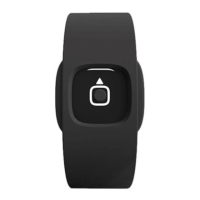

 To Next Page