EasyManua.ls Logo

iFIT IFAHR120 - User Manual

iFIT IFAHR120
4 pages
Print Icon
To Next Page IconTo Next Page
Loading...
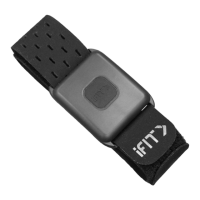
Thank you for purchasing the innovative iFIT
®
SMARTBEAT heart rate monitor. Please read this
manual before using the heart rate monitor.
IMPORTANT: To download a manual in a different
language, please see the accompanying Quick
Start Guide.
If you have questions after reading this manual,
please see the accompanying Quick Start Guide
for Member Care contact information.
HOW TO CHARGE THE HEART RATE MONITOR
You must charge the heart rate monitor before
it can be used. To charge the heart monitor, first
remove the small sheet of clear film (not shown)
from the back of the sensor (A).
Next, align the metal pins (B) on the charger (C) with
the contacts (D) on the back of the sensor. Then, set
the charger on the sensor; a magnet in the charger
will hold the charger in place.
Plug the cord (E) on the charger into a USB port on
your computer or on another power source. While
the heart rate monitor is charging, the LED light
on the front of the sensor will flash red. When the
sensor is fully charged, the LED light will turn solid
green.
B
C
D
A
E
Model Number IFAHR120
IFIT is a registered trademark of iFIT Inc. The Bluetooth
®
word mark
and logos are registered trademarks of Bluetooth SIG, Inc. and are used under license.
ANT
+
™ is a trademark of Garmin Ltd. or its subsidiaries.
Question and Answer IconNeed help?

Do you have a question about the iFIT IFAHR120 and is the answer not in the manual?

Summary

How to Charge the Heart Rate Monitor

Prepare Sensor and Charger Connection

Remove protective film and align magnetic charger pins with sensor contacts for charging.

Connect Charger to Power Source

Plug the charger's cord into a USB port on a computer or power source to begin charging.

Charging Indicator Lights

Learn about the LED light's behavior during charging and when the sensor is fully charged.

How to Put On the Heart Rate Monitor

Armband Preparation and Placement

Prepare the armband by peeling off the end and slide the monitor onto your arm, ensuring correct orientation.

Adjusting Armband Fit

Securely fasten the armband by pressing the free end against the rest, avoiding overtightening.

How to Use the Heart Rate Monitor

Pairing with Fitness Equipment

Connect the monitor to compatible fitness equipment via ANT+ or Bluetooth for data transmission.

Activating and Monitoring Heart Rate

Press the iFIT button to activate; observe LED lights for heart rate detection and pairing status.

Turning Off the Monitor

Press and hold the iFIT button for 3 seconds to power down the heart rate monitor.

Care and Maintenance

Storage and Environmental Precautions

Store the monitor in a dry place, away from direct sunlight and extreme temperatures.

Battery Usage Recommendations

For optimal battery performance, use the device at room temperature.

Cleaning the Sensor and Armband

Clean the sensor with mild soap and a damp cloth; hand wash and air dry the armband.

Troubleshooting and Compliance

Troubleshooting Common Issues

Verify equipment compatibility, correct placement, and understand factors affecting readings.

Canada Compliance Information

Details license-exempt transmitter/receiver compliance and Class B digital apparatus standards.

USA FCC Compliance Information

Outlines FCC rules, warnings on modifications, and RF exposure compliance for the device.

Warranty and Recycling Information

Limited Warranty Terms

Details parts warranty, coverage limitations, and conditions that void the warranty.

Limitations of Liability and Rights

Clarifies iFIT's liability for damages and customer rights under the limited warranty.

UK Recycling Guidelines

Instructs on proper electronic waste disposal and recycling to protect the environment.

Overview

The iFIT SMARTBEAT (Model Number IFAHR120) is a heart rate monitor designed to track and display your heart rate during exercise. It utilizes both ANT+ and Bluetooth® Smart technologies to connect wirelessly with compatible fitness equipment.

Function Description:

The primary function of the iFIT SMARTBEAT is to accurately measure and transmit your heart rate data to compatible fitness equipment. This allows you to monitor your workout intensity and optimize your training. The device is worn on the arm, typically 2 to 3 inches (5 to 8 cm) above or below the elbow, against the skin and under clothing. It features an iFIT button for activation and deactivation, and an LED light that provides visual feedback on its status, including charging, heart rate detection, and pairing.

Important Technical Specifications:

  • Model Number: IFAHR120
  • Connectivity: ANT+ and Bluetooth® Smart
  • Power Source: Rechargeable battery
  • Charging: Via USB port using the included magnetic charger
  • Operating Temperature Range: 14°F to 122°F (-10°C to 50°C)
  • LED Indicators:
    • Charging: Flashing red (charging), Solid green (fully charged)
    • Heart Rate Detection (not detected): Alternating blue and red
    • Heart Rate Detection (detected): Flashing green
    • Pairing (successful): Solid blue for a few seconds, then flashing green
    • Power Off: Solid red for 2 seconds

Usage Features:

  • Initial Setup: Before first use, the heart rate monitor must be charged. This involves removing a clear film from the back of the sensor, aligning the metal pins of the charger with the contacts on the sensor, and connecting the charger to a USB power source. The LED will flash red during charging and turn solid green when fully charged.
  • Wearing the Device: The armband should be positioned on your arm, 2 to 3 inches (5 to 8 cm) above or below your elbow, with the iFIT button facing upward. It must be worn against the skin and under clothing. The armband should be adjusted to be firm but not overtightened, as this can restrict circulation.
  • Activation: To activate the heart rate monitor, press the iFIT button. The LED light will alternate between blue and green while detecting your heart rate. Once detected, it will flash green. If no heart rate is detected, the LED will alternate between blue and red.
  • Pairing: The device pairs wirelessly with compatible fitness equipment that has an ANT+ or Bluetooth® Smart receiver. Instructions for pairing are typically found in the user manual of the fitness equipment. Upon successful pairing, the LED light on the sensor will turn solid blue for a few seconds, then flash green.
  • Deactivation: To turn off the heart rate monitor, press and hold the iFIT button for 3 seconds. The LED light will turn solid red for 2 seconds and then turn off.
  • Troubleshooting: If the device doesn't function correctly, ensure the fitness equipment has an ANT+ or Bluetooth® Smart receiver, check the wearing position on the arm (adjusting slightly higher or lower if needed), ensure proximity to the console, and be aware that certain medical conditions or magnetic interference from high power lines can affect readings.

Maintenance Features:

  • Storage: Store the heart rate monitor in a warm, dry place, avoiding plastic bags or other containers that trap moisture. Do not expose it to direct sunlight for extended periods or to temperatures outside the range of 14°F to 122°F (-10°C to 50°C) during use, transportation, or storage. Extreme temperatures or improper disposal (fire, incineration, cutting, crushing) can cause the battery to explode or leak flammable gas/liquid.
  • Battery Life: For optimal battery capacity, use the battery at room temperature. Low temperatures can reduce battery capacity.
  • Cleaning: To clean the sensor, use a damp cloth with a small drop of mild soap, then wipe with a damp cloth and thoroughly dry it with a soft towel. Avoid using alcohol, abrasives, or chemicals. The armband can be hand washed and air dried.
  • Disposal: This electronic product must not be disposed of in municipal waste. It should be recycled according to local regulations to preserve the environment and conserve natural resources. Contact local city offices or the place of purchase for information on proper disposal methods.

iFIT IFAHR120 Specifications

General IconGeneral
BrandiFIT
ModelIFAHR120
CategoryMedical Equipment
LanguageEnglish