Quick Guide
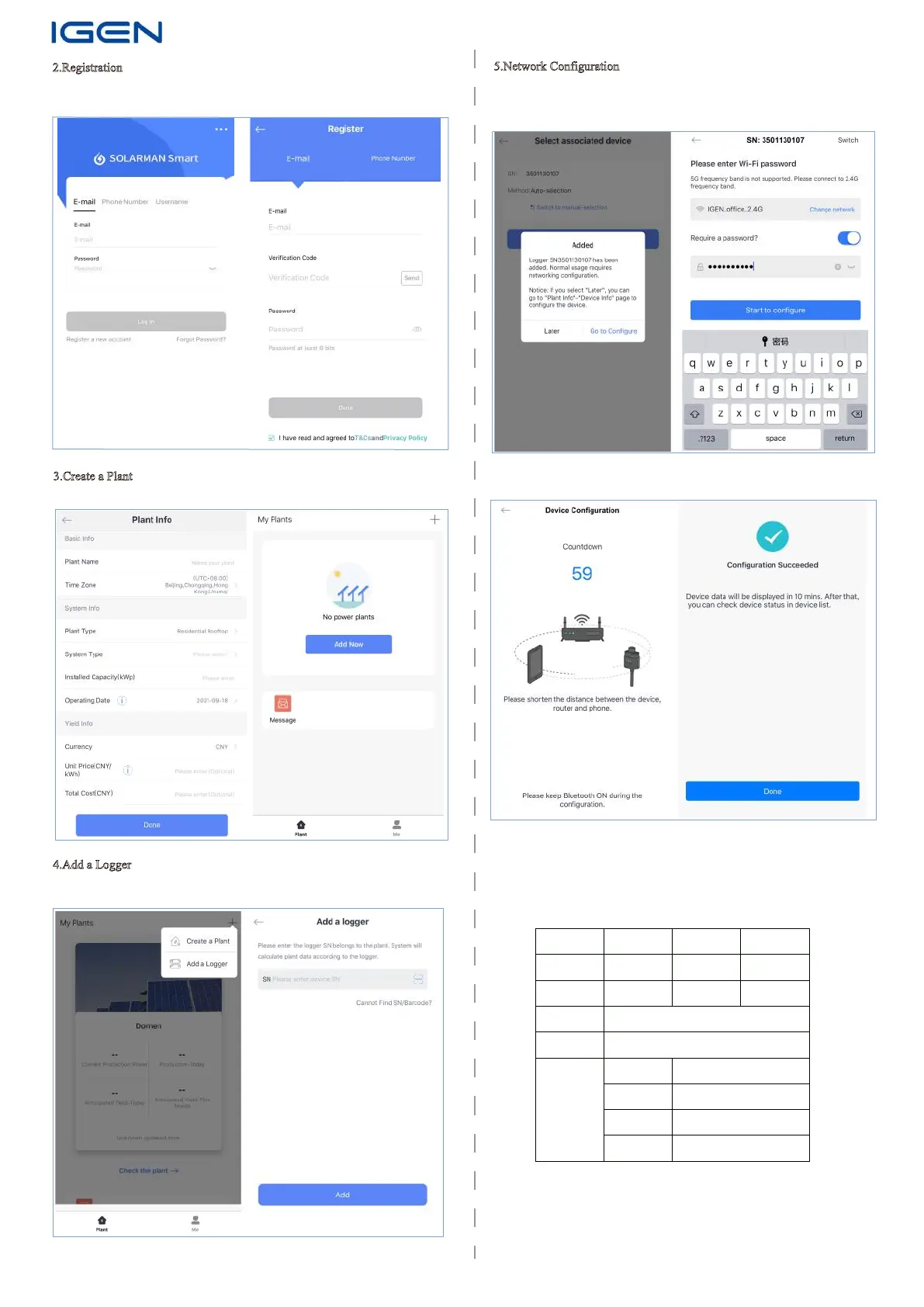
2.Registration
Go to SOLARMAN Smart and click ”Register” to create an account.
3.Create a Plant
Click “Create a Plant”and enter basic plant info.
4.Add a Logger
Click “+” in the upper-right corner and select “Add a Logger”, scan logger SN
or enter SN manually.
5.Network Configuration
Click “Go to Configure” to set network. Please select 2.4G network.
(5G network is not supported for now.)
Please keep WiFi and Bluetooth ON.
Please wait for a few minute, and click “Done” to check plant data.
WARRANTY CARD
Dear Customers
Thank you very much for using our products. In order to provide you with better
service, please fill in the warranty card and reserve it carefully.
User Name
Customer Name
Product Nmae/
Model
Product SN
Order No.
Customer
Address
Customer Phone
Failure Cause and TreatmentDate
Maintenance
Records
Purchaes Date
This card can not be altered, or it will be considered as invalid.
Email: customerservice@solarmanpv.com
Tel: +86-400-181-0512
Add: Block F4, China IoT International Innovation Park, No. 200, Linghu Avenue,
Wuxi, Jiangsu, P. R. China
Website:
www.solarman.cn/www.solarmanpv.com


 To Previous Page
 Loading...