12
OPERATING INSTRUCTIONS
First Use - Cleaning the Interior
Before using the appliance for the rst time, wash the interior and all internal accessories
with lukewarm water and some neutral soap so as to remove the typical smell of a brand
new product, then dry thoroughly.
Important: Do not use detergents or abrasive powders, as these will damage the nish
Temperature Setting
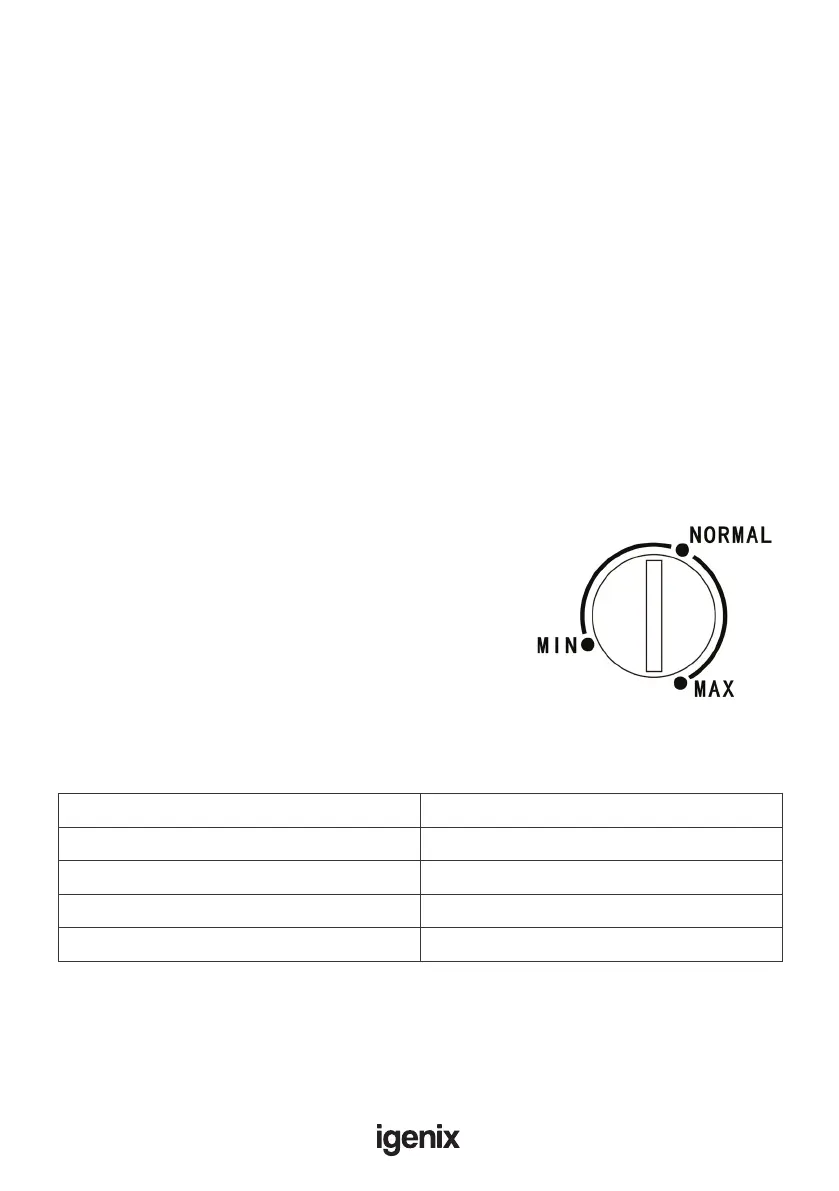
• Plug in your appliance. The internal temperature is
controlled by a thermostat. There are 3 settings, MIN,
NORMAL AND MAX. MIN is the warmest setting
and MAX is the coldest setting.
• The appliance may not operate at the correct
temperature if it is in a particularly hot environment
or if you open the door often.
Position different food in each compartment according to the below table
Refrigerator Compartments Type of Food
Freezer drawer(s)/shelf Foods for long-term storage
Bottom drawer/shelf Raw meat, poultry, sh
Middle drawer/shelf Frozen vegetables, chips
Top drawer/shelf Ice cream, frozen fruit, frozen baked goods
Electrical Connection
Before plugging in, ensure that the voltage and frequency shown on the rating plate
correspond to your domestic power supply. The appliance must be earthed. The power
supply cable plug is provided with a contact for this purpose. If the domestic power
supply socket is not earthed, connect the appliance to a separate earth in compliance
with current regulations, consulting a qualied electrician.
The manufacturer declines all responsibility if the above safety precautions are not
observed. This appliance complies with E.E.C Directives.


 To Next Page