6
- You can set the time zone, wheel size, metric and imperial units in the
GPS Bike APP.
- If the Bluetooth icon of GPS Bike is not displayed, it means that it has
paired the phone but is not connected.
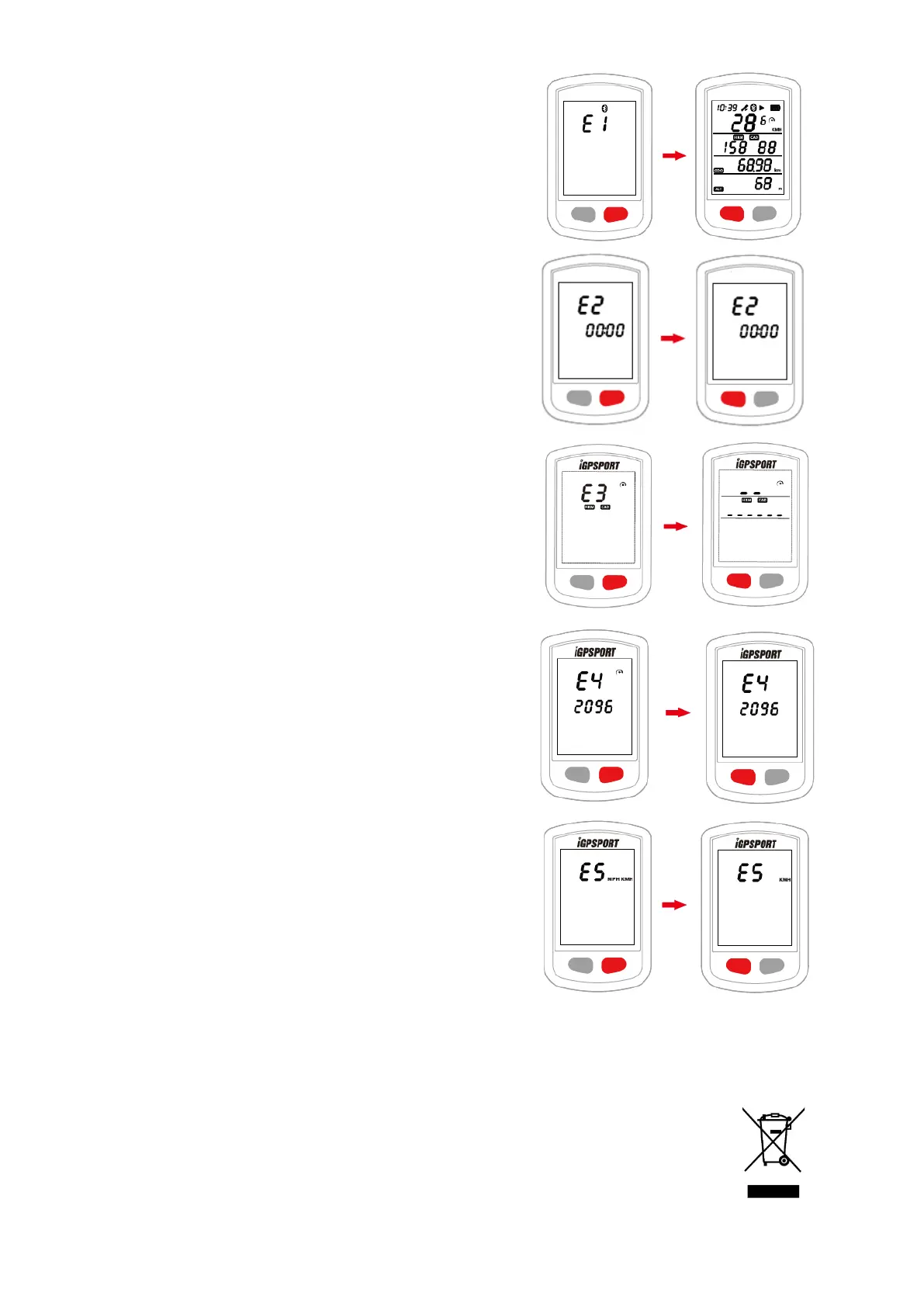
7. SETTING TIME ZONE (SETTING MODE E2)
- Default time zone: UTC/GMT+00:00 (Please set the local time zone)
- Hold the right button for more than 2 seconds to enter the setting mode.
- Select the right button to scroll settings mode from E1 to E5.
- Select the left button to enter E2 mode when E2 is flashing.
- Select left button to change digits of hour and minute, select right button
to change value.
- The setting will be automatically saved if no operation is done within 10
seconds.
8. SEARCHING AND CONNECTING SENSORS (SETTING MODE E3)
C200 can be used with ANT+ sensors including: heart rate monitor (HR),
cadence sensor (CAD), speed sensor (SPD), cadence and speed
combined senzor. Please search the ANT+ sensors when using ANT+
sensors for the first time.
- Wake up ANT+ sensors.
Heart rate monitor (HR) should be worn attached to skin just around the
chest. Cadence sensor (CAD) should be installed on the crank arm of non-
drive side, then rotate the crank arm.
Speed sensor (SPD) should be installed on the top of the front wheel hub,
then rotate the front wheel.
- Hold the right button for more than 2 seconds to enter the setting mode.
- Select the right button to scroll settings mode from E1 to E5.
- Select the left button to enter E3 mode when E3 is flashing.
- C200 will search sensors automatically.
- When sensors are connected, the icons will light up. C200 will exit
searching sensors mode in 20 seconds.
- C200 will automatically connect the sensors that have been connected. It
is required to search the sensor again after the battery is replaced.
9. SETTING THE WHEEL SIZE & CIRCUMFERENCE (SETTING MODE
E4)
Please set the wheel circumference if you use a speed sensor (SPD).
Default wheel circumference: 2096 mm.
- Hold the right button for more than 2 seconds to enter the setting mode.
- Select the right button to scroll settings mode from E1 to E5.
- Select the left button to enter E4 mode when E4 is flashing.
- Select the left button to change numerical digits, select the right button
to change numerical value.
- Hold the right button for more than 2 seconds to save and exit.
The unit of wheel circumference is mm. The setting will be automatically
saved if no operation is done within 10 seconds. Frequent wheel sizes
and their circumferences can be found on the product's website
www.iget.eu.
10. SETTING METRIC AND IMPERIAL UNITS (SETTING MODE E5)
Default unit: metric (kilometer)
- Hold the right button for more than 2 seconds to enter the setting mode.
- Select the right button to scroll settings mode from E1 to E5.
- Select the left button to enter E5 mode when E5 is flashing.
- Select the right button to switch between metric (kilometer) and imperial
(mile) units.
- Hold the right button more than 2 seconds to save and exit.
The setting will be automatically saved if no operation is done within 10
seconds.
11. FACTORY RESET
- Power off C200.
- Connect C200 to power adaptor by USB cable.
- Hold the left and right button at the same time more than 5 seconds until
“FA” displays on the screen. Do not disconnect the charger while “FA” is
displayed.
- Disconnect the C200 from the power adaptor.
Factory reset will clear out all data and Odometer, please backup activity
files before factory reset.
12. ABBREVIATIONS
AVG - Average, CAL - Calories, TEM - Temperature, MAX - Maximum, ODO - Odometer (Total distance), ALT - Altitude, DST -
Distance, Gra - Gradient
Safety Precautions: The device cannot be immersed under water. The device can be used in the temperature range from -10°
to 50 °C. The device can only be charged between 0 ° and 45 ° C. Das Gerät kann nur zwischen 0 ° und 45 ° C aufgeladen
werden.
1) For household use: The given symbol (crossed-out wheeled bin) on the product or at accompanying
documents means that used electrical and electronic products should not disposed of with household waste. To
ensure proper disposal of the product, hand it over to a designated collection point, where it will be accepted
free of charge. The correct disposal of this product will help to save valuable natural resources and prevent any
potential negative impacts on the environment and human health, which could otherwise be caused by
inappropriate disposal of wastes. For more details, please, contact your local authorities or the nearest
collection point. The improper disposal of this waste can be penalized in accordance with national regulations.
Information for users to disposal of electrical and electronic devices (corporate and business use): For proper



 To Next Page
 Loading...


