5
vymieňať žiadnu jeho súčasť. Pri otvorení alebo odstránení krytov hrozí riziko úrazu elektrickým prúdom. Pri nesprávnom
zostavení zariadenia a jeho opätovnom zapojení sa taktiež vystavujete riziku úrazu elektrickým prúdom.
Prehlásenie o zhode: Týmto INTELEK spol. s r.o. prehlasuje, že typ rádiového zariadenia C220 je v súlade so smernicou
2014/53/EU. Úplné znenie EU prehlásenia o zhode je k dispozícií na týchto internetových stránkach www.iget.eu.
Záručná lehota je na výrobky 24 mesiacov, pokiaľ nie je stanovená inak.
RoHS: Súčiastky použité v prístroji splňujú požiadavky o obmedzení používania nebezpečných látok v elektrických a
elektronických zariadeniach a sú v súlade so smernicou 2011/65/EU. Vyhlásenie k RoHS možno stiahnuť na webe
www.iget.eu.
Toto zariadenie je možné používať v nasledujúcich krajinách:
Výhradní dovozca/výrobca produktov iGET pre EU: INTELEK spol. s r.o., Ericha Roučky 1291/4, 627 00 Brno - Černovice,
CZ, http://www.iget.eu, SUPPORT: http://www.iget.eu/helpdesk, Copyright © 2021 INTELEK spol. s r.o. Všetky práva
vyhradené.
English:
Thank you for purchasing an iGET product. Individual parameters, description by figures and design in the manual may differ
depending on the version and updates. To obtain a complete and detailed manual, go to www.iget.eu. Printing errors reserved.
Update your device as soon as a new version of software is available!
First run
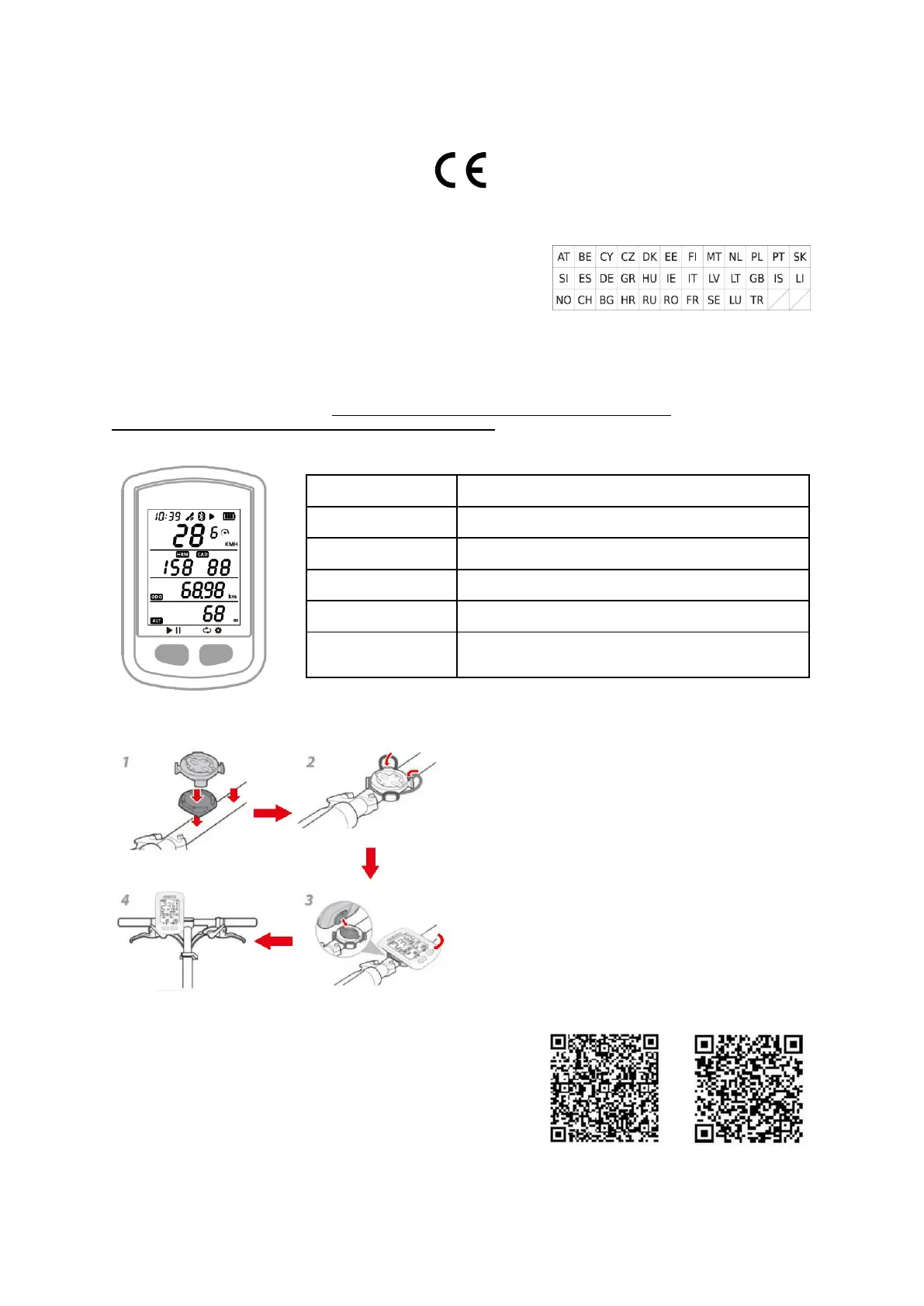
1. BUTTONS
2. INSTALLATION OF BIKE MOUNT
3. ACQUIRING SATELLITE SIGNALS AND TIME SETTING
Please make sure C200 is outdoors and under a clear view of
the sky. Usually it may take 5 to 120 seconds to locate satellite
signals. Remain stationary when acquiring satellite signals.
The time and date will be calibrated automatically after
locating satellite signals.
4. SMART BACKLIGHT
C200 will automatically calculate the sunrise and sunset time
based on the GPS position. Backlight turns on before sunset
and turns off after sunrise automatically. When the backlight is
off, select any button to turn on backlight for 15 seconds.
5. BATTERY
Battery life – about 30 hours. Charging max. DC 5V/500 mA.
Charging time about 2,5 hours. Please use a DC 5V adapter
for charging. As the temperature drops, the battery life will
decrease. C200 supports charging during use. Do not
overstretch the USB plug in order to keep the device
waterproof and dustproof.
6. PAIRING YOUR SMARTPHONE (SETTING MODE E1)
- Hold the right button for more than 2 seconds to enter the setting mode. Android APP iOS APP
- Select the right button to scroll settings mode from E1 to E5.
- Select the left button to enter E1 mode when E1 is flashing.
- Select right button to connect phone, the device will restart.
- When C200 Bluetooth icon flashes it means the device is searching.
- Download GPS Bike APP.
- Turn on your smartphone’s Bluetooth and open GPS Bike APP.
- Enter the Status menu, click +, find “C200” and click it to connect.
- When C200 Bluetooth icon lights up it mean it is connected and paired with
a smartphone.
- After the phone is paired successfully, the device and the phone will automatically connect with Bluetooth.
Press left button to Record / Pause
Hold left button more than 2 seconds
Hold left button more than 10 seconds
Press right button to switch data pages
Hold right button more than 2 seconds to enter the setting
mode



 To Next Page
 Loading...


