Need help?
Do you have a question about the Iget HOMEGUARD HGDVK83304 and is the answer not in the manual?
This document describes the iGET HOMEGUARD Heat-sensing HD CCTV Kit, a complete CCTV solution for home or office security. It features high-quality cameras, easy setup and configuration, motion detection, and network connectivity.
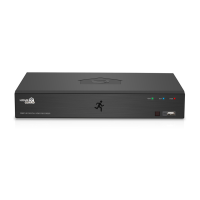
The iGET HOMEGUARD Hybrid DVR is a digital video recorder that supports various video input types, including CVBS, AHD, TVI, CVI, and IP cameras. It uses H.264 video compression and G.711 audio compression for efficient storage and transmission. The system allows for simultaneous recording and playback of 4, 8, or 16 channels of video data, depending on the model. It supports multiple recording formats such as 1080p, 720p, 960H, D1, and CIF. The DVR includes a hard disk overwrite function and supports mass storage hard disk backup via high-speed USB 2.0. Network connectivity is enabled through a specific codec, allowing for remote monitoring via a network viewer and mobile viewer.
Compression: H.264 Standard Compression (video), G.711 audio compression. Operating System: Linux. Smart Device Support: Apple iOS (iPhone/iPad) and Android Phones and Tablets. Dual Stream: Yes, set by channel. Image Quality: 1080p (1920 x 1080). Frame Rate Recording:
Easy Setup: The DVR includes a start-up wizard that guides users through initial configuration, including password creation, network settings, date/time setup, disk formatting, and resolution selection. Smart Detection (PIR Setup): The system features advanced PIR (Passive Infrared) motion detection that senses body heat, significantly reducing false alarms caused by non-human movements. It requires both motion and heat to be detected simultaneously for accurate alerts, conserving hard drive space. Recording Modes: Users can set up various recording modes, including manual, scheduled recording (daily and hourly), motion recording, and PIR recording. Playback Options: The DVR offers multiple search and playback methods, including general, events, sub-periods, smart, and pictures. Users can search by date, type, and select specific channels for playback. Continuous recordings are represented by colored bars on a timeline, indicating different recording types. Remote Access:
User Interface: The DVR's main interface provides quick access to various functions, including channel name display, PIR and motion detection indicators, manual recording, manual capture, instant playback (last five minutes), PTZ control, zoom, and color settings. It also features options for main menu access, different channel layouts, auto sequence display, audio volume adjustment, stream switching (main/sub stream), preview policy (real-time, balanced, smooth), connection state, manual mode, system information, video loss indicator, user switching, search & playback, system setup, lock screen, and shutdown options.
Hard Disk Management: New hard drives must be formatted before use. The system supports hard disk overwrite function. Firmware Upgrade: The DVR supports firmware upgrades, though users should ensure the USB drive used is compatible. Troubleshooting: The manual provides a Q&A section for common issues such as DVR not starting, slow startup, repeated reboots, playback stopping, firmware upgrade failures, black and white picture, no image display, distorted video, distorted colors, skewed/deformed video, and poor playback quality. Solutions include checking power supply, hard drive status, cable connections, video parameters, and network settings. Technical Support: Helpdesk and technical support are available via www.iget.eu/cs/helpdesk-centrum-cs and https://helpdesk.intelek.cz/. Warranty: All products come with a 24-month warranty from the date of invoice. Warranty instructions cover contacting support for faults, mailing the warranty card, and conditions under which repairs are paid (e.g., human error, non-conforming environment, missing warranty card, expired warranty).


 To Next Page
 General