4
CZ
SK
EN
PL
HU
Quick Start Guide
• Internet Connection Requirements
-Please ensure the router you are using has already been connected to the Internet with DHCP mode enabled. Alarm M5 supports IPV4
protocol only.
-The system supports the following types of connection:
-LAN: 10/100M Ethernet.
-Wi-Fi: 2.4GHz, WEP/WPA/WPA2 encrypted.
-GSM
-4G LTE(Only in "M5-4G"): bands upon request.
• Place the Panel at a Suitable Place
-If Wi-Fi is used to connect the panel to internet, please make sure the panel is placed under Wi-Fi coverage before installation. (It is
recommended to use your phone to help verify the Wi-Fi coverage at the spot.
• Install the SIM Card (Optional)
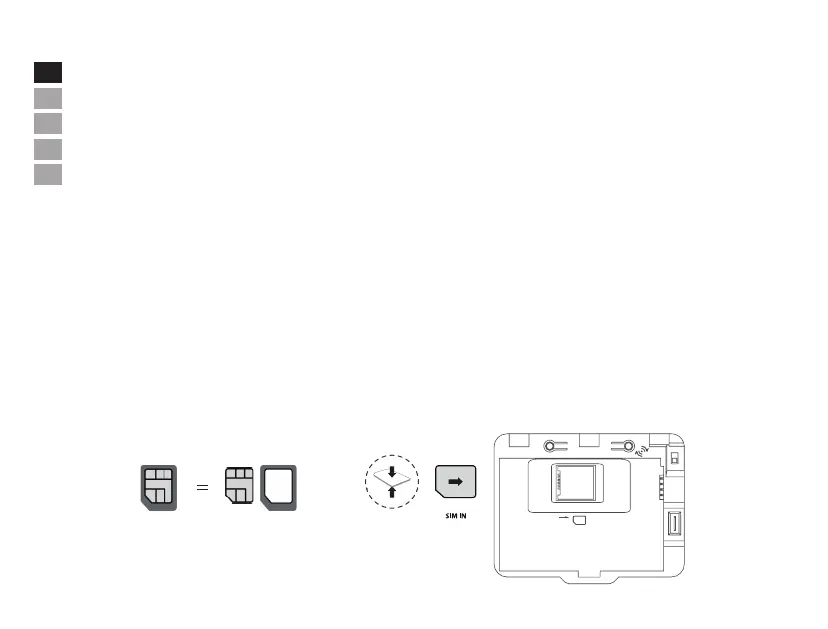
-Insert a Micro SIM card. Please place a Nano-SIM to a card adapter for installation.
-To connect the panel to the GSM network, you need a SIM card with the disabled PIN code request (PIN code request can be disabled using
your mobile phone) and su icient amount on the account.
Note: The main panel does NOT support Hot Swap function. Kindly Switch o the main panel before inserting or removing Micro SIM Card.
Plastic
Metal
Nano SIM CardMicro SIM Card
RESET
OPEN
SIM
ON
OFF


 To Next Page