5
CZ
SK
EN
PL
HU
Note: Take care not to scratch or bend the contacts on the SIM card when inserting it into the card holder.
• Get Ready for Setup
-Use your iPhone or Android smartphone to download the “M5 Smart” APP from either iOS APP
Store or Google Play by searching “M5 Smart”, or scan the QR code right with your mobile phone.
Note: For "M5-4G", please download "iGET M5" APP.
Power Switch
- Please open the cover on the back of the device, and turn on the power switch. The indicator on the panel will
flash and a er approximately 45 seconds a beep sound should occur indicating the device being activated.
Place the panel close to 2.4GHz Wi-Fi signal.
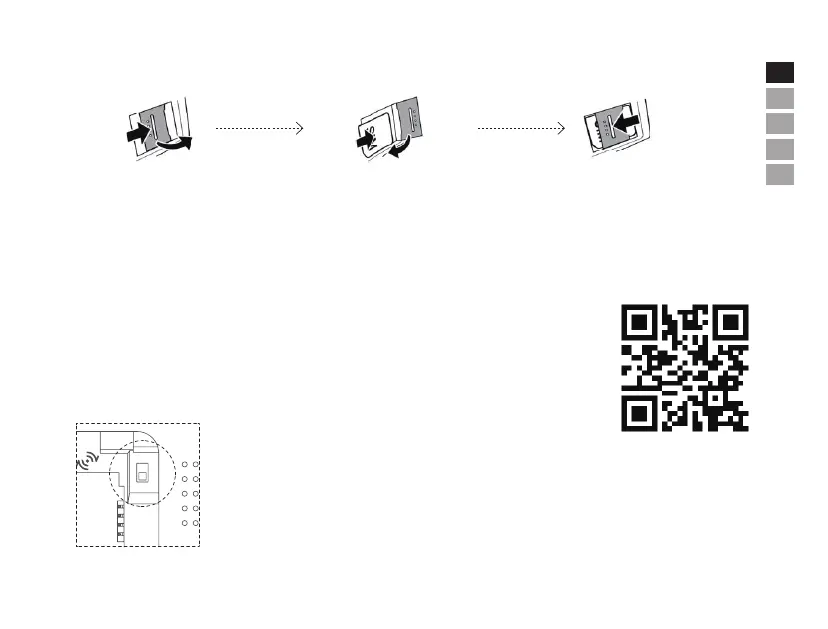
Remove back cover and battery to
locate the Micro SIM card holder.
Press the card holder’s lid towards
the ON/OFF button until it“clicks”.
Li the lid to an up right position. Place the card
in the compartment. Make sure the gold contacts
are facing downwards and the cut-o corner is
placed as shown on the drawing. Hold the card in
the correct position and close the lid.
Carefully press down and slide
the lid away from the ON/OFF
button until it“clicks” in-to place.
ON
OFF
iGET M5


 To Next Page