13
Connect the Bridge to your WiFi Network
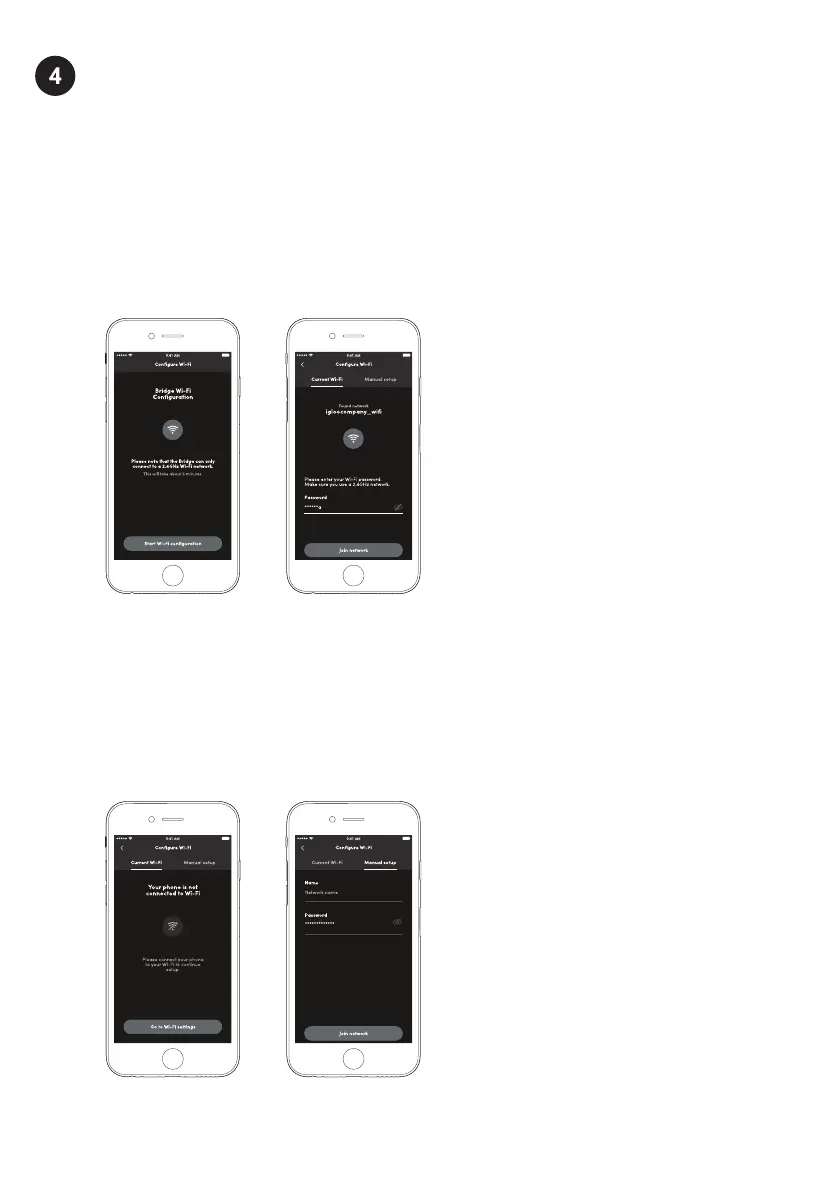
a) Select [Start WiFi configuration]
b) If your phone is already connected to a WiFi network and you would like the Bridge
to connect to the same WiFi network, please enter the password for that WiFi network.
Note: The Bridge can only connect to a 2.4GHz WiFi network. 5GHz is not supported.
The Bridge only supports routers with WPA2 or WPA, which are the most popular methods
of securing your network. The Bridge will not be able to connect to routers using unsecure
protocols such as WEP or routers without encryption.
If your WiFi is not turned on, please turn it on to continue the WiFi configuration.
Select [Go to WiFi settings] to be redirected to your phone’s settings to turn on WiFi.
Connect your phone to the WiFi network that you want the Bridge to connect to and
return to the igloohome app and enter the password for that network.
Or, select the [Manual setup] tab and type in the WiFi name and password manually.


 To Next Page