EasyManua.ls Logo

iGlucose GM291 - User Manual

iGlucose GM291
33 pages
Print Icon
To Next Page IconTo Next Page
Loading...
Version 2 Date: 3.17.2016
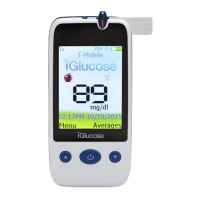
iGlucose™ Blood Glucose Monitoring System
GM291 User Manual

Questions and Answers

  • R
    Randy MurphyAug 18, 2025
    How to fix iGlucose Blood Glucose Meter that cannot turn on?
    • M
      Megan PowellAug 18, 2025
      If your iGlucose Blood Glucose Meter won't turn on, first ensure the battery is correctly inserted. If it is, try recharging the battery. If the device still fails to power on, replace the battery.
  • J
    Jessica MooreAug 21, 2025
    What to do if iGlucose GM291 shows no response when strip is inserted?
    • T
      Timothy PowellAug 21, 2025
      If your iGlucose Blood Glucose Meter doesn't respond when you insert a strip, make sure the battery is charged. Also, ensure you're inserting the test strip correctly and that you're using the right type of strip. If problems persist, contact customer support.
  • J
    James WatsonAug 23, 2025
    What to do if iGlucose Blood Glucose Meter shows HI blood glucose result?
    • C
      Clifford ConwayAug 23, 2025
      If your iGlucose Blood Glucose Meter displays a 'HI' result, review the proper testing procedure and perform a quality check with control solution. Repeat the blood test; if 'HI' still appears, call your doctor or seek medical attention immediately.
  • M
    Michael SteeleAug 26, 2025
    What to do if iGlucose GM291 Blood Glucose Meter has no response when blood sample is applied to the strip?
    • A
      Anna ThorntonAug 26, 2025
      If your iGlucose Blood Glucose Meter does not respond when blood is applied, ensure you are using a sufficient blood sample and that the strip is not damaged. If issues persist, check the device using a Control Solution test.
  • D
    Deborah GrimesAug 28, 2025
    How to fix low battery on iGlucose GM291 Blood Glucose Meter?
    • G
      Gary KhanAug 28, 2025
      If your iGlucose Blood Glucose Meter displays a low battery warning, charge the battery.
  • M
    Michelle EnglishAug 30, 2025
    What to do if iGlucose GM291 shows LO blood glucose result?
    • J
      James RussellAug 31, 2025
      If your iGlucose Blood Glucose Meter displays a 'LO' result, review the proper testing procedure and perform a quality check with control solution. Repeat the test; if 'LO' still appears, call your doctor or seek medical attention immediately.
  • D
    Diane MathisSep 2, 2025
    How to resolve temperature out of range error on iGlucose Blood Glucose Meter?
    • E
      Elizabeth PadillaSep 2, 2025
      If your iGlucose Blood Glucose Meter displays a temperature out of range error, move to an area with a temperature between 50ºF - 104ºF (10ºC to 40ºC). Do not artificially heat or cool the device. Then, repeat the test with a new test strip.
  • N
    Nichole LongSep 5, 2025
    What to do if part of the display is not working on iGlucose Blood Glucose Meter?
    • G
      George SandersSep 5, 2025
      If part of the display on your iGlucose Blood Glucose Meter is not working, contact customer support at 1-844-IGLUCOSSE (1-555-5555-5555).
  • J
    Jenna HawkinsSep 7, 2025
    How to turn off iGlucose GM291 Blood Glucose Meter that is not responding?
    • S
      Shannon MorganSep 7, 2025
      If your iGlucose Blood Glucose Meter won't turn off, press and hold the “up” button, then select “Shutdown” by pressing the middle button.
  • S
    Steven RiceSep 9, 2025
    Why can't my iGlucose GM291 send data?
    • S
      Summer MartinSep 9, 2025
      If your iGlucose Blood Glucose Meter cannot send data, retry later or in a different location with a stronger signal.

Summary

Caution

Important Safety Notes

Key safety precautions for using the iGlucose Blood Glucose Meter.

Limitations

The iGlucose Blood Glucose Monitoring System

The iGlucose Blood Glucose Meter

The iGlucose Blood Glucose Test Strip

Precautions for Test Strips

Precautions for handling and storing iGlucose Blood Glucose Test Strips.

Meter Activation and Battery Charge

Steps to activate the meter and charge its rechargeable battery.

Setting Up Your Meter - Setting the Date, Time

Meter Operation

Turning On; Off the Meter

Instructions for powering the iGlucose Blood Glucose Meter on and off.

Handling the iGlucose Blood Glucose Test Strip

Inserting the iGlucose Blood Glucose Test Strip

Step-by-step guide on how to correctly insert a test strip.

Test Preparation

Performing a Blood Glucose Test

Blood Glucose Testing Procedure

Detailed steps for performing a blood glucose test using the meter.

Understanding Test Results and Messages

Quality Control Testing

Performing a Quality Control Test

Step-by-step instructions for conducting a quality control test.

Caring for Your Meter

Cleaning and Disinfecting Procedures

Detailed steps for cleaning and disinfecting the meter and lancing device.

Error Messages and Troubleshooting

Trouble Shooting

Common problems and their recommended solutions for the meter.

Sampling Error

Error Codes and Meter Malfunctions

Explanation of error codes (Er1-Er5) and troubleshooting meter malfunctions.

Specifications

Emergency Card

iGlucose GM291 Specifications

General IconGeneral
BrandiGlucose
ModelGM291
CategoryBlood Glucose Meter
LanguageEnglish