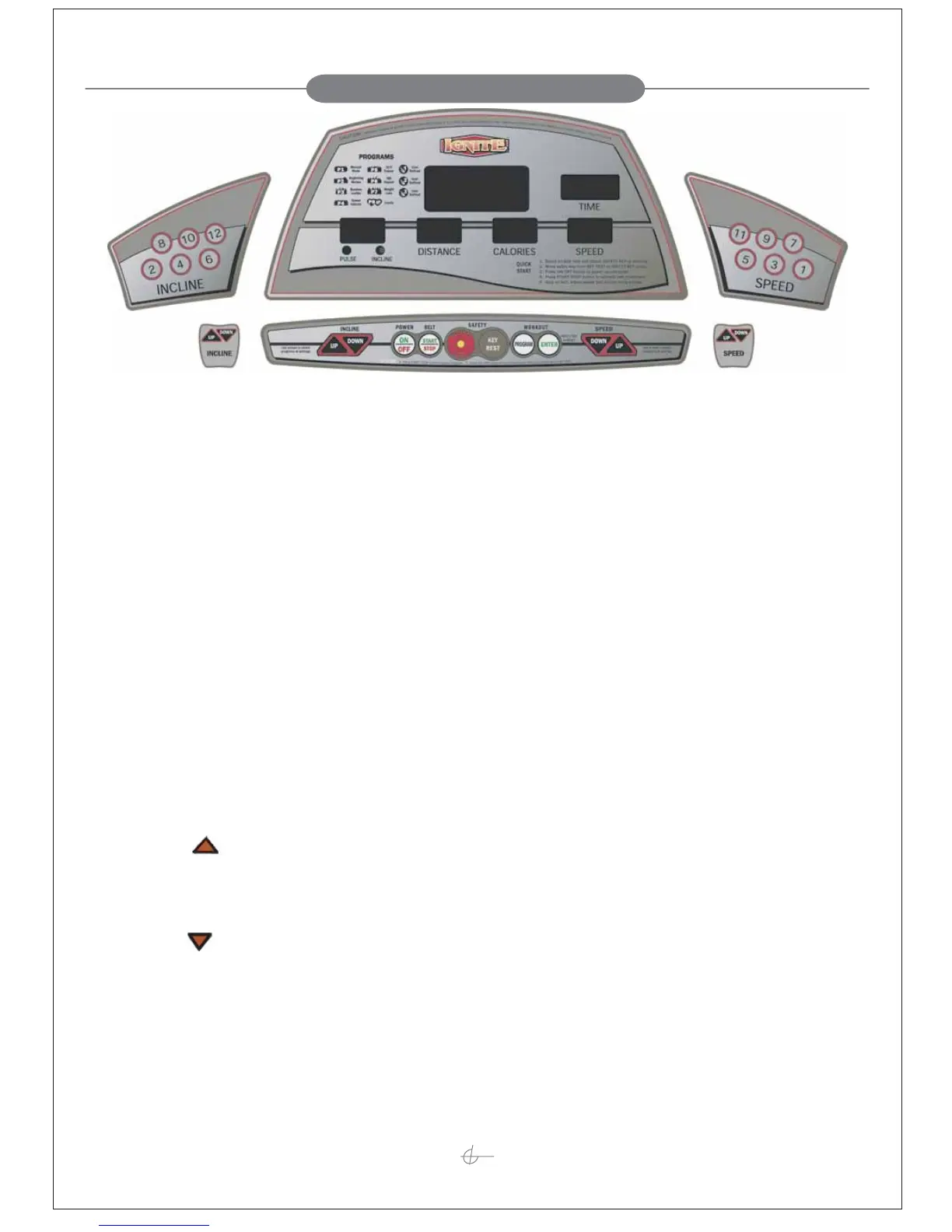
955 COMPUTER OPERATION
10
Before Starting
Note: Never stand on the walking belt while starting or stopping the treadmill.
Straddle the walking belt by standing on the side rails. If you are a new user, start at a slow speed and
hold the handles until you become comfortable.
Computer Control Bar
Magnetic Safety Key
Note: The 955 computer and walking belt will not function without the Magnetic Safety Key in place.
To operate the 955 treadmill, attach the safety key lanyard clip to your clothing and position the Magnetic
Safety Key on the “Safety Key” circle.
When not in use, move the Magnetic Safety Key to the “Off” circle.
Major Function Keys:
1. INCLINE +:
Increases the incline level in the range from 1 to 16 shown in the PULSE/INCLINE Display.
Pressing once increases 1 level and to speed up the decrement by pressing and holding it for 2 seconds.
2. INCLINE –:
Decreases the incline level in the range from 1 to 16 shown in the PULSE/INCLINE Display.
Pressing once increases 1 level and to speed up the decrement by pressing and holding it for 2 seconds.
3. POWER:
Press this button to turn on or turn off the power.
Computer Control Bar
Incline Easy Keys
Incline Quick Adj Keys
Speed Quick Adj Keys
Speed Easy Keys


 To Next Page