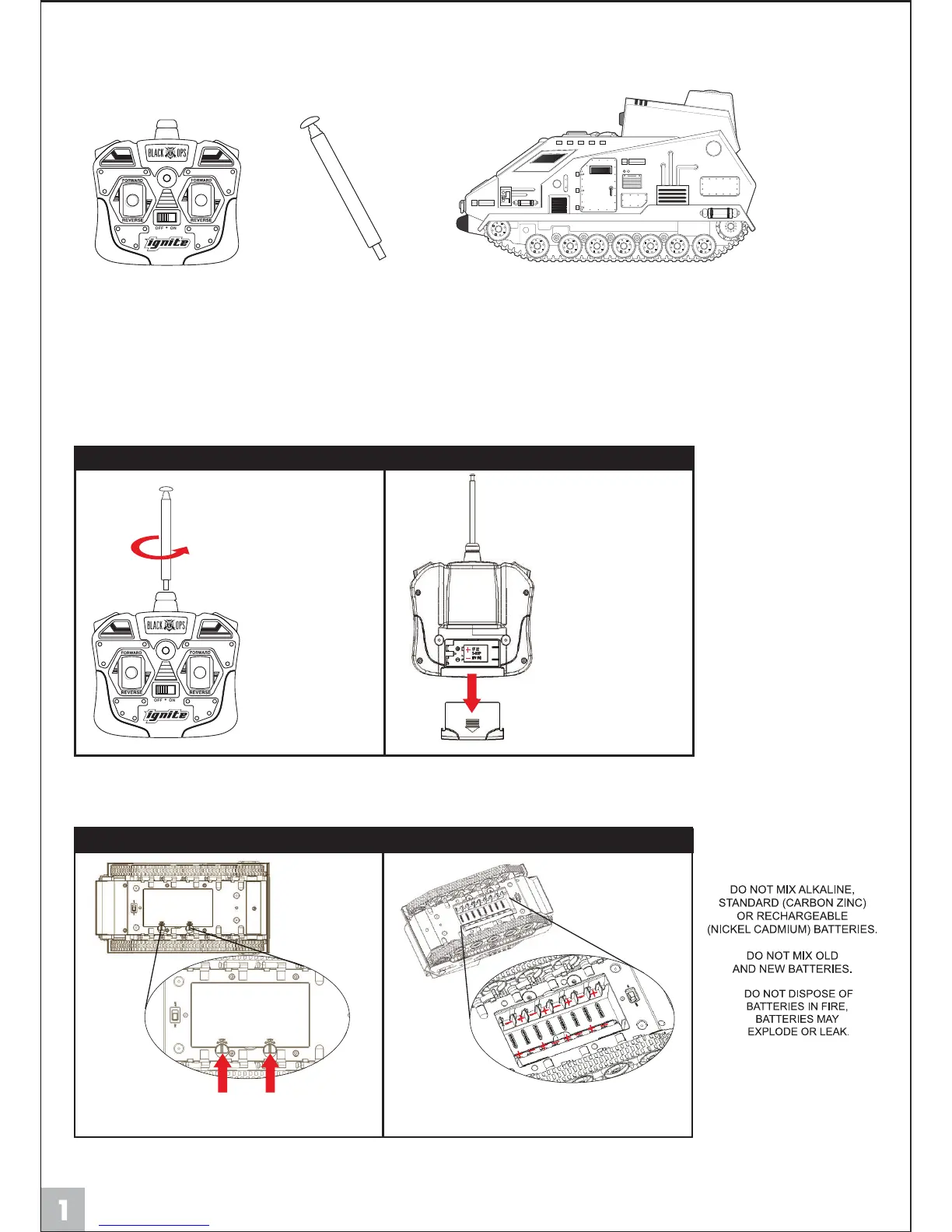
Controller Airsoft VehicleController’s Antenna
CONTENT LIST
vehicles regular battery installation
antenna installation
Turn the battery cover dials away from
the cover remove cover.
Insert 8-AA batteries, according to their
correct polarities. Replace the battery cover.
Screw in the antenna to
the top of the controller.
Slide back cover off,
insert 1-9V battery,
replace cover.
Diagram #1
Diagram #2
PLEASE NOTE:
A) Make sure the batteries
have been inserted correctly
(+ or -) into vehicle & controller.
B) If the vehicle does not
respond properly, please
replace the alkaline batteries
in the vehicle and/or
controller battery.
Remember to take out all
the batteries from the vehicle
and the controller if the
vehicle will not be used for
a long time.
NOTE:
To prevent damage, the contents of the package that are listed above have been packed
in the tray and may be out of plain sight. Please remove all contents from the tray.
FRONT
FRONT


 To Next Page