905 COMPUTER OPERATION
10
Before Starting
Note: Never stand on the walking belt while starting or stopping the treadmill.
Straddle the walking belt by standing on the side rails. If you are a new user, start at a slow speed and hold the handles until you become comfortable.
Key Functions:
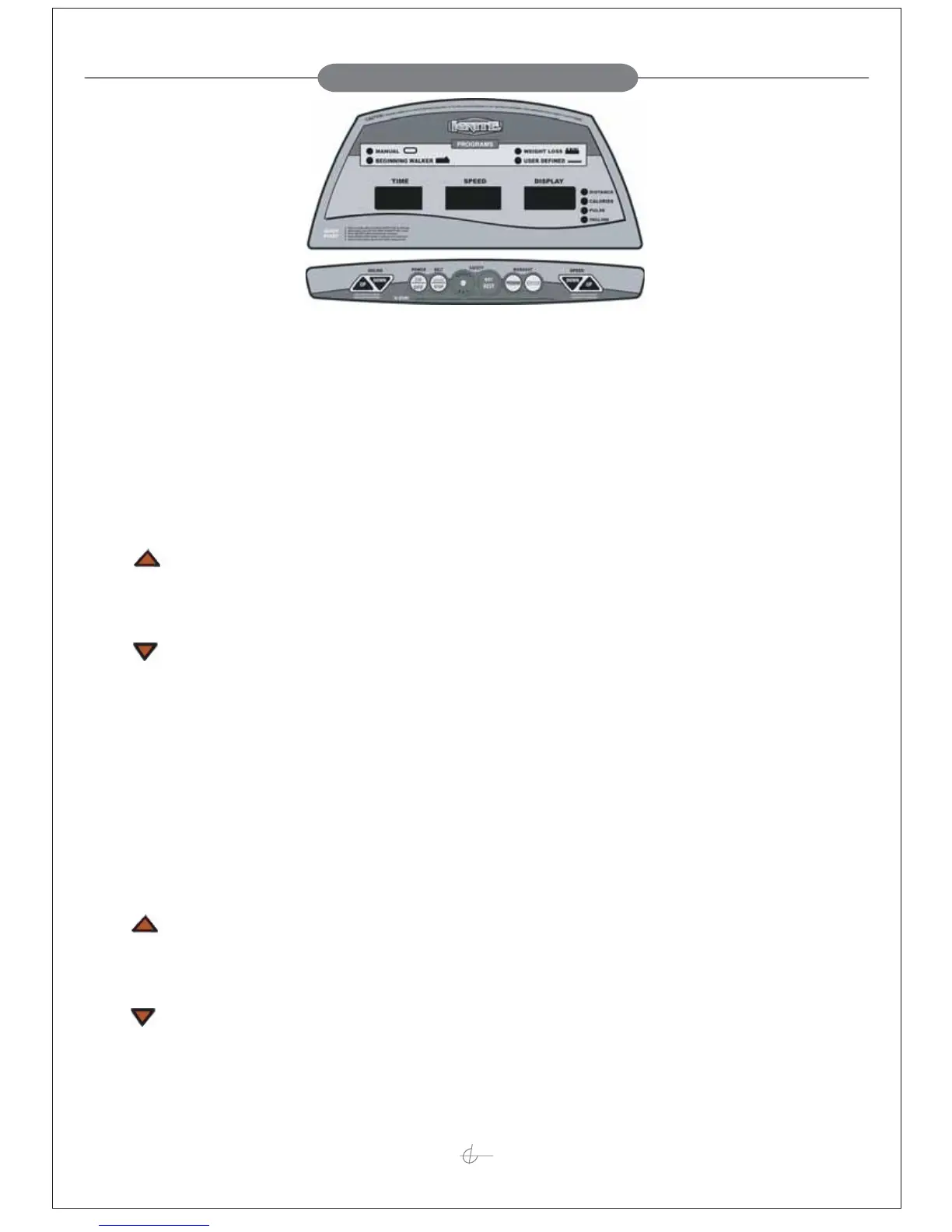
There are total 13 keys including 1 Safety key, 8 Major Function Keys, 2 Speed Quick-Access Keys, and 2 Incline Quick-Access Keys.
A. Safety Key:
The treadmill can be operated only with the key attached on the SAFETY KEY ON button and both of the monitor and the treadmill stop as soon as the
key is removed. Do not exercise, please attach the Safety Key on the OFF position.
B. Major Function Keys:
1. INCLINE +:
a. Press this button to choose the program form Manual, P1, P2, U1.
b. During the setting mode, press this button to increase the setting value.
c. During the exercise mode, increases the incline level in the range from 0 to 12. Pressing once increases 1 level and to speed up the decrement by
pressing and holding it for 2 seconds.
2. INCLINE –:
a. Press this button to choose the program form Manual, U1, P2, and P1.
b. During the setting mode, press this button to decrease the setting value.
c. During the exercise mode, decreases the incline level in the range from 0-12 –11 to 0. PULSE/INCLINE Display. Pressing once decreases 1 level
and to speed up the decrement by pressing and holding it for 2 seconds.
3. POWER:
Press this button to turn on or turn off the power.
4. START/STOP:
Starts or stops the program chosen and the incline will back to level 0.
5. SCAN/SELECT:
a. Scan: During the exercise stage, press this button to scan the function of Distance, calories, pulse and incline every 5 seconds. (LED light will glitter.)
b. Select: During the exercise stage, press this button to select the function of the Distance or calories or pulse or incline function. (LED light will not glitter.)
6. ENTER/RESET:
a. Press this button to confirm your desired program or setting value.
b. Hold two seconds to reset all of the value to initial mode.
7. SPEED +:
a. Press this button to choose the program form Manual, P1, P2 and U1.
b. During the setting mode, press this button to increase the setting value.
c. During the exercise mode, increases the speed level in the range from 0.8to 16.0 KPH or 0.5 MPH to 10 MPH shown in the SPEED Display.
Pressing once increases 0.2 KPH or 0.1 MPH. To speed up the increment, hold this button more than 2 seconds.
8. SPEED –:
a. Press this button to choose the program form Manual, U1, P2, and P1.
b. During the setting mode, press this button to decrease the setting value.
c. During the exercise mode, decreases the speed level in the range from 0.8 to 16.0 KPH or 0.5MPH to 10MPH shown in the SPEED Display.
Pressing once decreases 0.2 KPH or 0.1 MPH. To speed up the decrement, hold this button more than 2 seconds.
Computer Control Bar
Computer Display Panel


 To Next Page
 Loading...