English
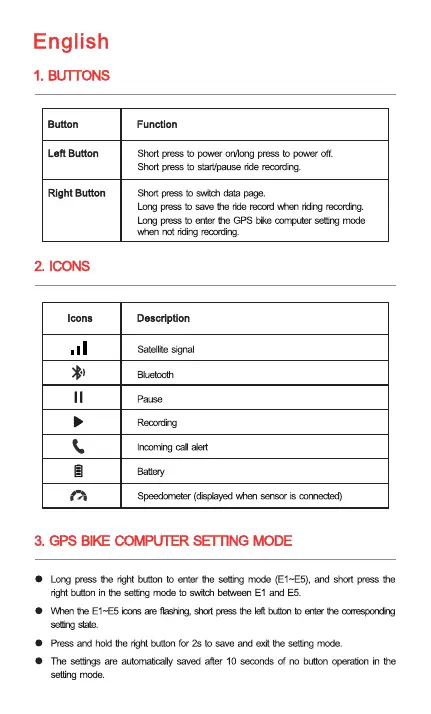
1. BUTTONS
Len Button
Right Button
2 Icaqs
Icons
Function
Shut press to po.ver pressto power off.
Short press to start/pauseride recording
Short pressto switchdata page.
pressto save tie ride recordvhn remrding.
pressto enter GPS bikecornputersettingmode
when not recnrding
Description
Satelite signal
pause
alert
(cfiplayed sensor is cmrH:ted)
3. GPS BIG SETTING BODE
Lmg press the rÜht button to the setting mode (El—E5),and press
right buttonin to switchbeb,h.eenEl and E-5.
Whentre El —E5icons ae nashiv, slut he left eMa Mnecot—xndim
Press and hold he ight buttonfor 2s to save ard exit the setting mode.
The settings are autrynaticanysaved after 10 seconds of button r»eration the
setting mode.



 To Next Page