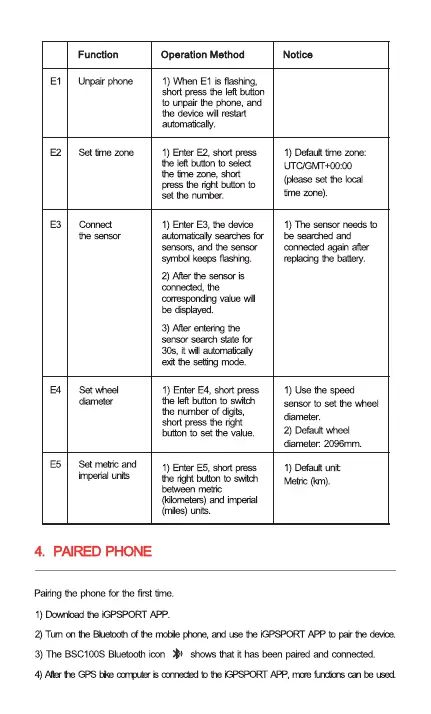
El
E2
E3
E4
E5
Function
urvair pmne
Set tirne zone
Connect
Yle senscr
Set wheel
Set netrt and
hwial urits
Operation Method
1) VhhenEl is
sho:t pressthe leftbutton
to Lmpairthe phme,
the device Will restart
autonnaticaly.
1) EnterE2. shcrt press
the left button to select
tte tine zore,
press buttm to
set Hle nurnber.
1) EnterE3, the deviæ
autornaticdtysearchesfor
sensus, and the sensu
symtnl keeps
2) After
connected, the
valæ wi
be displayed_
3) Afterente@ the
seardl state for
30s, autunaticaty
exit Hle mode.
1) Enter E4, stut press
the left button to switch
the numberof dots,
short pressthe right
button to set the value.
1) EnterE5, short FTess
the light buttonto swith
metric
and imperial
(miles)uMs.
Notice
1) Defaulttime zme:
UTC,GMT+OOOO
(pleaseset he
time zme).
1) The needsto
searched and
connected after
the battery.
1) use speed
sensor to set Mheel
2) Defaultvheel
darneter. 2096mm.
1) Defaultunit:
Metric(km).
4. PHONE
Pairingthe for the first tine
l) GPSPORT
2)Tun he untcnth (i he rn±de he GPSPCRTAPP to he
3) Bluetooth shows that it has been paired connected.



 To Next Page