This document outlines the features, specifications, and usage instructions for the SonicB True Wireless Earphones, model SBBTW1.
Function Description:
The SonicB True Wireless Earphones are designed for a seamless audio experience, offering freedom from wires with a rechargeable carrying case. They are intended for listening to music, making and receiving calls, and interacting with smartphone voice assistants. The earphones are sweat-resistant, making them suitable for workouts, and feature enhanced audio for an upgraded listening experience.
Important Technical Specifications:
- Bluetooth Version: 5.0
- Frequency Response: 2.4GHz - 2.48GHz
- Driver Unit: 6mm
- Operation Range: 10m
- Earphones Batteries: 40mAh Lithium Ion Each
- Charging Case Station Battery: 300mAh Lithium Ion
- Play Time: Up to 3 hours
- Play Time with Charging Case Station: Up to 12 hours
- Earphones Charging Time: About 1 hour
- Charging Case Station Charge Time: About 1.5 hours
- Charging Port: Type-C
Usage Features:
Charging and Powering ON:
- Charging the Case: Connect the provided Type-C cable to a computer USB port or a USB wall charger and plug the other end into the Type-C charging port (D) on the back of the Charging Case Station. The LED indicator light (C) will flash RED while charging and remain RED when fully charged.
- Charging the Earphones: Open the Charging Case Station and place the earphones in their designated areas. The LED lights (B) on the earphones will illuminate RED, and the LED indicator light (C) on the Charging Case Station will illuminate BLUE. The LED lights will turn off automatically when fully charged.
- Powering ON/OFF (Manual): If earphones are off, press and hold the Multi-Function button (A) for 2 seconds to turn them ON. If earphones are already ON, press and hold the Multi-Function button (A) for 4 seconds to turn them OFF.
- Powering ON/OFF (Automatic): Earphones turn ON automatically when removed from the Charging Case Station and turn OFF automatically (and begin to charge) when placed back in the case.
Bluetooth Pairing:
- Method 1 (Manual):
- Ensure earphones are off. Press and hold the Multi-Function button (A) for 2 seconds to turn them ON. They will enter Bluetooth pairing mode, emitting a tone, and the LED indicator light (B) on one earphone will flash BLUE and RED.
- Enable Bluetooth on your smartphone or music device.
- Select "sonicB honest earphones" from the list of available Bluetooth devices. The LED will blink BLUE slowly, and a tone will indicate successful pairing.
- Method 2 (Automatic with Case):
- Pick up both earphones from the Charging Case Station. They will connect to each other automatically and enter pairing mode. One earphone will flash RED and BLUE steadily.
- Enable Bluetooth on your smartphone, tablet, computer, or music device.
- Select "sonicB honest earphones" from the list of available Bluetooth devices.
Single Earphone Mode:
- Remove either the RIGHT or LEFT earphone from the Charging Case Station, or turn on only one earphone.
- Press and hold the Multi-Function button (A) until the earphone prompts "POWER ON." After a few seconds, it will enter pairing mode (flashing RED & BLUE).
- Open your device's Bluetooth settings and select "sonicB honest earphones" to pair.
- Power On/Off: Press and hold for 2 seconds (ON) or 4 seconds (OFF).
- Pause & Play Music: Press once on either earphone.
- Answer & Hang Up Calls: Press once on either earphone during an incoming call to answer, press once again to hang up.
- Reject Calls: Press and hold for 1-2 seconds on either earphone during an incoming call.
- Next Track: Double press the Multi-Function button (A) on the RIGHT earphone.
- Previous Track: Double press the Multi-Function button (A) on the LEFT earphone.
- Increase Volume: Triple press the Multi-Function button (A) on the RIGHT earphone.
- Decrease Volume: Triple press the Multi-Function button (A) on the LEFT earphone.
- Smartphone Assistant (Google Assistant™ / Siri®): Hold the Multi-Function button (A) on either earphone for 1-2 seconds until you hear a "beep" prompt.
Ear Tips:
- Includes small, medium, and large soft silicone ear tips for a perfect hold and comfort.
Maintenance Features:
- General Care:
- DO NOT expose the unit to liquid, moisture, or humidity.
- DO NOT use abrasive cleaning solvents.
- DO NOT expose to extreme temperatures.
- DO NOT dispose of in fire.
- DO NOT expose to sharp objects.
- DO NOT attempt to disassemble.
- Troubleshooting:
- No Power: Recharge earphones using the included Charging Case Station and Type-C cable.
- Music Not Playing Over Bluetooth: Ensure your Bluetooth device has A2DP profile, devices are paired and connected. Restart earphones.
- Bluetooth Device Will Not Reconnect: Navigate to Bluetooth settings, "Forget" "sonicB honest earphones," then re-pair.
- Buttons Not Working: Turn True Wireless Earphones off, reconnect after a few seconds. Ensure Bluetooth is activated.
- Poor Sound Reception/Quality: Ensure earphones are charged and within 10m of your Bluetooth device.
- One Earphone Not Connected to Other: Power off both earphones (4s hold), then power both on (2s hold). They will connect automatically.
- Earphones Not Charging: Ensure earphones are properly placed in the Charging Case Station, the case battery is fully charged, and there's no dirt/debris on charging conductors.
- Battery Disposal: Do not dispose of Lithium-ion batteries with general waste. Return to a battery recycling collection point.
- Environmental Protection: The appliance should not be put into domestic garbage at the end of its useful life. Dispose of at a central point for recycling of electric and electronic domestic appliances. The materials used are recyclable.
- Warranty & Legal:
- Supplier's warranty is non-transferable and limited to the original purchaser.
- Proof of original purchase date with a dated receipt is required.
- Warranty is not applicable if the product has been subject to physical abuse, improper installation, modification, or unauthorized repair.
- Responsibility is limited to repair or replacement at the supplier's discretion.
- Exempt from warranty are limited-life consumable components (batteries, decorates, accessories).
- Supplier is not responsible for failures due to accident, abuse, misuse, or unauthorized repair/modification/disassembly.
- Modification and repair should be done by authorized personnel or returned to the manufacturer.
- This warranty grants specific legal rights, which may vary under local laws.
- Bluetooth® is a registered trademark of Bluetooth SIG Inc.

 Need help?
 General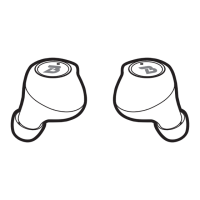

 To Next Page