Charging the Unit
CHARGE UNIT BEFORE USE
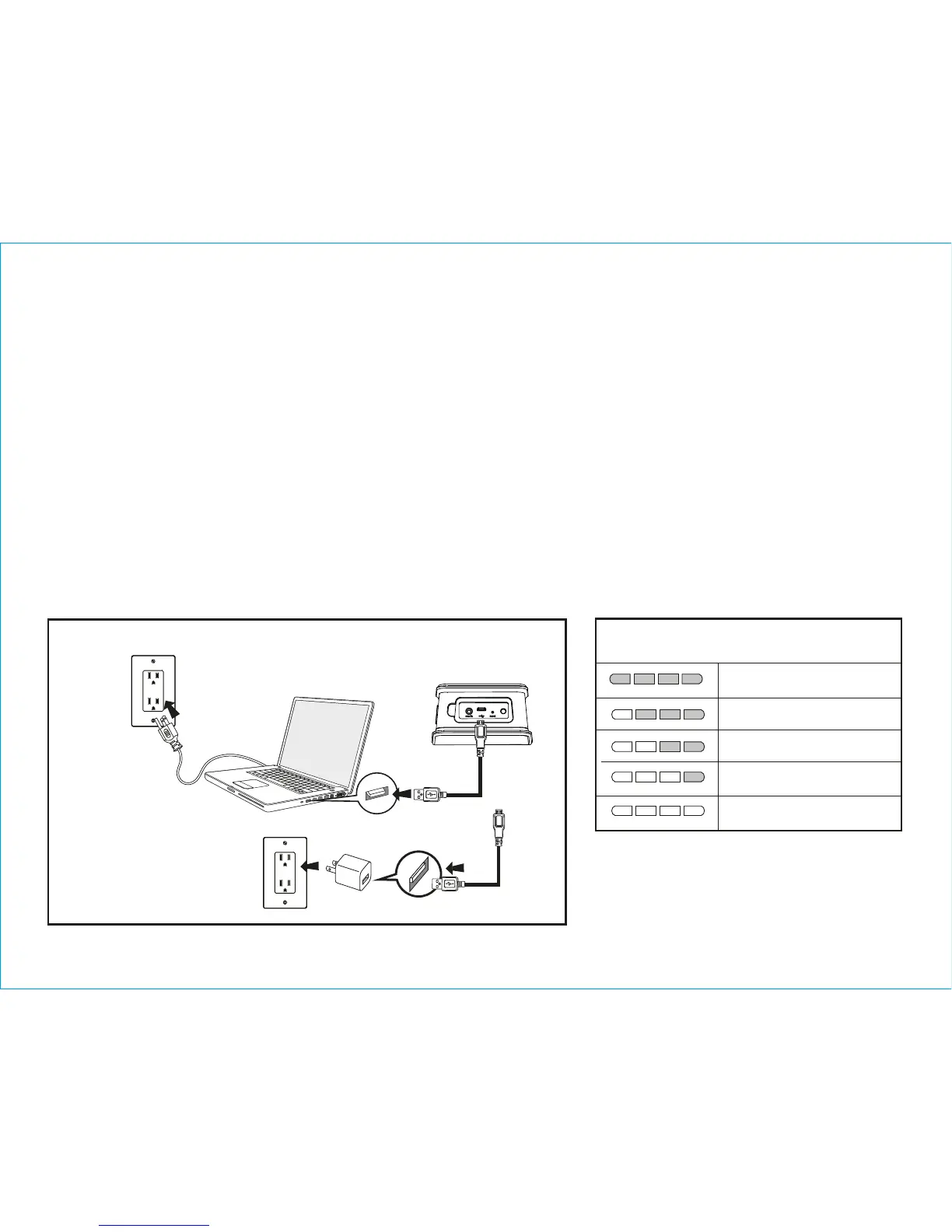
1. Connect the micro USB plug to the micro USB charging port on the side of the unit.
2. Connect the standard USB plug end of the cable to a power USB port on a comput-
er or other USB charging device. For first time use, charge unit for about 8 hours.
3. The Battery Level Meter on the front of the unit flashes while the unit is charging
and turns solid once the unit is fully charged. See table above for charge status
information.
6
Using the
iBT39
NOTE: The white, 4 segment Battery
Level Meter on the front of the unit is
activated when the unit is ON or when
connected to a charging source via the USB
cable.
iHome iBT39 USB port
Charge via computer USB port, USB AC adaptor
or other powered USB port
Computer
connected
to working outlet
Computer USB port
USB AC adaptor (not included)
Battery Charge Status
100% charged
dead, needs charge
low, needs charge
60 - 99% charged
46 - 60% charged


 To Next Page