Range
Speed limit
When using a hoverboard, you must pay attention to relevant safety matters. Thus, you must fully understand all the precautions
in the instruction manual before riding. It is very important for you to understand these safety issues before use.
Riding Method
04 05
· The top speed is 12km/h (7.5mph).
· When the hoverboard is faster than the top speed, the buzzer will give an alarm.
· Riding below the speed limit helps to maintain balance; when the speed is greater than the speed limit, the hoverboard will
raise its head upwards. Please keep the speed to a safe speed.
The range of a hoverboard is related to many factors, such as:
· Terrain: Riding on smooth ground will increase the range, otherwise the range decreases.
· Weight: The weight of the rider affects the range.
· Ambient temperature: Storage at the recommended temperature will increase the range, on the contrary, it will
reduce the range at extreme temperatures.
· Maintenance: Proper charging and maintenance of the battery can increase the range, otherwise it will shorten
the range.
· Speed and riding way: Maintaining a medium speed can increase the range. And frequent starting, stopping,
acceleration, and deceleration will shorten the range.
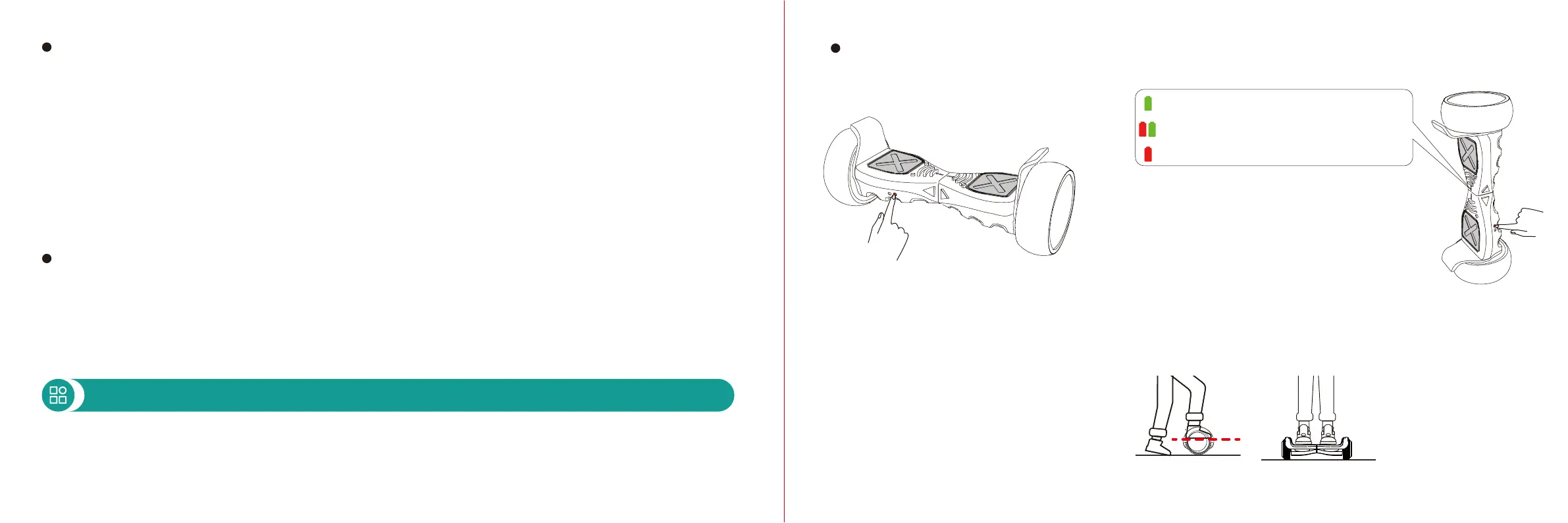
1. Press the power switch to turn on the power,
the working indicator will light and the hoverboard
will enter automatic balance state.
3. Step on the pedal with a trigger switch with
one foot. After keeping your body stable, step the
other foot on the other deck of the hoverboard.
Riding Steps
2. Select the riding mode: 3 modes
1) Beginner mode: 5mph/8km/h top speed
2) Skilled mode: 6.2mph/10km/h top speed
3) Master mode: 7.5mph/12km/h top speed
To select your riding mode:
First, turn on the hoverboard and place it with
one wheel hub touching the ground and the
other facing up. The default riding mode after
powering on is Skilled mode (the battery
indicator flashes red and green alternately).
Next, press the power button to cycle through
the Master, Beginner, and Skilled mode. When
Master mode is selected, the battery indicator
will flash red. When Beginner mode is selected,
the battery indicator will flash green.


 To Next Page