Plug in for NBN
™
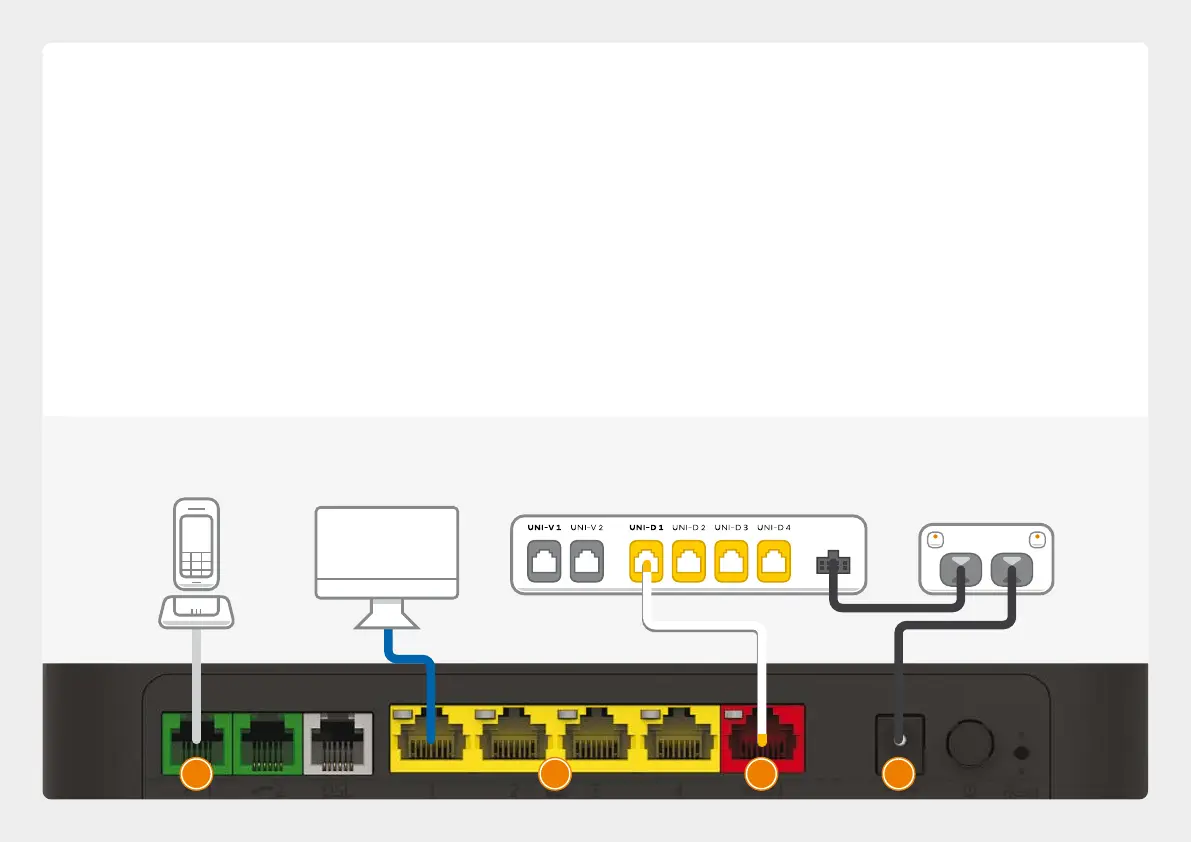
Fibre to the Premises
1. Using the power cable supplied, connect your
modem’s Power port to a power outlet. Press the
Power button on the back of the modem to turn
it on.
2. Use the supplied Ethernet cable to connect your
modem’s red WAN port to the UNI-D 1 port on
your NBN™ Connection Box. If UNI-D1 doesn’t
work, try each UNI-D port before contacting us
for a hand.
3. If you wish to use your VoIP phone service,
connect a phone handset to your modem’s
Phone1 port.
4. You can use an additional Ethernet cable to
connect your computer to any of your modem’s 4
LAN ports. Alternatively, follow the steps later in
this guide to connect devices via WiFi.
Turn to Page 14 to continue setup.
Ethernet Cable
Plug into your computer’s
Ethernet Port (Optional)
Phone Cable
Plug into handset
(Optional)
P OWER
NBN™ Connection Box
Connects to your modem via
Ethernet to the WAN Port
Power Cables
Plug into power outlets
1243
10


 To Next Page
 Loading...
