ENGLISH
16 OPERATING THE MONITOR
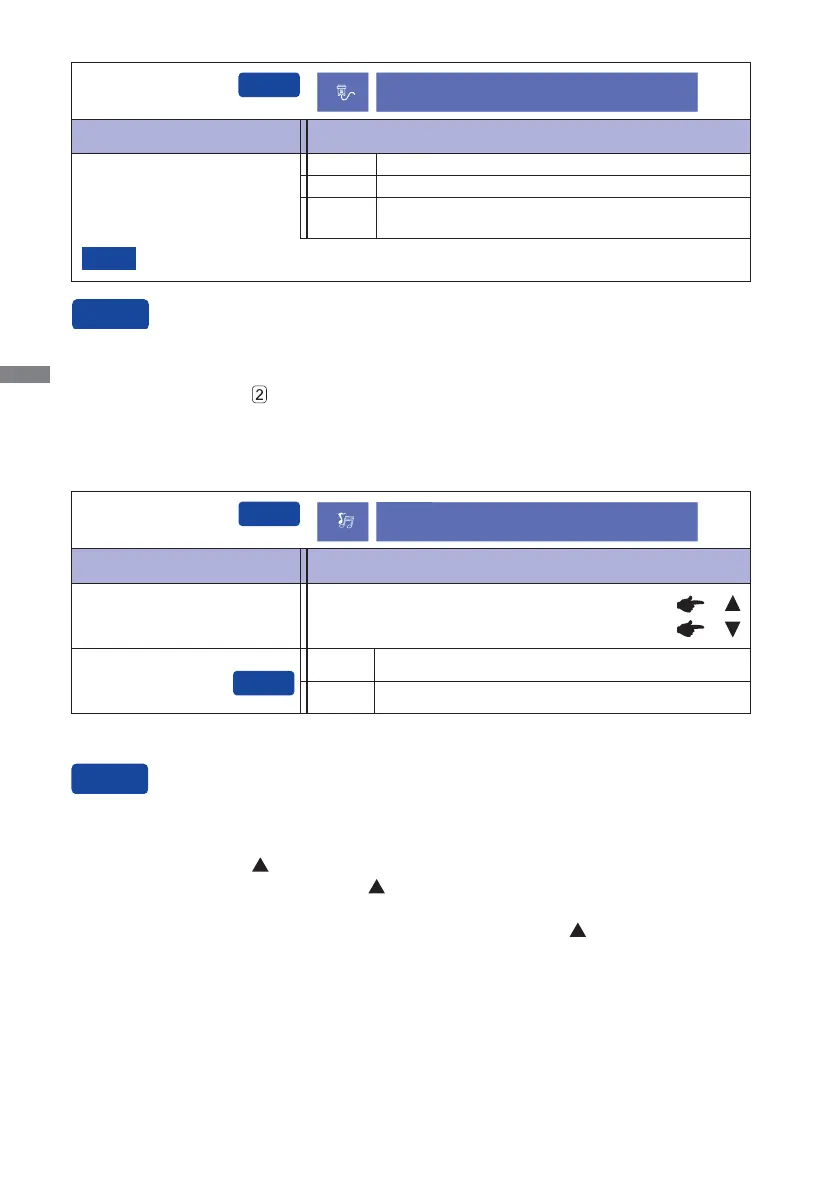
Adjustment Item Problem / Option Button to Press
Input Select
Input Select
You can skip the Menu items and display an adjustment scale directly by using the following button
operations.
Input Select: Press the
Button when the Menu is not displayed.
Input source is fi xed, not selected automatically when VGA and DVI which are selected.
Select the VGA input.
Select the DVI input.
VGA
DVI
Auto
Search for an available input source and select
automatically.
NOTE
Volume
Too soft
Too loud
Adjustment Item Problem / Option Button to Press
Audio Adjust
Mute *
Return the sound volume to the previous level.
Turn off the sound temporarily.
* To activate the option, mark it in the setup menu. To deactivate it, remove the marking.
You can skip the Menu items and display an adjustment scale directly by using the following button
operations.
Audio Adjust: Press the
Button when the Menu is not displayed.
Mute: Pressing and holding of the
Button for about 2 seconds when the Menu is not
displayed.
Mute and Unmute are switched as follows by pressing the
Button successively.
Input Select
Audio Adjust
Off
On





 To Next Page