OPERATING THE MONITOR 11
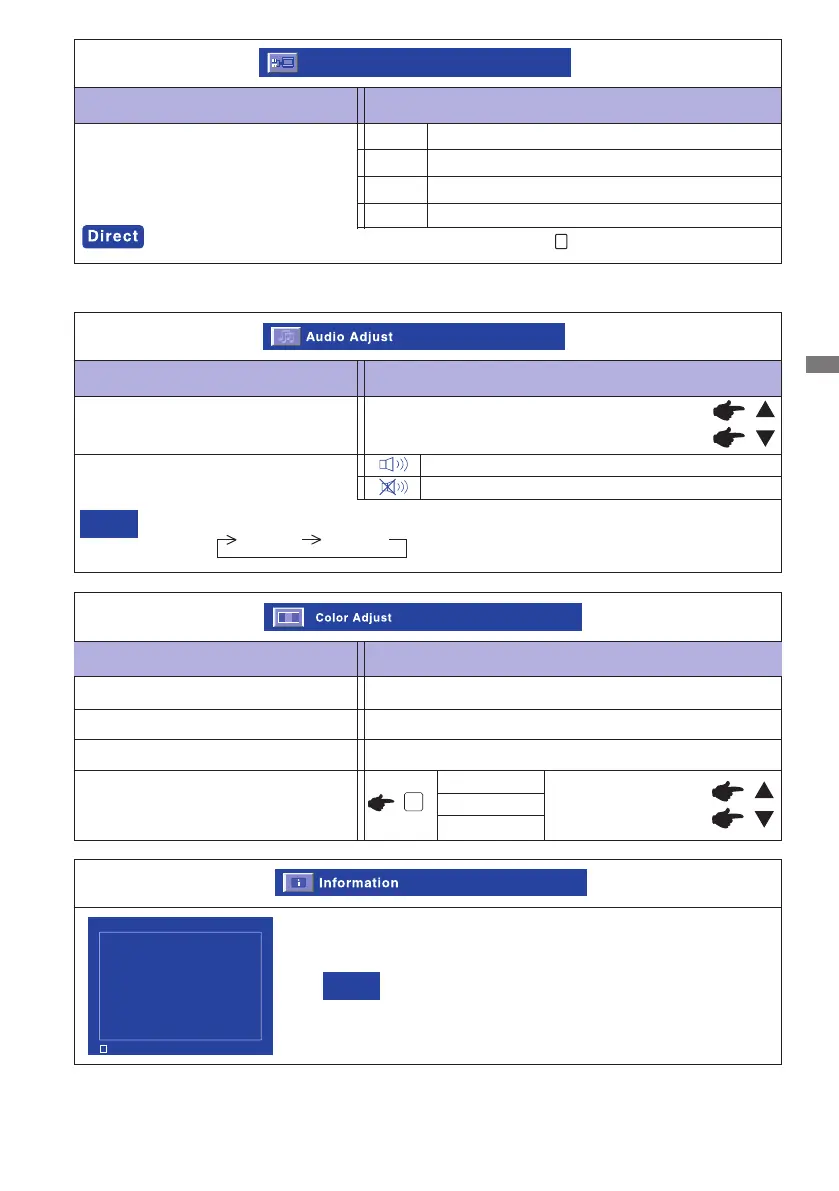
Adjustment Item Problem / Option Button to Press
Color Adjust
9300K
6500K
Reddish white
Bluish white
5400K
Greenish white
Green
Red
Blue
Too weak
Too strong
User Color
Adjustment Item Problem / Option Button to Press
Audio Adjust
Volume
Too soft
Too loud
Mute
Mute off and on are switched as follows by pressing the Select Button successively.
Mute off Mute on
NOTE
Return the sound volume to the previous level.
Turn off the sound temporarily.
Adjustment Item Problem / Option Button to Press
Input Select*1
Input Select
Select the VGA input
Input Select
VGA
DVI
Select the DVI input
HDMI*2
Select the HDMI input
2
*2 Available for ProLite E2407HDS-B1/W1 only.
*1 Not available for ProLite E2407HDSV
You can display the Input Select Menu by pressing the button under no signal input.
See your graphic card user guide for more information about
changing the resolution and refresh
NOTE
Information
Displays information regarding the current input signal coming
from the graphic card in your computer.
AUTO
Select the AUTO input
2
Information VGA
H. Frequency: 67.5 KHz
V. Frequency: 60.0 Hz
Resolution: 1920x 1080
Pixel Clock: 148.5 MHz
Serial Number: 1103291100001
Model Number: PLE2407HDS
1 : Exit





 To Next Page