ENGLISH
5 BEFORE YOU OPERATE THE MONITOR
Put the monitor on a stable surface. The monitor may cause injury or damage if it
falls or is dropped.
Do not give a strong impact to the monitor. It may cause damage.
Unplug the monitor before removal or installation to avoid electric shock or damage.
The monitor is supplied complete with a stand. If you prefer to wall mount the monitor, please follow
the instructions below to remove the stand. Be sure to include the stand with the monitor if it is
necessary to return the unit.
CAUTION
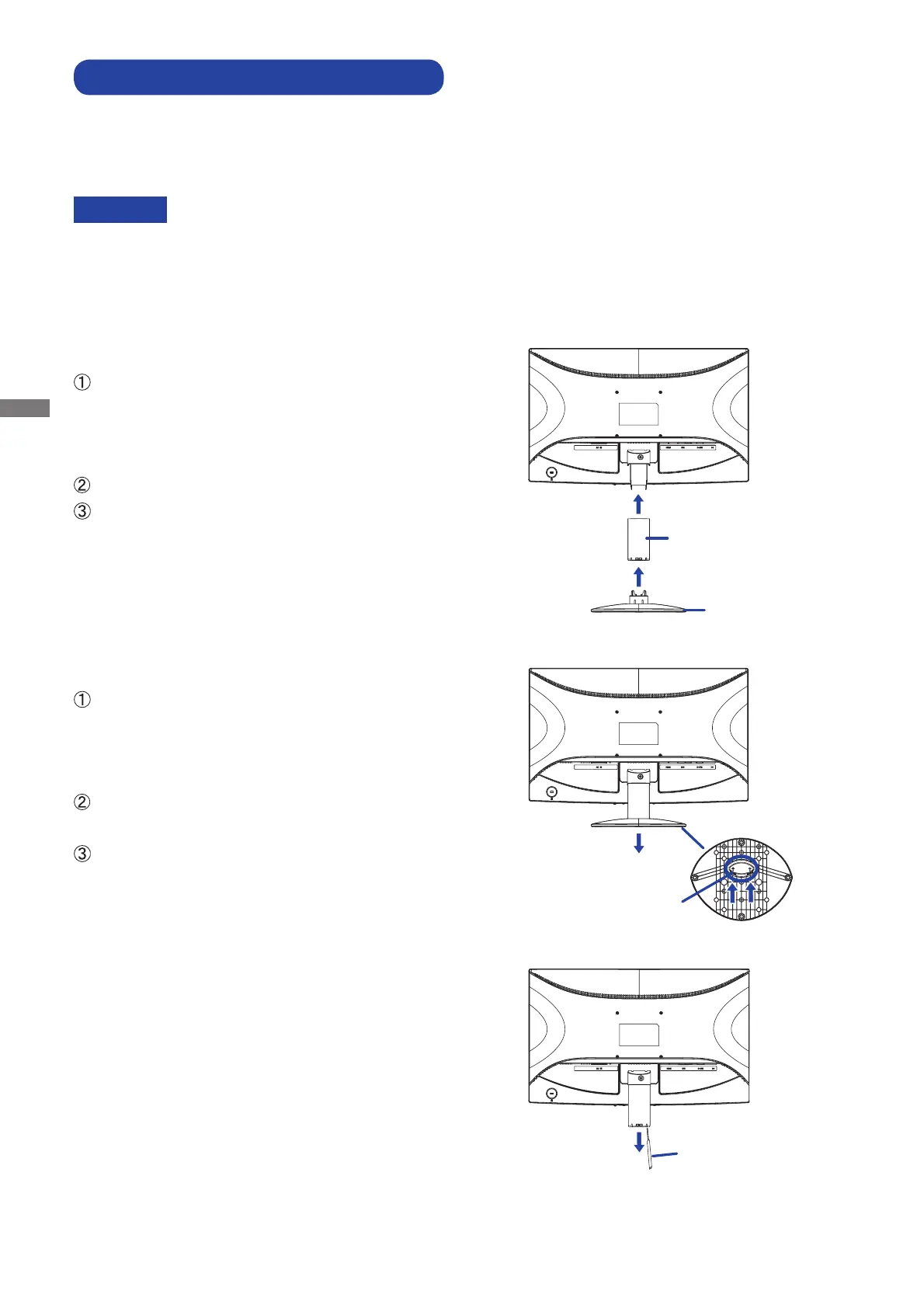
FITTING AND REMOVAL OF BASE
<Installation>
Put a piece of soft cloth on the table
beforehand to prevent the monitor from being
scratched. Lay the monitor fl at on a table with
front face down.
Hold the monitor and push the Stand-Neck.
Hold the monitor and push the Stand-Base.
<Remove>
Put a piece of soft cloth on the table
beforehand to prevent the monitor from being
scratched. Lay the monitor fl at on a table with
front face down.
Press and hold the hooks inside, and pull the
Stand-Base.
There are two locks inside of the Stand-Neck,
unlock them by thin stick and pull the Stand-
Neck.
Stand-Neck
Stand-Base
Hooks
Thin Stick







 To Next Page