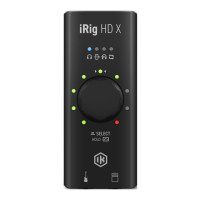
The iRig HD X is a universal guitar interface designed for use with iOS devices, Mac, and PC. It is a new member of the iRig guitar interface family, featuring a redesigned enclosure and several important new functionalities.
Function Description
The primary function of the iRig HD X is to act as an audio interface for connecting an instrument, such as a guitar or bass, to a host device. It allows users to input their instrument's signal, process it through software on their device, and output the processed or direct signal.
The interface operates in two main modes, determined by the "Loopback+" feature:
- Loopback+ Off (1 in / 2 out interface): In this mode, the iRig HD X functions as a standard 1-input, 2-output interface. The instrument input is routed to Channel 1. This is suitable for direct recording or monitoring of the instrument signal.
- Loopback+ On (3 in / 2 out interface): When Loopback+ is active, the interface becomes a multichannel 3-input, 2-output device. The instrument input is routed to Input 3. Additionally, a loopback feature is active on Inputs 1 and 2, which allows for routing a processed signal from the host device back into these inputs. This mode is particularly useful for streaming applications where users want to send an effected instrument signal to their audience.
Usage Features
The iRig HD X is controlled primarily through a single Multi-function knob and LED ring. This knob allows users to manage various features of the interface, indicated by four blue Function LEDs that show the currently controlled function:
-
Headphone Volume Control:
- When the headphone symbol LED is lit blue, the knob controls the level of the headphone output.
- The LED ring temporarily shows the current volume level when adjusted, then returns to displaying the input signal's peak level.
- Headphone volume can also be controlled via the host device's volume controls.
- Pressing the knob switches to the FX/THRU control.
-
FX/THRU Control:
- When the FX/THRU symbol LED is lit blue, the knob selects the type of signal sent to the Amplifier output jack.
- THRU Mode (CW rotation): The Amplifier output carries the dry instrument signal, identical to the input. This is ideal for sending the unprocessed signal to an external instrument amplifier while simultaneously connecting iRig HD X to a recording app on the host device. This setting does not affect the headphone output.
- FX Mode (CCW rotation): The Amplifier output carries the processed signal from the host device. This allows users to process their instrument within an app and send the effected signal to an amplifier's clean channel. In FX mode, the Amplifier output's level is controlled by the headphone volume control.
- The LED ring temporarily shows the current setting when adjusted, then returns to displaying the input level.
- Pressing the knob switches to the direct monitoring control.
-
Direct Monitoring Control:
- When the direct monitoring symbol LED is lit blue, the knob enables or disables the direct monitoring feature.
- ON (CW rotation): Activates direct monitoring. The input signal is mixed with the output signal from the audio software and routed directly to the headphone output, allowing for zero-latency monitoring of live inputs.
- OFF (CCW rotation): Deactivates direct monitoring.
- When direct monitoring is ON, the Amplifier output is automatically forced to THRU mode, and the FX/THRU LED will blink. Forcing the Amplifier output to FX will automatically set direct monitoring to OFF.
- It is crucial to disable any software monitoring options when direct monitoring is active to prevent "double-monitoring," which can cause increased volume and phasing sounds.
- The LED ring temporarily shows the current status when adjusted, then returns to displaying the input level.
- Pressing the knob switches to the Loopback+ control.
-
Loopback+ Mode Control:
- When the loopback+ symbol LED is lit blue, the knob activates or deactivates the Loopback+ feature.
- ON (CW rotation): Activates Loopback+, turning on three LEDs of the LED ring. This changes the interface to a 3-in/2-out configuration, useful for streaming processed signals.
- OFF (CCW rotation): Deactivates Loopback+, with the central LED of the LED ring turning on. This returns the interface to a 1-in/2-out configuration.
- To confirm the mode selection, press the knob. The iRig HD X will restart, and the channel count of the interface will change accordingly. It is recommended to change the operation mode before opening recording or streaming applications.
- The Loopback+ feature is particularly useful for streaming an effected signal to a streaming app.
-
Tuner Mode:
- Pushing and holding the multi-function knob for more than one second enters Tuner Mode.
- In Tuner Mode, the LED ring displays the note being played and provides tuning indication. The central LED illuminates when the note is tuned (within a +/- 5 cents range).
- Pushing and holding the knob again exits Tuner Mode and returns to the previously selected mode.
Installation and Setup:
- Connect the iRig HD X to a host device (computer or mobile device) using the provided USB-C cable.
- Connect your instrument (guitar, bass, or other mono instrument) to the 1/4" input jack.
- Launch an audio application and set iRig HD X as the default audio device.
- Connect headphones, a mixer, or powered speakers to the 1/8" (3.5mm) headphone jack.
- Connect an external amplifier to the 1/4" TS Amplifier output jack and select the desired signal type (THRU or FX) using the FX/THRU function.
The iRig HD X features a high headroom input, eliminating the need for a dedicated gain control. The input gain is pre-set to accommodate all types of pickups (active or passive), allowing for immediate plug-and-play use.
Maintenance Features
- Troubleshooting - No Sound: Ensure a Core Audio-compatible audio app is launched on your iOS device or Mac. For iOS, verify the app works with the Lightning dock connector. For Mac, confirm "iRig HD X" is set as the audio input device in your app. If no sound is played back through headphones or the Amp Out, check the headphone volume control and the volume of the connected host device using its volume buttons.
- Troubleshooting - Phasing Sound: If a "phasing" effect is present while monitoring, disable input monitoring in your recording app or turn off the direct monitor on iRig HD X.
The device is designed for ease of use with minimal user maintenance beyond ensuring proper connections and software settings. Regular software updates for the host device and audio applications are recommended for optimal performance.

 Need help?
 General

 To Next Page