
 Need help?
Do you have a question about the IK AmpliTube TONEX and is the answer not in the manual?
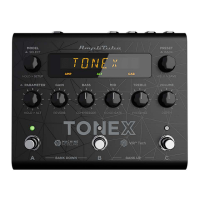
Overview of the TONEX ecosystem, including Pedal, Librarian, and ToneNET.
Definition and types of TONE MODELs, including limitations of captured effects.
How to use TONE MODELs without owning a capture device, via ToneNET.
Structure of TONEX PRESETs, including effects like Noise Gate, Compressor, TONE MODEL, EQ, and Reverb.
Details on AIMM™ DSP technology, bank/preset capacity, connectivity, and physical specs.
Explanation of the encoders, display, and footswitches on the TONEX Pedal's front panel.
Description of all input and output ports on the back of the TONEX Pedal.
Steps to navigate, select, and edit AMP and CAB components of TONE MODELS.
Process for importing Impulse Responses (IRs) into the TONEX Pedal.
Procedures for navigating, renaming BANKS, and renaming/saving PRESETs.
Method for quickly saving a PRESET to its current location.
Visual representation of the audio signal path through the TONEX Pedal's DSP.
Explanation of GAIN, BASS, MID, TREBLE, and VOLUME parameters for sound shaping.
Description of parameters accessed via the ALT function, including REVERB MIX, COMPRESSOR THRESHLD, etc.
Details on parameters like MODEL.VOL, NOISE GT, NG REL, NG DPTH, etc.
Configuration settings for EXT. CTRL, AMP, and CAB active/bypass within a PRESET.
Overview of global settings like NAMING, BANK NAV, USERMODE, and CAB bypass.
How to set up expression pedals and switches for parameter control and macros.
Procedure to calibrate an expression pedal for optimal performance.
Steps to configure a double switch pedal for preset or bank navigation.
Instructions for using the TONEX Pedal as a computer audio interface.
Configuration of MIDI, ASIO drivers, and related specifications for connectivity.
Explanation of the TONEX Librarian software for managing presets and tone models.
Information on additional software like TONEX MAX and AmpliTube 5.
Hardware and OS requirements for TONEX for Mac/PC and AmpliTube 5.
Specific requirements for using the pedal as an audio interface on Windows.
How to get help via FAQ, support forms, and contact information.
Guide to accessing the IK Multimedia User Area for product management and downloads.
 General
| Type | Amp Modeling Pedal |
|---|---|
| Presets | 150 user presets |
| Inputs | 1 x 1/4" (instrument) |
| Outputs | 1 x 1/4" Headphone |
| MIDI I/O | In/Out |
| USB | 1 x USB Type-B |
| Power Source | 9V DC power supply |
| Software | TONEX |
| Tone Models | 1000 Tone Models available |

 To Next Page