23
Appendix A: Changing from Right- to Left-hand
Conguration
The ET4 wheel module was engineered to be versatile and accommodate
a wide range of users. With the included components you have the
option to position the wheel module in many positions to best suit your
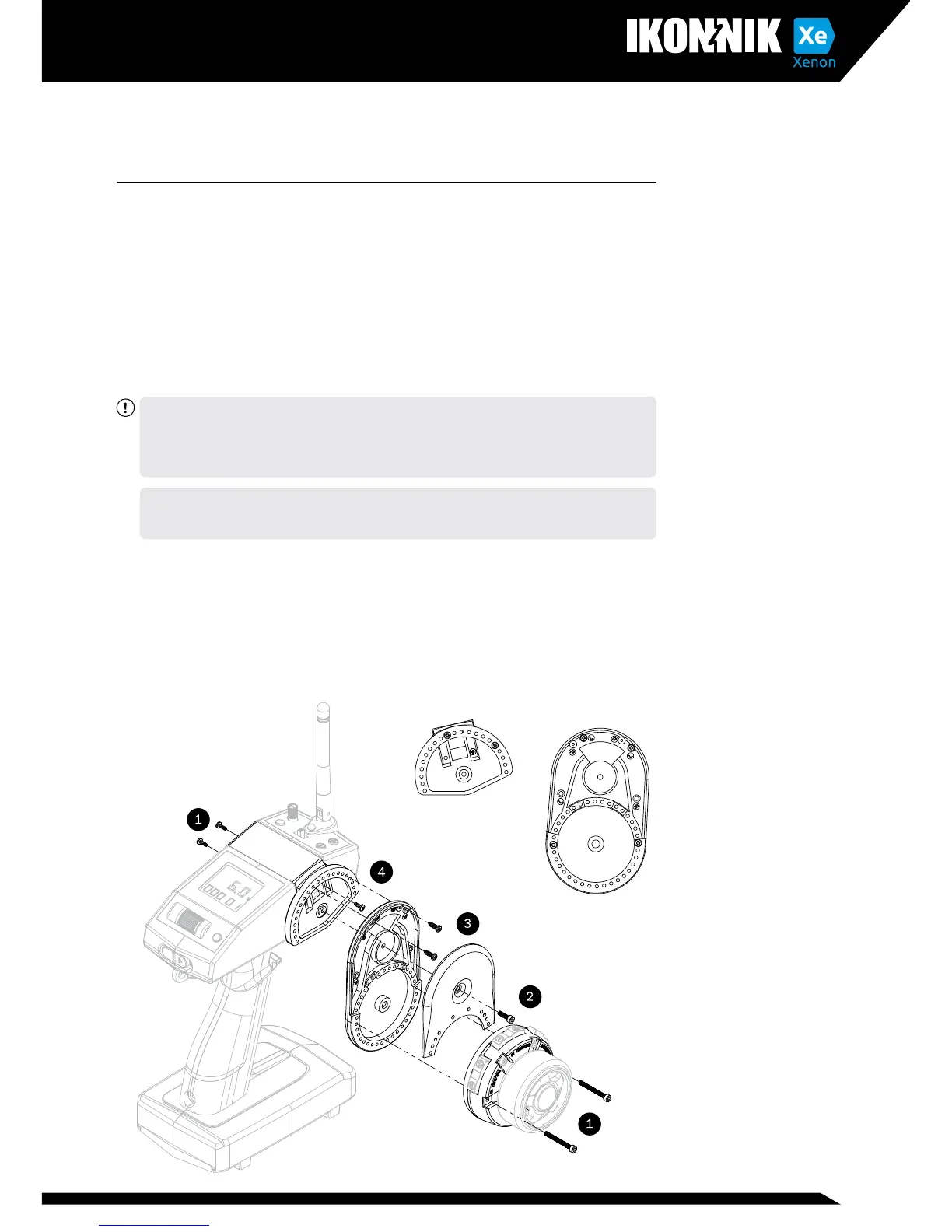
own ergonomics. See the guide below and follow the numbered steps to
recongure your transmitter for left-handed use. Although the options seem
unlimited, there are indeed some conguration combinations of wheel drop
module and wheel module position that are not able to be safely used,
This is due to wires and screw locations within the case. For simplicity
we recommend conguration angles close to standard, though through
experimentation you will nd others work well also
CAUTION: ALWAYS REMOVE THE BATTERIES PRIOR TO ANY DISASSEMBLY OF YOUR
TRANSMITTER. FAILURE TO DO SO COULD CAUSE DAMAGE TO THE SENSITIVE
ELECTRONICS. NEVER UNPLUG ANYTHING WHILE THE POWER IS STILL TURNED
ON. PAY ATTENTION TO WIRES AND HANDLE THEM WITH CARE, AVOID PINCHING,
PULLING OR KINKING THE WIRES DURING RECONFIGURATION
Tip: When reinstalling the wheel module, ensure the center of the wheel module
is angled close to vertical, tilted slightly back towards the grip. This provides the
most natural neutral position for the most common cant.
1. Remove the two screws on each side of the wheel module using a 2mm
hex wrench.
2. Remove the drop-down module cover using a 2mm hex wrench
3. Remove the 2 Philips head screws securing the drop down module to the
wheel mount.
4. Remove the 3 Philips head screws securing the wheel mount to the
transmitter case.



 To Next Page