EasyManua.ls Logo

iLive IHP211B - Page 7

iLive IHP211B
12 pages
Print Icon
To Next Page IconTo Next Page
To Previous Page IconTo Previous Page
Loading...
Customer Support: 1-888-999-4215 7
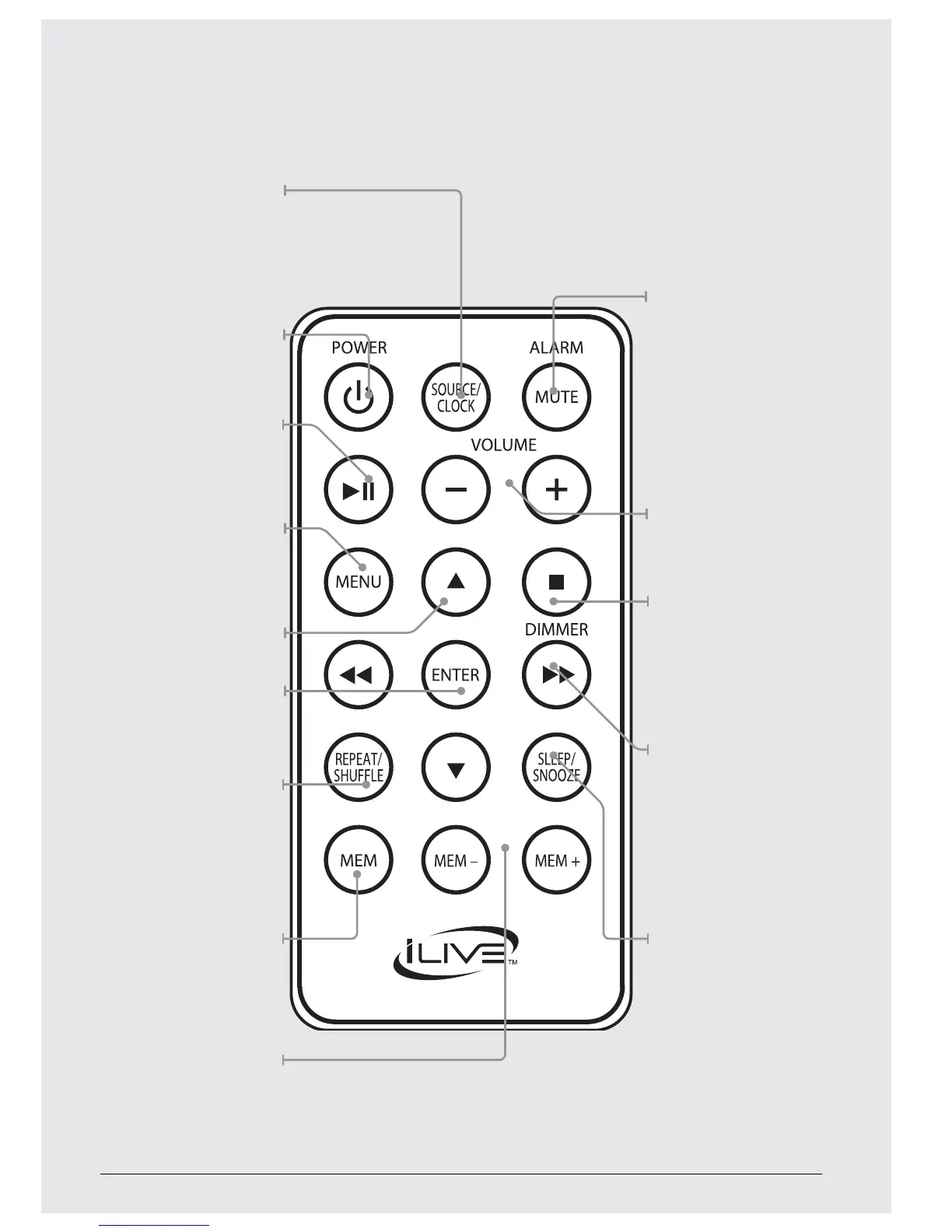
Source/Clock
Press to adjust the
source to iPod, Line In,
FM Radio, or CD. With
the power o, press to
begin setting the clock.
Power
Press to power the
music system o or on.
Play/Pause
Press to play or pause
a docked iPod or
iPhone, or loaded CD.
Menu
Press to cycle between
menus on a docked
iPod or within the iPod
app on a docked iPod
touch or iPhone.
Arrows (pq)
Enter
Press to make
selections on a docked
iPod or iPhone.
Repeat/Shue
Press repeatedly to
set the repeat and
shue options on a
loaded CD or docked
iPod or iPhone.
Memory
In FM Radio mode,
press to begin
saving the current
station as a preset.
Mem ±
In FM Radio mode,
press to cycle through
preset radio stations.
Alarm/Mute
With the power o,
press and hold to
begin setting the
alarm, or press to
activate or deactivate
the set alarm. In iPod,
Line In, FM Radio, or
CD modes press to
mute the volume.
Volume
Press to adjust
the volume.
Stop/Dimmer
Press to stop a CD
during play. With
the power o, press
and hold to adjust
the brightness of
the display.
Tune/Search
Press to adjust the
FM radio station.
Press to skip between
tracks on a loaded
CD or docked iPod
or iPhone. Press and
hold to search through
an individual track.
Snooze/Sleep
After the alarm sounds,
press to delay the
alarm for an additional
9 minutes. In radio,
iPod, or Line In modes
press repeatedly to
set the sleep timer.
Customer Support: 1-888-999-4215 7

Related product manuals