Customer Support: 1-888-999-4215
Quickstart Guide
Set soundbar media source
to match your chosen
audio connection.
You can set the source
using the remote or the
controls on the soundbar.
Set soundbar media source
to match your chosen
audio connection.
You can set the source
using the remote or the
controls on the soundbar.
3
3
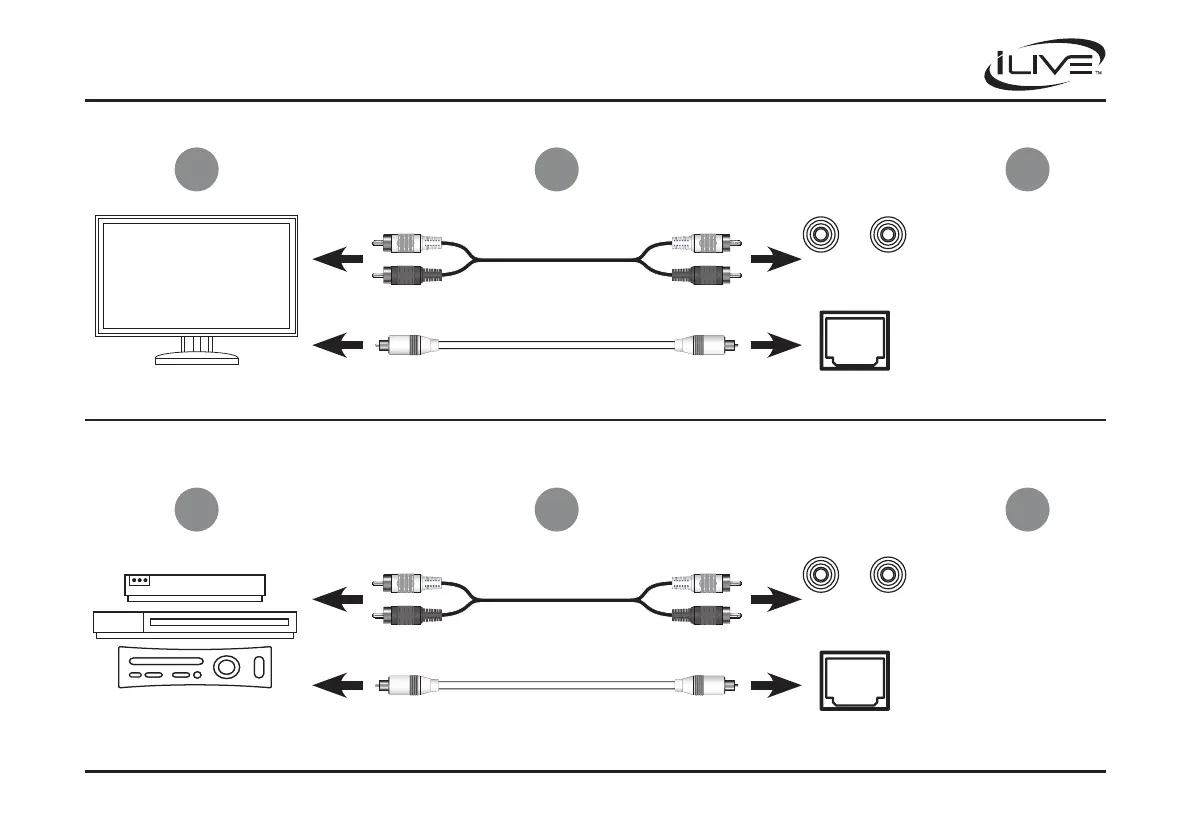
Connecting to a DVD player, Gaming Console, or other device
OPTICAL IN SUB OUT RLAUX INLINE IN
DC IN
OPTICAL IN SUB OUT RLAUX INLINE IN
DC IN
OPTICAL IN SUB OUT RLAUX INLINE IN
DC IN
OPTICAL IN SUB OUT RLAUX INLINE IN
DC IN
Soundbar
Soundbar
Aux In (RCA)
Inputs
Aux In (RCA)
Inputs
RCA Audio Cable
(not included)
RCA Audio Cable
(not included)
Optical Cable
(included)
Optical Cable
(included)
Optical Input
Optical Input
Locate the RCA or Optical audio
output on your device.
Locate the RCA or Optical audio
output on your TV.
2
2
1
1
Connecting to a TV
iLive | ITBSW397 v1824-01


 To Previous Page