5
Features & Specifications
• 37" length
• Wireless subwoofer
• Supports Bluetooth
• Wireless range: 60 ft.
• 2.1 channel stereo sound
• Full-function remote with learning capability
• Optical digital audio input
• Line In (3.5mm audio input)
• Aux In (RCA stereo audio inputs)
• Subwoofer output
OPTICAL IN SUB OUT RLAUX INLINE IN
DC IN
OPTICAL IN SUB OUT RLAUX INLINE IN
DC IN
DC IN
CONNECT
ON
OFF
OPEN
2x AAA 1.5V
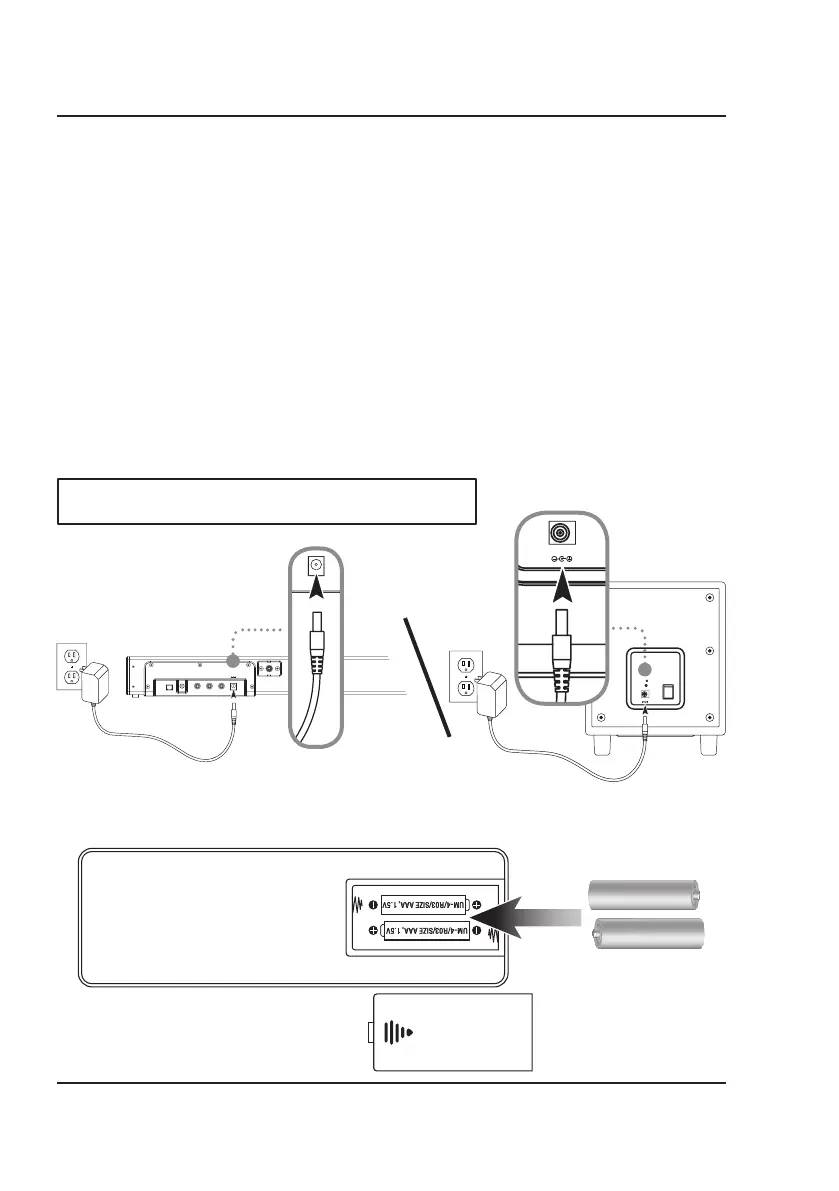
On both the soundbar and the subwoofer, plug the power cord (included) into
the DC Input on the back of the unit and a standard wall outlet.
NOTE: The power adapters for the soundbar and the subwoofer are NOT
interchangeable. Be sure you have the correct adapter before using.
Setup
Includes
• Remote control: requires 2 AAA batteries (included)
• Optical audio cable
• 2 AC/DC power adapters:
1 soundbar, 1 subwoofer
• Wall-mount hardware and instructions
Power
Remote Batteries
OPTICAL IN SUB OUT RLAUX INLINE IN
DC IN


 To Next Page