2
Selection of programme and Starting of the Machine
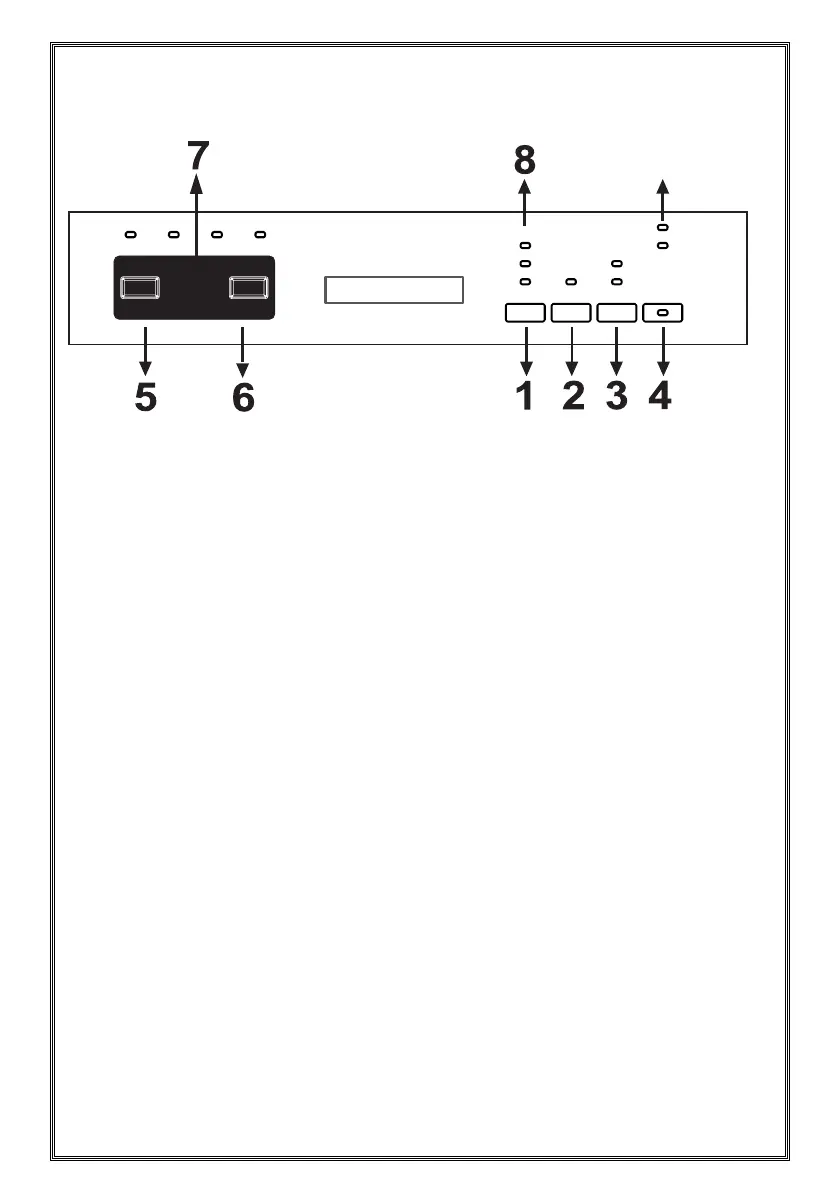
You can press the On/Off button (4)
to switch on the product. On/off lights will
be on so long as the machine is on. Press
the program button (5) to set the suitable
program.
Press the Start/Pause button (6) to start
the program. Once the selected program
has started, the Washing light will be on
and the program duration will be displayed.
If you open the door of the machine while
the program is continuing, program number
and program duration will be displayed
alternately.
You can follow the program flow with the
Washing, Rinsing, Drying and End lights (7)
on the control panel. Once the drying light
has become on, the machine will remain
silent for 40 to 50 minutes.
NOTE: If you press the option (3) button
once, half load option will be activated.
This option will shorten the durations of
the selected programs to reduce power
and water consumption. If you are using
combined detergents that contain rinse aid
and extra features, press the option button
for the second time and
activate the tablet function. You can use the
Extra button (1) to add the following functions
to the compatible washing program.
When the hygiene function (8) is active,
you can make the washing process
more hygienic by changing the washing
temperature and durations of the current
program.
If you select the extra rinsing (8) function,
the extra rinsing light will become on and
thus, washing-rinsing steps will be added to
the selected program, making your dishes
cleaner and shinier.
If you select the extra drying (8) function, the
extra drying light will become on and thus,
drying duration of the selected program
will extend, making your dishes drier.
Additionally, Hygiene and Drying functions
cannot be selected at the same time since
they are incompatible with each other.
9



 To Next Page