GETTING STARTED
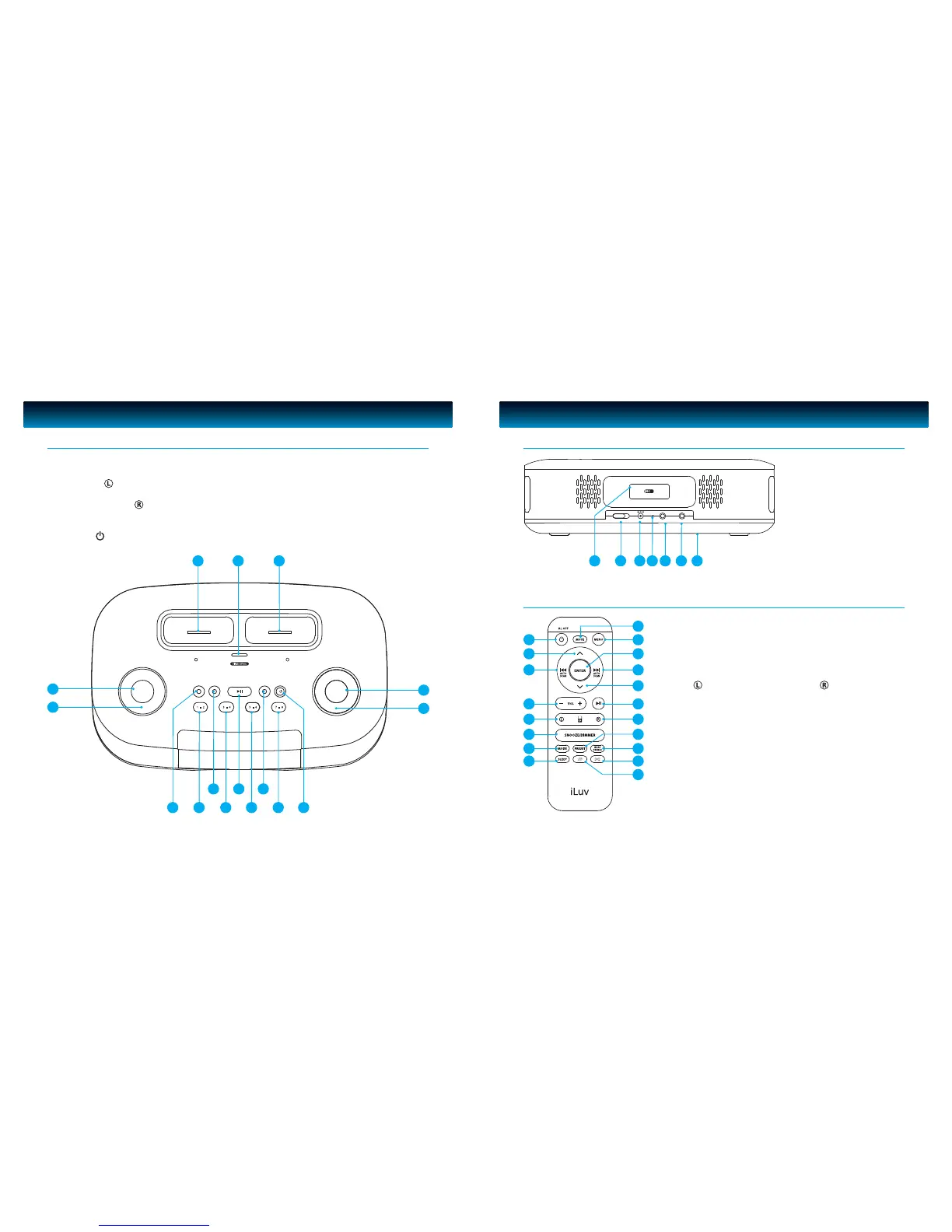
1. VOLUME Knob
2. MODE Button
3. iPod Dock
4. SELECT/TIME SYNC Button
5. iPod/iPhone Dock
6. SET BASS/TREBLE TIME Button
7. SEARCH Knob
8. POWER /AL OFF Button
Location of Controls on the Main Unit
9. PRESET Number (7- 8) button
10. SLEEP Button
11. PRESET Number (5 - 6) button
12. PLAY/PAUSE (AUTO SCAN) Button
13. PRESET Number (3 - 4) button
14. ALARM 2 Button
15. PRESET Number (1- 2) button
16. ALARM 1 Button
3 4 5
7
6
1
2
15 11 913
12 1014
816
GETTING STARTED
17. REMOTE CONTROL Holder
18. DST Switch [(-1)/(+1)]
19. POWER Jack
20. FM ANTENNA
21. HEADPHONE Jack
22. AUX IN Jack
23. Back up battery
Compartment Cover
Location of Controls on the Main Unit – CONTINUED
1. POWER/AL OFF Button
2. UP Button
3. SKIP BACKWARD
/AUTO SCAN Button
4. VOLUME +/- Button
5. iPod Select Button
6. SNOOZE/DIMMER Button
7. MODE Button
8. SLEEP Button
9. MUTE Button
10. MENU Button
Location of Controls on the Remote Control
11. ENTER Button
12. SKIP FORWARD
/AUTO SCAN Button
13. DOWN Button
14. PLAY/PAUSE Button
15. iPod Select Button
16. PRESET Button
17. BASS TREBLE Button
18. SHUFFLE Button
19. REPEAT Button



 To Next Page