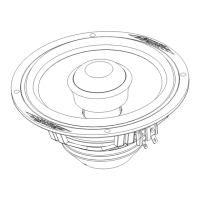
The Image Dynamics ID Series Component System, specifically the ID65cs model, is a high-fidelity 2-way speaker system designed for automotive audio applications. It is engineered to deliver a balanced sound with high fidelity, performance, and long-lasting reliability.
Function Description:
The ID65cs is a component speaker system comprising a woofer, a tweeter, and a crossover network. Its primary function is to reproduce a wide range of audio frequencies, with the woofer handling mid-bass and vocal reproduction, and the tweeter responsible for high-frequency sonic delivery. The passive crossover network ensures that the correct frequency ranges are sent to the appropriate speakers, optimizing sound quality and protecting the drivers.
Important Technical Specifications:
ID65cs Driver (Woofer):
- Size: 6.5 inches
- Nominal Impedance: 4-ohm
- Frequency Response: 55Hz-25kHz
- Sensitivity (1W/1M): 89 dB
- Magnet Size: 21oz.
- Mounting Depth: 2.75 inches (70mm)
- Power RMS/Peak: 100W/200W
- Dome Size: 1 inch Silk
- Mounting (Diameter): 1 7/8 inches (48mm)
- Nominal Impedance: 4Ω
- Frequency Response: 3K-25Khz
- Sensitivity (1M/1M): 89 dB
- Mounting (Depth): 3/4 inch
- Power (RMS/Peak): 50W/100mm
Technical Features:
- Premium Component System: Offers a high level of performance suitable for critical listeners.
- Parabolic Butyl Rubber Surround: Ensures long-lasting and linear piston movement for dynamic sonic reproduction, contributing to durability and consistent performance.
- Poly/Mica Cone: Designed for detailed and distortion-free mid-bass and vocal reproduction, enhancing clarity and accuracy.
- Y-35 Magnet Motor Structure: Provides a powerful flux field to increase efficiency, allowing the speaker to produce more sound with less power.
- 25mm Silk Dome Tweeter: Coated with Image Dynamics' proprietary DDC coating for accurate sonic delivery up to 25kHz, ensuring crisp and clear high frequencies.
- High Grade Crossover Components: Includes metalized polypropylene capacitors and low-loss 16 gauge air core inductors, which are crucial for precise frequency separation and minimal signal degradation.
Usage Features:
Installation Versatility:
- Woofer: Designed for secure mounting in vehicle speaker holes. Grills are supplied and can be installed over the speaker.
- Tweeter: Comes with several mounting housings (flush mount, surface mount, and angle mount) to allow for versatile installation and optimal sound imaging. Tweeters should typically be mounted on-axis and as close to ear level as possible.
- Crossover Network: Two separate 2-way crossover networks are included. They should be mounted in a location free from moisture and dirt to protect the electronic components.
Wiring:
- Crossover Connections:
- Connect amplifier or head unit output to the crossover's INPUT terminals.
- Connect terminals labeled WOOFER to the component midrange speaker.
- Connect terminals labeled TWEETER to the component tweeter set.
- Polarity: Proper polarity must be observed when connecting speaker wires to the crossover network terminals to ensure optimum sound reproduction and performance.
- Secure Connections: Screw terminals on the crossover network should be tightened securely but without over-tightening, as this can strip the screws and damage the terminals. Power tools are not recommended for this task.
Sound Optimization Tips:
- Amplifier Power: Ensure sufficient unclipped amplifier power is supplied to the speakers. Under-powering and clipping an amplifier can cause more damage than over-powering.
- Electronic Crossover: For optimal performance, consider using a separate amplifier for the speakers with an electronic crossover to precisely set the frequency range. While passive crossovers work, a two-amp setup with an electronic crossover can reduce stress on the amplifier.
- Mounting: Firmly mount speakers, especially if the vehicle's original cutout is too large, by using a panel of Masonite or MDF to avoid sound cancellation.
- Sealing: Use weather stripping to ensure a tight seal for maximum dynamic performance.
- Placement: Avoid mounting speakers or external crossovers in locations where they might get wet.
- Tweeter Positioning: Experiment with tweeter positioning to determine the best imaging result before making permanent cuts.
Maintenance Features:
- Durability: The parabolic butyl rubber surround and high-quality materials contribute to the long-lasting reliability of the speakers.
- Warranty: Image Dynamics USA offers a limited warranty of one (1) year on speakers for defects in material and workmanship, provided they are purchased from an Authorized Image Dynamics Dealer in the USA.
- Service: In case of service, the original dated receipt is required. Products found defective within the warranty period will be repaired or replaced.
- Warranty Exclusions: The warranty does not cover damage from bent frames, water, abuse (holes in cone, ripped spider, voice coil damage due to amplifier clipping/distortion), or improper installation not conforming to the owner's manual.
- Return Authorization: For returns, an RA# (Return Authorization Number) must be obtained from Image Dynamics Customer Service and prominently marked on the shipping carton.
- Serial Numbers: Removed or altered serial numbers will void the warranty.
Safety Precautions:
- Always wear protective eyewear when using tools.
- Turn off all stereo and electrical devices and disconnect the vehicle's negative battery lead before beginning installation.
- Keep speakers in their packaging until final installation.
- Locate all fuel lines, brake lines, oil lines, and electrical cables when planning installation to avoid damage.
- Check for sufficient clearance behind mounting surfaces.
- Use grommets when running speaker wires through sheet metal to insulate them from sharp edges.
- Ensure windows have full range of travel for door installations.
- Mount speakers securely, using all available mounting holes.
- Check available mounting depth carefully.
- High-powered audio systems can produce sound pressure levels higher than "Live Concert" levels, which can cause hearing loss or damage with prolonged exposure.
- Listening to audio equipment at high volumes while driving can impair the ability to hear external sounds (horns, warning signals, emergency vehicles), creating a potential traffic hazard. Image Dynamics USA recommends listening at lower volume levels when driving.

 Need help?
 General

 To Next Page