10780631 • 07-2003 3
rd
Ed. 10780631 • 07-2003 3
a
Ed.
Français
English
55
RANGE
It allows to select the desired range, 5 ranges (channels) are available
Ch1 range 200V for inputs between
-50…50V and -200…200V (DG4P, RM3C)
0…50V and 0…200V (DG4Q)
Ch2 range 20V for inputs between
-5…5V and -20…20V or 1…5V (DG4P, RM3C)
0…5V and 0…20V or 1…5V (DG4Q)
Ch3 range 200mV for inputs between
-50…50mV and -200…200mV (DG4P, RM3C)
0…50mV and 0…200mV (DG4Q)
Ch4 range 20mA for inputs between
-5…5mA and -20…20mA or 4…20mA (DG4P, RM3C)
0…5mA and 0…20mA or 4…20mA (DG4Q)
Ch5 range 2000µA (2mA) for inputs between
-500…500µA and -2000…2000µA (DG4P, RM3C)
0…500µA and 0…2000µA (DG4Q)
ATTENTION:
Programming of channel Ch5 (2mA) is expressed in µA (2000µA)
The range selection must be made both by keyboard programming and by
input terminal connection (see wiring diagram).
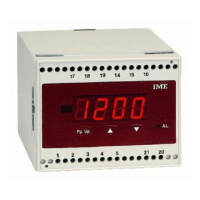
10 Press PgUp; the display shows InP
Simultaneously press
▲▼
The display shows PAS followed by Ch.1 (or by the stored channel)
20 Act repeatedly on PgUp until the desired channel is displayed.
Press once again PgUp to show End
30 Simultaneously press
▲▼
The display shows Sto; the meter stores the setting and automatically
leaves the programming menu.
Affichage
En plus de la valeur instantanée mesurée, il est possible d’afficher la valeur
maximum lue
(pic maximum) et l’état des alarmes ("On" = condition d’alarme
ou "OFF" = condition de surveillance).
VALEUR DE PIC
Pendant le fonctionnement normal, en appuyant sur la touche
▲
il est
possible d’afficher la valeur maximum mesurée.
En maintenant la touche
▲
enfoncée pendant 5 secondes, on peut remettre
à zéro la valeur de pic “rS.P”.
La remise à zéro s’effectue également quand ou éteint l’appar
eil l’absence
de l’alimentation auxiliaire ou lors du changement de la programmation du
signal d’entrée ou de l’affichage.
SIGNALISATION ALARMES
Lors du dépassement d’un ou des deux seuils programmés la LED "AL"
s’allume.
Appuyer plusieurs fois sur PgUp jusqu’à afficher rL.A
Appuyer en même temps sur
▲▼
.
L’afficheur indique PAS suivi par AL.1
En appuyant sur
▲
l’état de l’alarme 1 s’affiche.
On = condition d’alarme en cours
OFF = condition normale
En appuyant sur PgUp AL.2 est s’affiche
En appuyant sur
▲
l’état de l’alarme 2 s’affiche.
On = condition d’alarme en cours
OFF = condition normale
En appuyant sur PgUp End est s’affiche
Appuyer en même temps sur
▲▼
.
L’afficheur indique Sto et l’appareil quitte automatiquement la pr
ogramma-
tion. ■
H


 To Next Page
 Loading...