10780631 • 07-2003 3
rd
Ed. 10780631 • 07-2003 3
a
Ed.
with the programming (see item 23)
b SIf you want to modify the type, act on
▲
then press PgUp
230 Display shows SEt
241 Pressing once
▲
the display shows the loaded threshold (alarm interven-
tion point)
.
a If the displayed value is the desired one, pr
ess PgUp and go on
with the programming
(see item 25)
b If you want to modify the value, act on
▲
or
▼
until you get the
desired one, then press PgUp
250 Display shows HYS
261 Pressing once
▲
the display shows the loaded hysteresis
a If the displayed value is the desired one, press PgUp and go on
with the pr
ogramming
(see item 27)
b If you want to modify the value, act on
▲
or
▼
until you get the
desired one, then press PgUp
270 Display shows dEL
281 Pressing once the display shows the loaded delay.
a If the displayed value is the desired one, press PgUp and go on
with the pr
ogramming
(see item 29)
b If you want to modify the value, act on
▲
or
▼
until you get the
desired one, then press PgUp
290 Display shows End, simultaneously press
▲▼
to confirm the program-
ming.
300 Display shows Sto. The meter stores the setting and automatically
leaves the pr
ogramming menu. ■
Sommaire
I.M.E. S.p.A. se réserve à chaque moment le droit de modifier les caractéristiques sans préavis écrit.
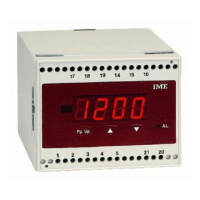
Description de la face avant 3
Paramètres programmables 4
Affichage 5
Instructions pour l’installation 2
Français
Programmation 6
Alarmes 11
English


 To Previous Page
 Loading...