
 Need help?
Do you have a question about the IMG STAGELINE PMX-400 and is the answer not in the manual?
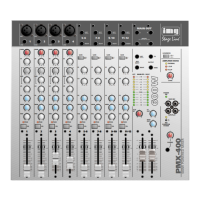
Detailed explanation of controls and inputs on the mixer's front panel, including channel strips and master section.
Description of connections and controls located on the mixer's rear panel, such as mains input and speaker outputs.
Instructions on how to connect various audio sources like microphones and line-level instruments to the mixer's input channels.
Guidance on connecting external effects processors using either the dedicated FX send/return or the insert jacks for signal modification.
How to connect headphones for monitoring and setting up a stage monitoring system via the dedicated monitor output.
How to connect audio recording equipment to the mixer's tape inputs and outputs for recording and playback.
Details on connecting the main stereo output (MAIN OUT) to amplifiers, external mixers, or other audio equipment.
Information on connecting loudspeakers to the mixer's amplifier outputs, including impedance considerations and cable types.
Instructions for connecting the mixer to the mains power supply using the provided cable and socket.
Initial steps for setting up input channels, including adjusting gain, EQ, pan, and fader levels before mixing.
Procedures for balancing and adjusting levels of different audio sources to create the final mix using channel faders and master controls.
How to listen to the master or prefader signals using headphones and adjust the volume for comfortable monitoring.
Explanation of the indicator lights (CLIP, THERMAL) that signal potential issues with the power amplifier, such as overload or overheating.
Procedures for changing internal jumpers (JP1, JP2) to alter signal routing for effect and monitor sends (post/pre fader).
Instructions on how to disconnect the 48V phantom power for specific mono channels by cutting a link (LK1).
 General
| Brand | IMG STAGELINE |
|---|---|
| Model | PMX-400 |
| Category | Mixer |
| Language | English |

 To Next Page