PEARL SERIES Operation Manual Page 63
Pioneer in Digital Vision Technology
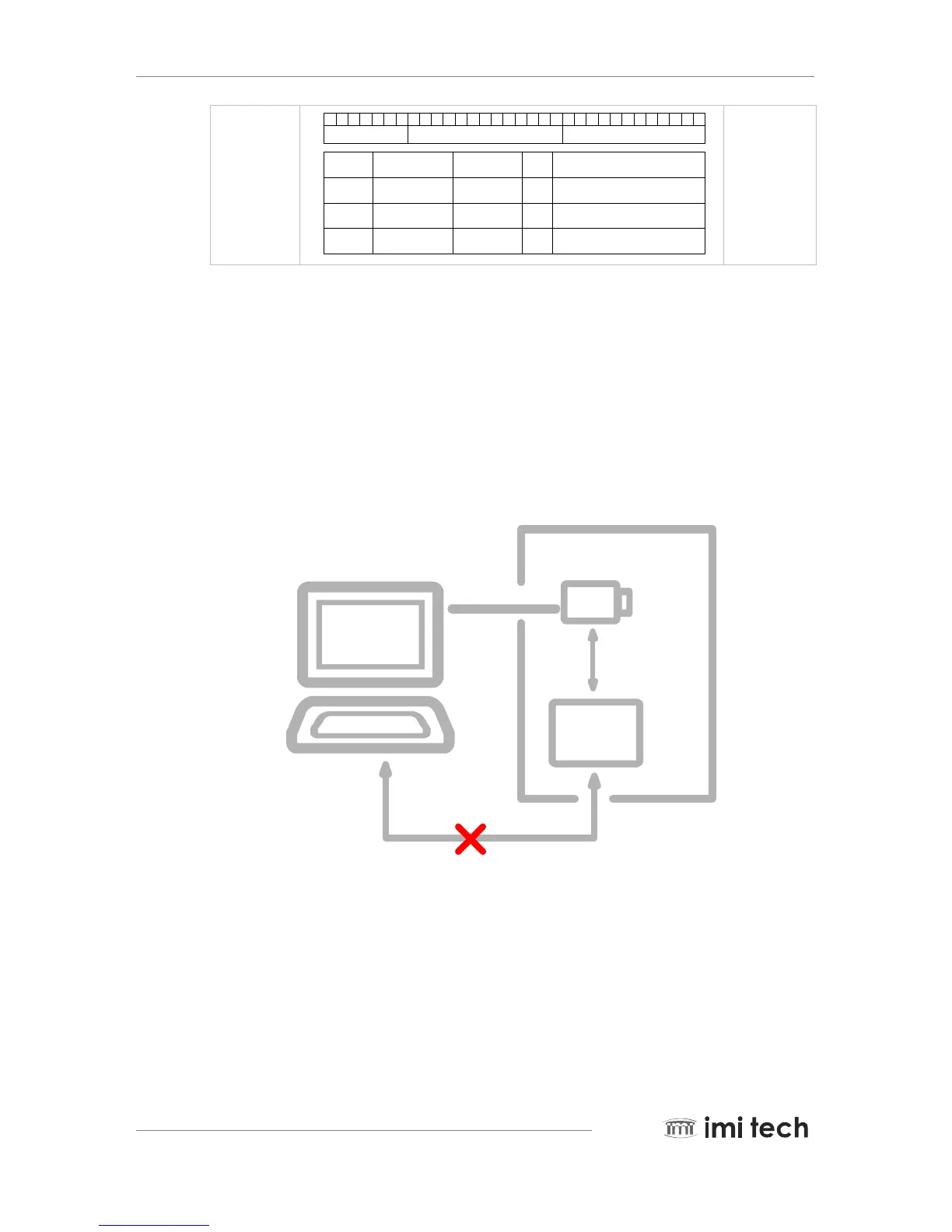
0 1 2 3 4 5 6 7 8 9 10 11 12 13 14 15 16 17 18 19 20 21 22 23 24 25 26 27 28 29 30 31
SECONDS COUNT CYCLE COUNT CYCLE OFFSET
Bit Numbe r Bit Nam e Function DIR Description
0 - 6
7 - 19
20 - 31
SECONDS COUNT
CYCLE COUNT
CYCLE OFFSET
Seconds Coun t
Cycle Coun t
Cycle O ffset
R/W
R/W
R/W
1 Hz c ycle timer counte r
8,000 Hz c ycle timer counte r
24.576 MHz c ycle timer counte r
5.8. Serial Interface
The Pearl Series cameras are equipped with the SIO (Serial input/output) feature described in the IIDC 1.31
specification. By using the serial interface, the user can execute commands by writing data in a specific address in
the FireWire address range. SIO can be further used as an RS232 interface which supports pass through and IMI
tech commands.
5.8.1. SIO Pass Through Scheme
User Target System
SIO(RS232) Pass Through
Camera
FIREWIRE
Cable
RS232C
System
Controller
5.8.2. SIO (RS232) Control Setting Procedure
STEP 1. Configuration of Registers Address : F2F22000h
Baud Rate : 9600, No Parity, 1 bit Stop, 8 bit data length
Write : F2F22000h, Data = 050800000h
Value read after write = 050800020h 20 is the buffer of TX and RX
STEP 2. Enable RS232 TX / RX Address : F2F22004h
Write Data : C00000000 : Now RS232 TX / RX port is enabled



 To Next Page