The IMILAB Video Doorbell Set is a comprehensive smart home security solution comprising a video doorbell and a smart hub. This system allows users to monitor their front door, receive notifications, and interact with visitors remotely.
Function Description
The IMILAB Video Doorbell provides real-time video surveillance of your doorstep, featuring a camera lens, motion sensor, light sensor, and an LED ring. When a visitor presses the doorbell button, it triggers an alert and allows for two-way audio communication via the integrated microphone and speaker. The smart hub acts as the central control unit, connecting the doorbell to your home network and providing local storage for recordings via a MicroSD card slot. The system is designed for easy setup and management through the Imilab Home app, available on both iOS and Android devices.
Important Technical Specifications
IMILAB Video Doorbell (Model: CMSXJ33A)
- Resolution: 2560x1440
- Dimensions: 60 x 33 x 142 mm
- Operating Temperature: -20 °C ~ 50 °C
- Aperture: F1.6
- Power Input: 5 V ⎓ 2 A
- FCC ID: 2APA9-CMSXJ33A
IMILAB Doorbell Hub (Model: CMWG33B)
- Power Input: 100-240V~, 50/60Hz, 0.3A MAX
- Dimensions: 57 x 34 x 105 mm
- Operating Temperature: -10 °C ~ 45 °C
- Expandable Memory: MicroSD Card (up to 64 GB)
- Wireless Connectivity: Wi-Fi IEEE 802.11 b/g/n 2.4 GHz
- FCC ID: 2APA9-CMSXJ33B
Usage Features
Getting Started and System Setup:
- Download the App: Users must download the Imilab Home app from the App Store (iOS) or Google Play (Android) to set up and manage the system.
- Account Registration: Sign up for an Imilab Home account and follow the on-screen instructions to complete the setup process.
Mounting the Video Doorbell:
- Mounting Spot Selection: Choose a mounting location that provides the desired field of view. Avoid placing the doorbell too close to a side wall, as this can cause IR light reflection and blur night vision.
- Recommended Height: For first-time installations, the recommended mounting height is 1.2 m (48 inches) from the ground.
- 15° Mounting Wedge: A 15° mounting wedge is included as a supplementary bracket for adjusting the viewing angle on specific sides.
- Wooden Surface Installation: For wooden surfaces, no pre-drill pilot holes are needed. Use the provided screws to secure the mounting bracket. The screw hole positioning card helps mark the screw positions. Required tools include a screwdriver, mounting bracket, 15° mounting wedge, mounting screws, and anchors.
- Hard Material Surface Installation: For hard materials like brick, concrete, or stucco, drill two 6mm (15/64 inch) holes through the screw hole positioning card. Insert the provided anchors and use long screws to secure the mounting bracket. Required tools include a power drill, 6mm (15/64 inch) drill bit, mounting bracket, 15° mounting wedge, mounting screws, and anchors.
- Final Mounting: Align the doorbell on the bottom of the mounting bracket and snap it into place by pressing down until it clicks.
Detaching the Doorbell:
- To detach the doorbell for recharging or other reasons, use the provided doorbell detaching pin. Insert the pin into the hole on top of the doorbell and then lift its bottom to remove it from the mounting bracket.
Charging the Doorbell:
- The doorbell is charged via a Micro-USB charging cable and a 5V USB charger. The LED status indicator will show continuous blinking green during charging and solid green when fully charged.
LED Status Indicators:
- Hub LED Status:
- Blinking blue: Waiting for connection.
- Solid blue: Network connection successful/connected.
- Blue and orange flashes alternately: Network connection failure.
- Blinking orange: Waiting for doorbell to connect.
- Solid orange: A firmware update is in progress.
- Press and hold the button for 10 seconds until the LED blinks blue: During the reset process, the hub will restart.
- Video Doorbell LED Status:
- Press and hold the sync button for 2 seconds until the blue light becomes solid: Power-on music will play.
- Press and hold the sync button for 8 seconds until the LED blinks green: Power-off music will play.
- Use USB to charge the doorbell, continuous blinking green: Charging.
- Solid green: Fully charged.
- Orange blinks once (PIR detection sensitivity adjustment): PIR detects motion.
- Orange blinks continuously (PIR detection sensitivity adjustment): PIR continues to detect motion.
- Press the doorbell button, then doorbell indicator light will blink blue: Both the outdoor doorbell and the indoor hub will ring.
Maintenance Features
Safety Statement and Precautions:
- Operating Temperature: The suitable operating temperature range for the product is between -20°C and 50°C. Do not use the product in environments with temperatures above or below this specified range.
- Charging Temperature: The operating temperature range for charging is between 0°C and 45°C. Do not charge the product in environments with temperatures above or below this specified range.
- Standby Time: Using the product in low temperature environments or during charging will affect its standby time. The actual standby time is related to the user's environment and habits.
- Optimal Performance: To improve product performance, avoid placing the video doorbell lens facing or next to reflective surfaces (e.g., glass windows/doors, white walls), which can cause image overexposure or dark images. Install the product in areas with good Wi-Fi reception and try to place the device away from metal structures, microwave ovens, or other locations where signal strength may be impacted.
- Battery Safety: Do not replace the battery in the video doorbell yourself; if not properly replaced, there is a danger of explosion. Batteries (battery pack or batteries) must not be exposed to sunlight, fire, or similar overheating conditions.
- Power Consumption: This product is a low power consumption video doorbell with a built-in battery. Do not use the Real-Time Monitoring feature for long periods when charging, to avoid battery life loss.
- Environmental Conditions: Do not use the device in environments with excessively high or low temperatures, or expose it to strong sunlight or wet environments.
FCC Statement:
- The device complies with Part 15 of the FCC Rules. Operation is subject to two conditions: (1) The device may not cause harmful interference, and (2) The device must accept any interference received, including interference that may cause undesired operation.
- Changes or modifications not expressly approved by the party responsible for compliance could void the user's authority to operate the equipment.
- This equipment has been tested and found to comply with the limits for a Class B digital device, pursuant to Part 15 of the FCC Rules. These limits are designed to provide reasonable protection against harmful interference in a residential installation.
- The device generates, uses, and can radiate radio frequency energy. If not installed and used in accordance with the instructions, it may cause harmful interference to radio communications.
- If interference occurs, users are advised to reorient or relocate the receiving antenna, increase the separation between the equipment and receiver, connect the equipment into an outlet on a different circuit, or consult the dealer or an experienced radio/TV technician.
- FCC 20cm Statement: This equipment complies with FCC radiation exposure limits set forth for an uncontrolled environment. The equipment should be installed and operated with a minimum distance of 20cm between the radiator and your body. The transmitter must not be co-located or operating in conjunction with any other antenna or transmitter.
WEEE Information:
- All products bearing the WEEE symbol (as per directive 2012/19/EU) should not be mixed with unsorted household waste. Proper disposal and recycling help prevent potential negative consequences for the environment and human health. Contact the installer or local authorities for more information about collection points.
EU Declaration of Conformity:
- Shanghai Imilab Technology Co., Ltd. declares that the radio equipment type IMILAB Video Doorbell and IMILAB Doorbell Hub are in compliance with Directive 2014/53/EU. The full text of the EU declaration of conformity is available on the IMILAB website.

 Need help?
 General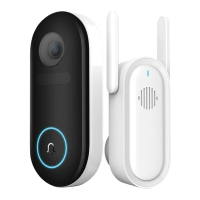

 To Next Page