8
Page 8 Page 9
10M 25M 50M 75M 100M 10Y 25Y 50Y 75Y 100Y
TEST Button
There are three ways to trigger your ash, but the simplest is to press the TEST button.
This is useful when you need to discharge the power built up in the ash unit, for example
just before replacing the ashtube (more on that later).
Sync Connection
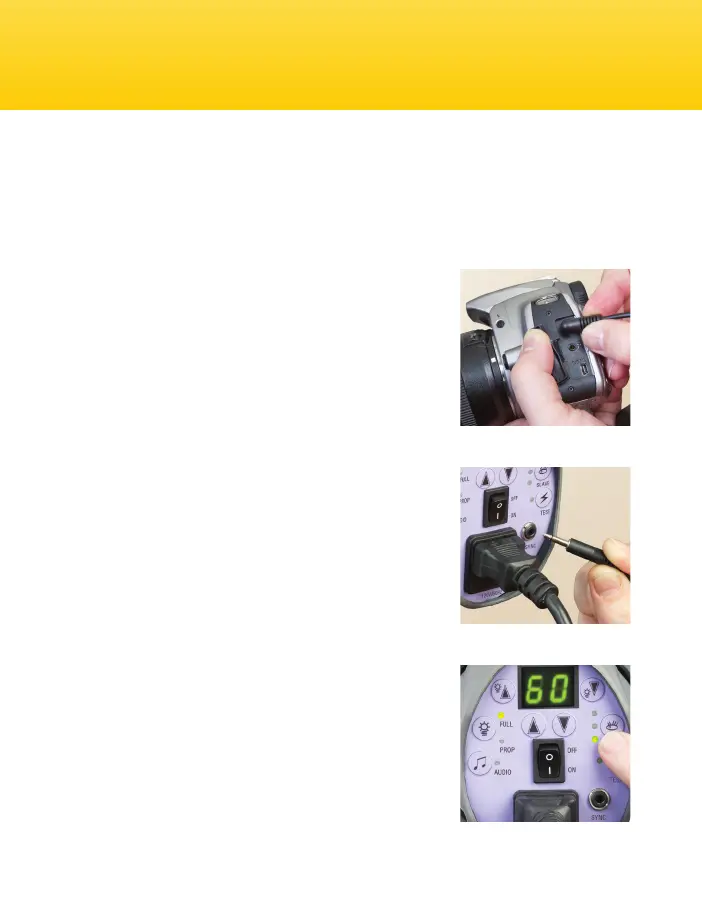
The sync jack on the VSD Monolight may be used for
direct connection to a camera set to ‘X’ synchronization.
Insert the “PC” end of the supplied sync cord into the
connection on your camera and the other mini-plug end
into the sync jack on the back panel of the VSD. A radio
slave receiver may also be plugged into this jack.
Photocell
The VSD Monolight features a photocell which allows the
flash unit to be triggered by another flash. This is called
“optical slave mode.” The photocell is located
underneath the red transparent cover on top of the unit.
The photocell is very sensitive but some experimentation
with positioning may be necessary to ensure a reliable
trigger, particularly if the cell is not in the direct line of
sight of the triggering ash unit. Avoid directly
illuminating the photocell from a continuous light source
(such as ceiling lights or windows) since this can prevent
correct operation. Very high ceilings can also affect the
operation of the photocell.
To operate your VSD as a “slave” to another ash,
disconnect any sync cords and press the “eye” button
until the bottom status LED is on. The two LEDs above
this light are reserved for future features. The bottom
LED must be lit to be in slave mode.
Triggering the Flash
Sync connection: step 1
Sync connection: step 2
Slave Mode
Audible Beep Settings
To Turn the Audible Beep Off
A beep will sound when the ash has recycled and is
ready to ash again. You can turn this audible beep off
by pressing the AUDIO button with the musical eighth
notes. The small LED next to this button will not be lit
when the audible beep has been turned off.
If you have turned the audible beep off, you can still
conrm that the ash has recycled and is ready to re
by looking at the small LED next to the TEST button.
When the ash has recycled, this LED will be lit.
Audible beep is off.


 To Next Page