Need help?
Do you have a question about the Imperial DABMAN i560 CD and is the answer not in the manual?
Contact information for technical support via phone and email for troubleshooting.
Physical address for returning the device for service or repair.
Explains warning symbols like DANGER, WARNING, CAUTION, and NOTE used in the manual.
Describes safety symbols including the CE mark and protection class II.
Explains plug polarity symbols and the symbol for indoor use.
Defines the product's intended use as a consumer electronics device for radio and audio playback.
Provides essential safety instructions regarding device use, handling, and child supervision.
Details operational safety measures, including protection against electric shock and environmental hazards.
Instructions for safely connecting the device to a power source.
Guidelines to protect the device from environmental factors like heat and moisture.
Warns about hearing damage from high volume with earphones/headphones.
Instructions and warnings regarding the safe handling and disposal of batteries.
How to clean the device safely and steps to take if it malfunctions.
Lists all items included in the product package.
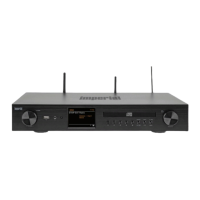
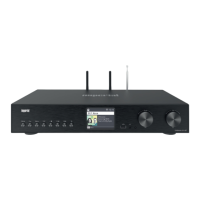
Overview of the device's front and rear panels and their connection points.
Detailed description of the buttons and controls on the front of the device.
Details the remaining buttons and connections on the front panel, including USB and headphone ports.
Explains various audio and network connections located on the rear panel of the device.
Details HDMI, speaker, power, Bluetooth, and antenna connections on the back.
Visual guide to the buttons and functions of the included remote control.
Explains the functions of various buttons on the remote control, such as Standby, Mode, and Navigation.
Details the functions of remaining remote control buttons, including INFO, Menu, Rec/Eject, and Volume.
Instructions on how to connect passive speakers to the built-in stereo amplifier.
Guide for connecting the device to a TV via HDMI for audio output.
How to connect external analogue audio sources like CD or DVD players.
Instructions for connecting to a sound system or subwoofer using analogue outputs.
How to connect to a sound system using digital audio outputs (Optical/Coaxial).
Connecting external devices with digital audio output (TV, Blu-Ray) to the device.
How to connect the device to a network for internet radio and UPnP via LAN or WiFi.
Basic instructions for operating the device using the remote or controls.
Steps to prepare the remote control, including battery installation.
Further safety warnings and instructions for the remote control battery compartment.
How to connect the supplied DAB/FM and Bluetooth/WiFi antennas.
Detailed steps for connecting the power adapter and turning on the device.
How to select the desired menu language for the device interface.
Setting the device's time and date synchronization method (Auto/Manual).
How to select the correct GMT time zone for accurate time display.
Instructions for enabling or disabling the summer time feature.
Configuration options for the device's standby display mode (Eco/Clock/Auto).
Setting the geographical location to access local internet radio stations.
Choosing between LAN or WiFi for network connection.
Steps for establishing a WiFi connection, including selecting a network.
Entering the WiFi password to establish a network connection.
General guidance on navigating menus and using basic device functions.
How to access and navigate the main menu and its sub-points.
Function of the 'Back' button for navigating one step back in menus.
Using the 'List' button to view previously listened-to radio stations.
Function of the 'MODE' button to switch between operating modes.
Accessing the system menu for device settings and configuration.
How to change the device's menu language.
Detailed explanation of setting the date and time, including automatic synchronization.
Setting up the network connection for Internet radio and UPnP.
WiFi network selection and confirmation process.
Entering the WiFi password to establish a network connection.
How to set up the radio as an alarm clock with up to 5 alarm times.
Selecting and configuring alarm times and settings.
Setting alarm time, repetition intervals, volume, and sound source.
How to edit a set recording timer, referencing chapter 8.12.
Adjusting the display settings for the device's standby mode.
Explains different standby modes: Eco, Standby with clock, and Auto standby.
Setting the sleep timer to automatically switch the radio to standby.
Options to disable or set a sleep timer duration from 10 to 120 minutes.
Adjusting the brightness of the device's display for operation and standby.
Setting the region to receive local radio stations.
How to update the device's operating software via USB or network.
Restoring the device to its original factory settings, including a warning about data loss.
Viewing information about the installed firmware version of the device.
Instructions for receiving digitally transmitted DAB+ radio stations.
How to view and select stations from the DAB station list.
Details on how the automatic DAB station search works and displays results.
How to manually search for DAB radio stations using broadcast frequency.
Instructions for accessing and configuring FM radio reception.
Performing automatic and manual station scans for FM radio.
How to access stored FM stations and assign memory buttons.
Instructions for selecting and accessing the Internet Radio function.
Overview of lists for selecting internet radio stations: Favourites, Radio, Podcasts, History, Search.
How to search for specific internet radio stations using keywords.
Storing up to 4 radio stations on memory buttons for quick access.
Saving up to 10 favourite radio stations for easy access.
Using the FAV+ button to save radio stations to the favourites list.
How to find and select local radio stations based on region.
How to adjust the volume and mute the device.
Switching between various operating modes like AUX, DAB+, FM, Internet Radio, etc.
Connecting external audio devices (MP3 players) via the AUX input.
Using the device as a media player for network-connected devices via UPnP.
Playing MP3 music files from a connected USB storage device.
Selecting and playing tracks from a USB drive.
How to play audio and MP3 CDs, including track selection and playback control.
Adjusting sound presets and customising EQ settings like bass and treble.
Advanced EQ settings for adjusting frequency ranges.
Displaying current weather information for a selected location.
Notes on weather forecast data accuracy and internet server reliance.
Recording FM, DAB+, and internet radio programmes to a USB drive.
Setting up timed recordings for radio broadcasts using a timer.
Connecting the radio to external devices via Bluetooth to play media.
Steps to pair the device with a Bluetooth receiver.
Playing music from an external Bluetooth-enabled device.
Using the radio to transmit audio signals via Bluetooth to receiving devices.
Customising the function of the MODE button on the device and remote control.
Listening to internet music streaming services supported by the device.
Entering account details to access music services.
Using the Soundmate app to operate the radio via smartphone or tablet.
Starting the app and using the touch controller for radio functions.
Accessing favourite stations and viewing playback information via the app.
Using the virtual remote control and switching operating modes via the app.
Solutions for when the display is off or the radio is unresponsive.
Troubleshooting steps if the remote control is not functioning.
Remedies for interrupted DAB+ reception, like antenna extension or rescanning.
Solutions for audio glitches in radio programmes, often location-related.
Tips for improving poor FM reception, such as antenna adjustment.
How to fix issues with AUX playback, including mode and cable checks.
Troubleshooting poor audio quality, checking bit rate and file compatibility.
Solutions for low volume issues, checking device and source volume settings.
Steps to resolve network connection problems, checking WiFi and router settings.
How to troubleshoot WiFi connection issues, checking networks and passwords.
Solutions for when no internet radio stations are found, checking connection and availability.
Ensuring the USB drive is formatted correctly (FAT32).
Troubleshooting no sound issues when other functions work, e.g. headphones plugged in.
Solutions for CD playback issues, including mode, insertion, and condition.
How to resolve interference issues, like moving mobile phones away.
Guidelines for storing the device when not in use to protect it from dust.
Information regarding registered trademarks of software and companies.
Proper disposal methods for the product's packaging materials.
Guidelines for disposing of the device according to WEEE directive.
Proper disposal of batteries, including chemical symbols meaning.
Technical details for Internet Radio, including chip set, codecs, and WiFi standards.
Technical data for DAB/DAB+/FM reception, including sensitivity and frequency range.
Technical details for WiFi and Bluetooth communication interfaces, frequencies, and encryption.
List of connectors and ports on the front of the device.
List of connectors and ports on the back of the device.
Manufacturer, voltage, power, and efficiency of the power supply unit.
Physical dimensions and weight of the device.
Contact information for technical support, including phone number and email.
Address to send the device for service or repair.
Declaration of conformity with EU standards and relevant directives.
 General
| Radio type | Internet |
|---|---|
| Tuner type | Digital |
| FM band range | 87.5 - 108 MHz |
| DAB III band range | 174 - 240 MHz |
| Supported radio bands | DAB+ |
| Bluetooth | Yes |
| Bluetooth version | 5.1 |
| Ethernet LAN data rates | 10, 100 Mbit/s |
| Projection | No |
| Product color | Black |
| Internet radio services supported | Amazon Music, Deezer, Napster, Qobuz, Tidal |
| RMS rated power | 60 W |
| Audio formats supported | FLAC, MP3, WMA |
| Display type | TFT |
| Display diagonal | 3.2 \ |
| Cables included | Optical |
| Headphone outputs | 1 |
| Headphone connectivity | 3.5 mm |
| USB 2.0 ports quantity | USB 2.0 ports have a data transmission speed of 480 Mbps, and are backwards compatible with USB 1.1 ports. You can connect all kinds of peripheral devices to them. |
| Power source | AC |
| AC input voltage | 240 V |
| DC input voltage | 18 V |
| AC input frequency | 60 Hz |
| Number of built-in speakers | 2 |

 To Next Page