
 Need help?
Do you have a question about the Impossible I-1 and is the answer not in the manual?
Instructions for aligning the camera's viewfinder and lenses for proper composition.
Explanation of LED indicators on the ring flash for camera status and film levels.
Overview of the control knob, shutter button, and flash/exposure settings.
Step-by-step guide for powering on, loading film, and taking a photo.
Detailed breakdown of how light enters and exposes the film within the camera.
Identification and description of major parts like the mirror, film, and rollers.
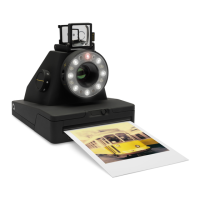
Overview of the I-1's features, including the ring flash and app connectivity.
Labeling and description of all external parts of the I-1 camera body.
Visual representation and identification of camera accessories like cables and straps.
Detailed guide on using the viewfinder for accurate composition and alignment.
Explanation of the different LED patterns on the ring flash and their meanings.
Visual guide covering camera setup, film loading, and photo taking process.
Instructions on how to charge the I-1's battery using the provided USB cable.
Procedure for powering the camera on and inserting the film cassette.
Guide to using the flash switch and lighten/darken switch for optimal shots.
Instructions for using the viewfinder and composing shots for the best results.
Process for pressing the shutter, ejecting, and shielding the developed instant photo.
Explains the ring flash for lighting and status indications, and how to check film/battery levels.
Guidance on viewfinder removal, roller cleaning, and attaching the hand strap.
Details on battery charging, usage, and compatible film types for the I-1.
Information on the tripod socket and how to mount the camera on a tripod.
Overview of the I-1 App's capabilities, including remote trigger and manual modes.
Addresses problems like photos not ejecting or flash not firing, with solutions.
Tips for avoiding dark photos and ensuring proper exposure.
Advice on using flash, lighting, and settings for various shooting conditions.
Guidance on night photography, landscape shots, and avoiding blurriness.
Provides contact details for Impossible's customer support team.
Details on dimensions, weight, operating temperature, and materials.
Information on the lens configurations, autofocus, and ring flash system.
Warnings about electric shock, water immersion, and product tampering.
Guidelines for lithium-ion battery use and recommended operating environments.
Information regarding FCC, Industry Canada, and other regional compliance standards.
Displays FCC ID, IC ID, CE mark, and disposal warnings.
Steps for installing the I-1 App and connecting the camera via Bluetooth.
Using the app for remote shooting and self-portraits.
Taking full control of exposure with aperture, shutter speed, flash, and focus.
Exploring double exposure, light painting, and noise trigger features.
Details on the I-1 release project celebrating instant photography globally.
Overview of the initial phase involving selected makers and their work.
Instructions on selecting a brief and making photos for the project.
List of creative prompts provided for participants to respond to.
Steps for making, submitting, and exhibiting photos for the project.
Details on how photos are swapped and exchanged between participants after exhibition.
User agreement covering photo usage rights, transfer of ownership, and personal data.
Information on product warranty and the photo swapping mechanism.
Policy on storing, processing, and sharing personal data for the project.
 General
| Resolution | 1080p |
|---|---|
| Night Vision | Yes |
| Two-Way Audio | Yes |
| Motion Detection | Yes |
| Wireless | Wi-Fi |
| Weather Resistance | IP65 |
| Field of View | 120 degrees |
| Storage | Cloud |
| Power Source | Battery or USB |

 To Next Page