English - 2
101675'6*+5241&7%6+0
9+0&195#5#4+5-1('.'%64+%#.5*1%-':
+565#0&5'4+1752'4510#.+0,74;#0&14
2412'46;&#/#)'/#;1%%74
1. Set your fan on a level and dry surface.
2. Make sure the rotary switch is at “OFF” position.
Plug the unit into a standard 120Vac 60Hz outlet.
3. To turn the unit, turn the rotary switch to the de-
sired fan speed setting “1” (LOW), “2” (MEDIUM)
or “3” (HIGH).
4. To stop the unit, turn the rotary switch to “OFF”
position.
5. Unplug the product from the electrical outlet when
it is not in use or is left unattended.
1#81+&6*'4+5-1('.'%64+
%#.5*1%-#.9#;5/#-'574'6*'241&7%6
+5702.7))'&(41/6*''.'%64+%#.176.'6
$'(14'5'48+%+0)14%.'#0+0)
*+5(#0+5016+06'0&'&61
$'&+5#55'/$.'&(14%.'#0+0)(14+06'40#.
2#465')$.#&'/1614+5#55'/$.;
/#;4'57.6+0241&7%6&#/#)''8'4
75'.+37+&514#$4#5+8'%.'#0'4561%.'#0
6*'241&7%6
1. Wipe the exterior surfaces with a soft damp cloth.
Dust can be removed from the Guard and Blades with
a small vacuum.
2. Do not immerse the motor, switch or wires in water
and never allow water to drip into blade or motor
housing.
3. Do not use any chemical cleaners such as acid, al-
cohol, etc, to clean the fan.
4. Make sure the fan is completely dry after
cleaning.it is not in use or is left unattended.
1#81+&6*'4+5-1('.'%64+
%#.5*1%-#.9#;5/#-'574'6*'241&7%6
+5702.7))'&(41/6*''.'%64+%#.176.'6
$'(14'%.'#0+0)145'48+%+0)
1016#66'/266112'0
:+5-1((+4'10164'2.#%'#66#%*/'062.7)106#+05#5#('6;&'8+%'
(75'6*#65*17.&016$'4'/18'&+5%#4&241&7%6+(6*'#66#%*/'062.7)+5&#/
#)'&
1. Grasp plug and remove from the receptacle or other
outlet device. Do not yank the cord to unplug.
2. Select a suitable tool such as a small flat screw-
driver or travel scissors.
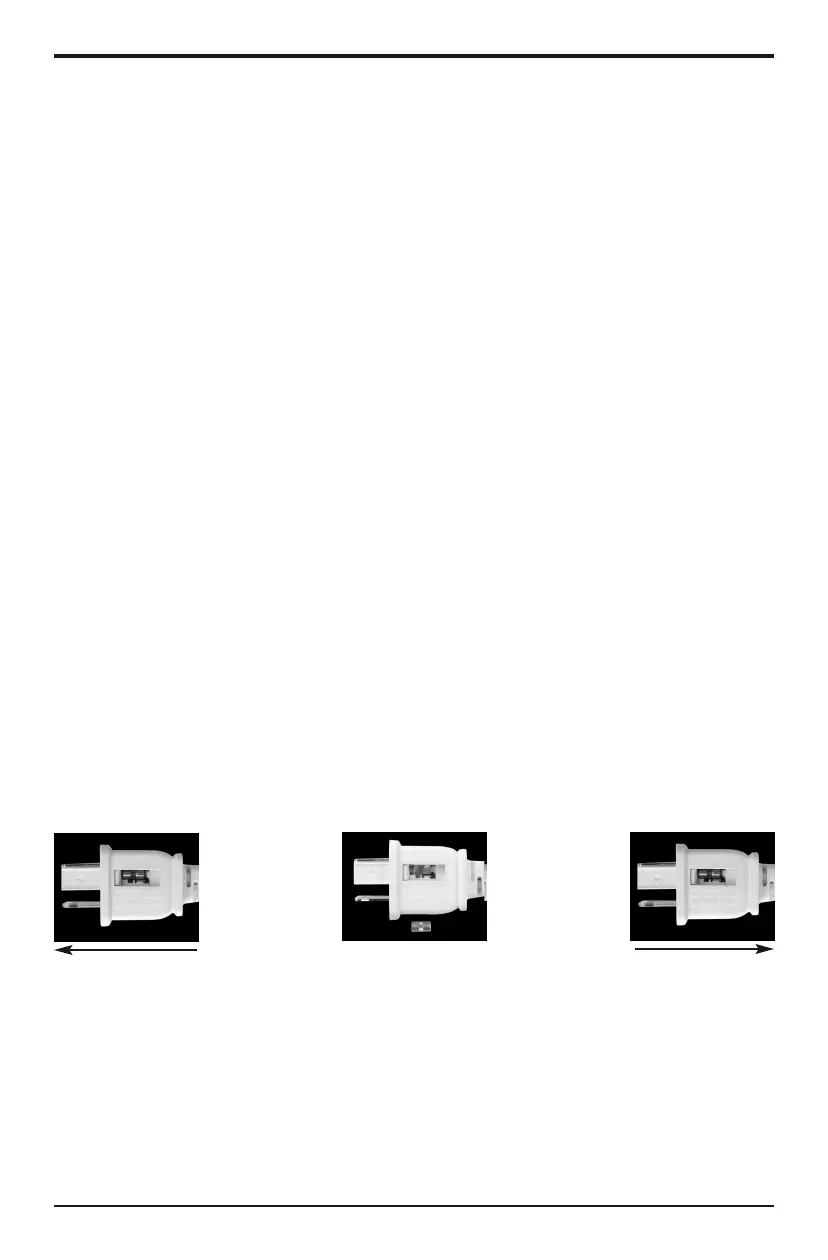
3. To open the fuse cover. Slide open fuse access
cover on top of attachment plug toward blades. (see
fig.1)
4. Carefully remove the fuse by prying it out. (see
fig.2)
5. Risk of fire can result by using wrong fuse rating.
Replace fuse only with 2.5 Amp, 125 Volt rating.(not
included)
6. To close the fuse access cover. Slide to close access
cover on top of attachment plug. (see fig.3)
+) +)


 To Next Page