1312
USING YOUR DISHWASHER
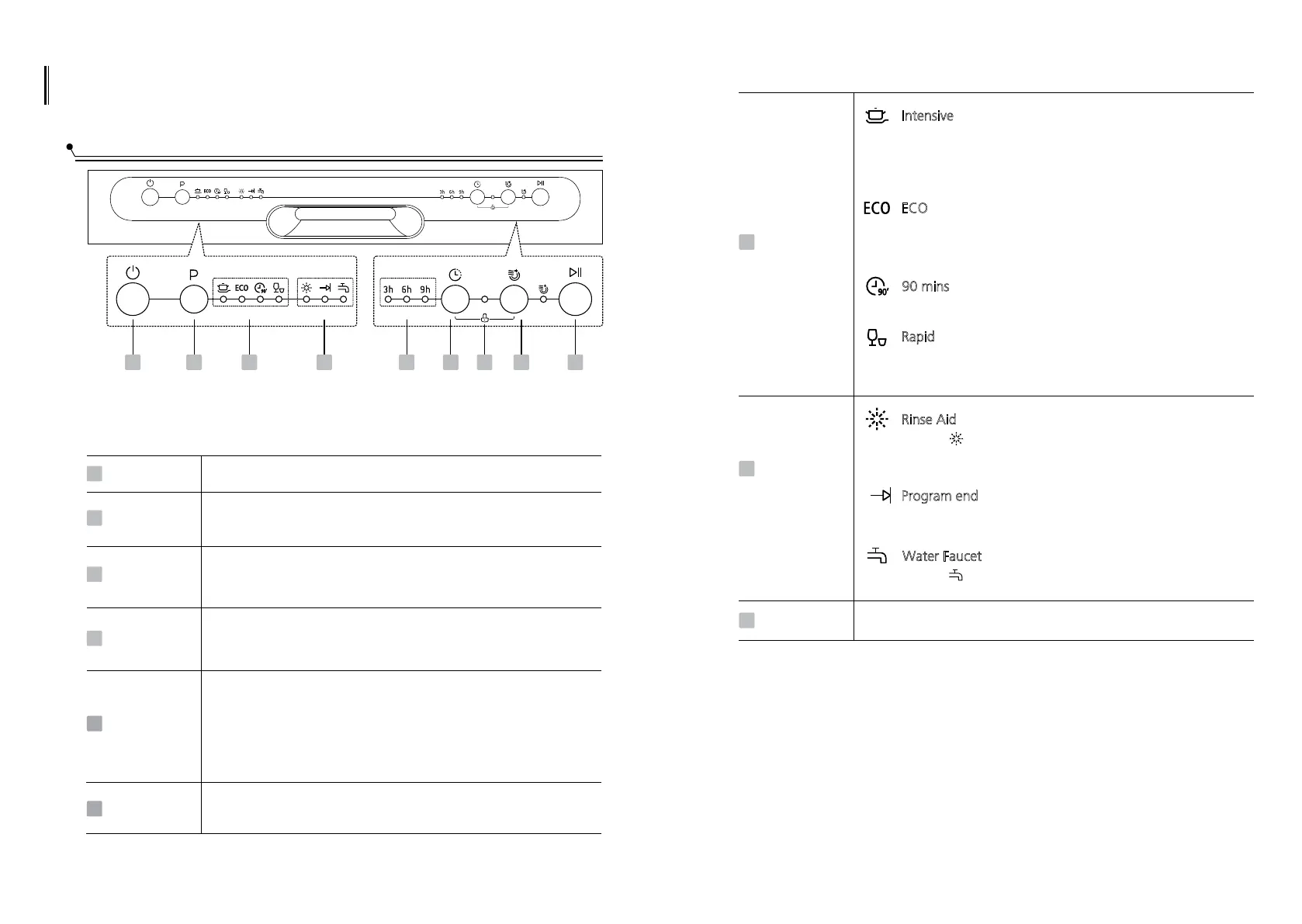
Control Panel
Operation (Button)
Power
Press this button to turn on your dishwasher, the screen lights up.
1
Program
Select the appropriate washing program, the selected program
indicator will be lit.
2
This option allows you to lock the buttons on the control panel,
so children cannot accidently start the dishwasher by pressing the
buttons on the panel. Only the Power button remains active.
To lock or unlock the buttons on the control panel, press and hold
the Delay button+Extra Drying button for 3 seconds simultaneously.
Child lock
5
3
Extra Drying
To dry dishes more completely.(It can only be used with Intensive,
ECO and 90 mins.)
4
Delay
Press the button to set the delay time, corresponding indicator
will be lit.
1
2 3 4 657 8 9
To start the selected washing program or pause it when the
dishwasher is working.
Start/Pause
6
Program end
when the program is end, the indicator will be lit.
Warning
indicator
Rinse Aid
Program
indicator
7
8
I
ntensive
For heaviest soiled crockery, such as pots, pans, casserole
dishes and dishes that have been sitting with dried food on
them for some time.
E
CO
For normally soiled loads, such as pots, plates, glasses and
lightly soiled pans, standard everyday cycle.
If the “ ” indicator is lit, it means the dishwasher is low
on dishwasher rinse aid and requires a refill.
Delay time
9
To show the delay time (3h/6h/9h).
R
apid
A shorter wash for lightly soiled loads that do not
need drying.
90 mins
For lightly soiled plates and pans that need quick wash.
Water Faucet
If the “ ” indicator is lit, it means the water faucet closed.
Indicator


 To Next Page