Packungsinhalt
Timesgreenlightflashes
Once
Twice
3times
4times
Remainingbatteryofkeyboard
0-25%
25%-50%
50%-75%
75%-100%
Howtocheckbatterystatus
Press + simultaneously, and check the
remainingbatterythroughtimesindicatorflashes.
PairingtoiPadsteps:
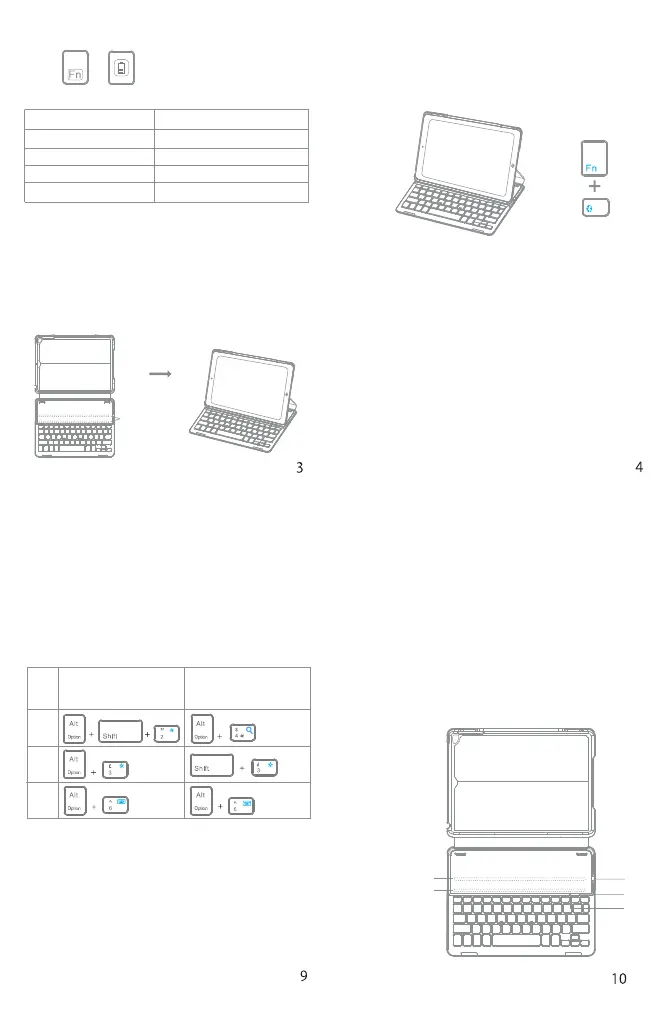
Step 1: Snapping the iPad onto either embedded
magneticstripswillcausethekeyboardtoturn
on.
MagneticStrips
Step 2: Press the FN and Delete keys together to
enter pairing mode. The blue Bluetooth
indicatorwillstarttorapidlyflash.
Step3:OntheiPad,selectSettings-Bluetooth-On.
Step 4: The iPadwill display “InateckBK2003” asan
availabledevice.
Step5:Select“InateckBK2003”ontheiPad.TheiPad
willdisplayacode.
Step6:Typethecodeonthekeyboardandpress
enter.ThekeyboardwillnowbepairedtoiPad
andtheBluetoothindicatorwillturnoff.
Instructionforcommonlyusedkeys
InateckBK2003(US)
Thedefaultlanguagesettingis
English(US)iPadlayout
InateckBK2003(UK)
Thedefaultlanguagesettingis
English(UK)iPadlayout
If you have any questions or problems, please
contactourcustomerservice.
KabelloseTastatur-Hülle
(Deutsch)
Produktübersicht
•DrathloseBluetooth-TastaturHülle*1
•USBLadekabel*1
•Bedienungsanleitung*1
Magnetstreifen1
①
③
②
Magnetstreifen2
2.Keyboardcannotbecharged:
•BesuretheUSB cable was connectedwiththe
keyboard correctly and the power supply is
normal
•Ensurethechargerhasbeeninsertedintothe
powersocket
€
£
§
%


 To Next Page