3
5. Clear Pairing History
Please follow the guides below to clear the pairing history if pairing
failures are encountered:
1) Turn o the BR1005, switch TX (RX) mode to RX (TX) mode after 5
seconds, and then restart the BR1005.
2) Turn o the BR1005, switch RX (TX) mode to TX (RX) mode after
5 seconds. After that, the pairing history of TX (RX) mode will be
cleared.
6. AUX and SPDIF Mode Switch
You can freely switch between SPDIF and AUX mode. In SPDIF
mode, connect devices through SPDIF IN for TX mode and SPDIF
OUT for RX mode.
7. RX Mode: Pause/Play
Press the Multifunction Button to pause or play while playing music.
8. Auto-o
In RX mode, the BR1005 will automatically power o if there is no
device to be connected within 6 minutes. The BR1005 will not turn
o automatically in TX mode.
Bluetooth Transmitter Mode (TX)
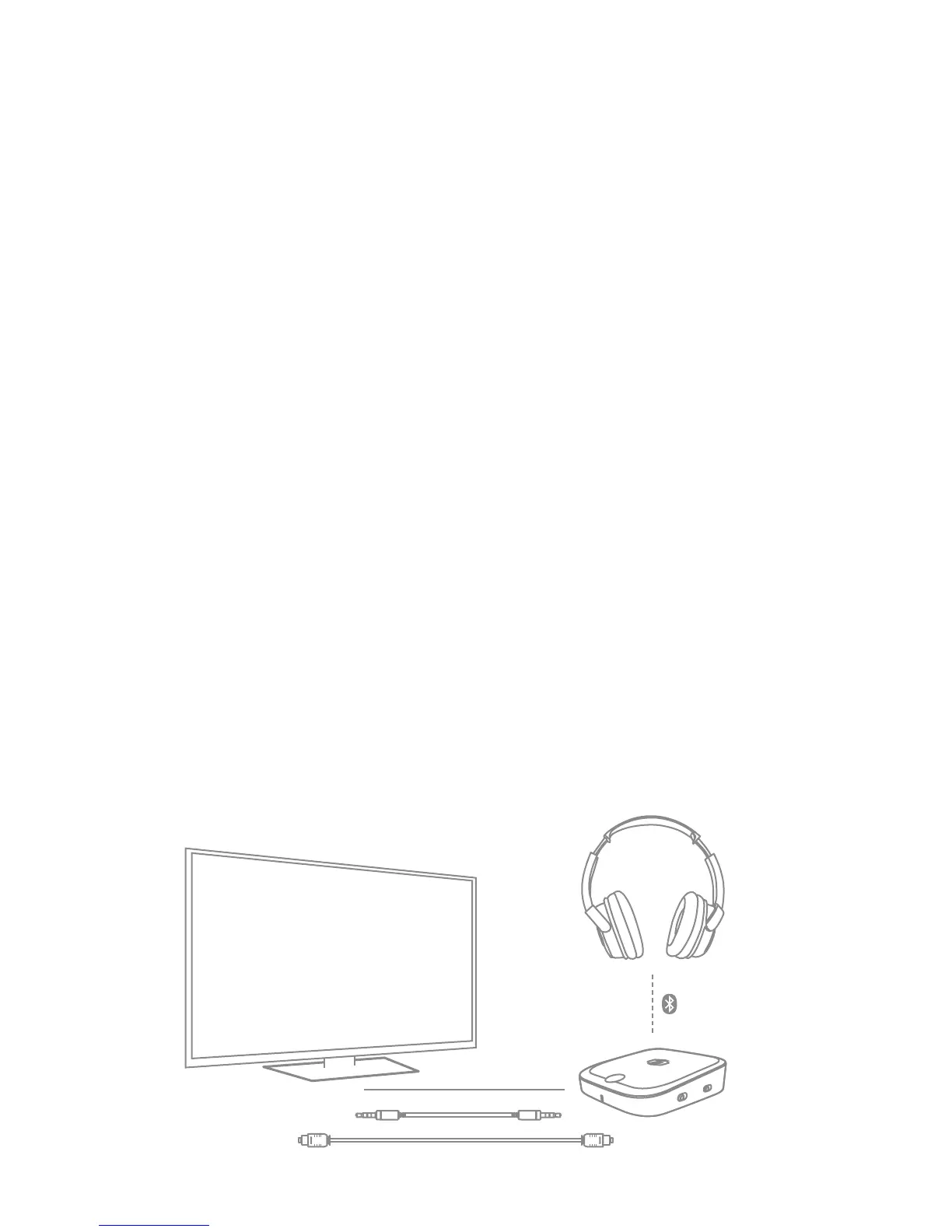
The transmitter mode enables the BR1005 to transmit audio signal
from non-Bluetooth devices like TV or computer to headphones or
speakers. When BR1005 is in TX mode, you can connect BR1005 with
a non-Bluetooth audio device like a TV / computer via an AUX audio
cable or optical audio cable. Then connect the BR1005 with Bluetooth
headset / speakers etc. via Bluetooth.


 To Next Page