EasyManua.ls Logo

InCharged ICE-30 - User Manual

InCharged ICE-30
39 pages
Print Icon
To Next Page IconTo Next Page
Loading...
Description
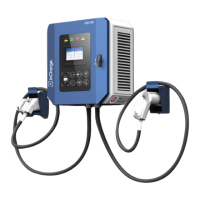
ICE-30 is a compact DCFC capable of charging with one or two connec-
tors and supports both CCS and CHAdeMO standards. This DC Wallbox
is designed for easy wall mounting or can be attached to our pedestal
which includes cable management and convenience lighting. The ICE-30
is easy to operate with an intuitive touchscreen display and is ideal for
auto dealers, fleet charging and a variety of parking applications where
shorter charge times are necessary.
Key Benefits and Features
150 to 1000Vdc output voltage range
30kW rated output power
User friendly control interface allows for access management via PIN or RFID
a
ccessibility
OCPP 1.6 standard supports interoperability across backend platforms
LTE Modem and LAN
Compact design is easy to mount on walls or on the optional InCharge pedestal
TUV certification to UL 2202 to ensure safety
480V 3-phase input for high efficiency conversion
The ICE-30 Dual CCS
Specifications
Available with CCS1 and CHAdeMO
DIN 70212 and ISO 15118-2 protocol supported
Hot galvanized steel, plastic facade, and tempered glass screen construction ensures longevity
Dimensions (D x W x H): 10.63” x 24.00” x 24.00” / 270 mm x 610 mm x 610 mm
Weight: 194lbs / 88kg
ICE-30
30kW DC Fast Charger
Question and Answer IconNeed help?

Do you have a question about the InCharged ICE-30 and is the answer not in the manual?

Overview

The InCharge ICE-30 is a compact DC fast charger designed for electric vehicles, offering a maximum output of 30kW. It supports both CCS1 and CHAdeMO charging standards, making it versatile for a wide range of EVs. The device is suitable for wall mounting or can be attached to an InCharge pedestal, providing flexibility in installation. Its robust design with an IP54 level of protection ensures durability for outdoor applications.

Function Description

The ICE-30 charger is designed to provide fast charging for electric vehicles. It features a user-friendly HMI (Human Machine Interface) with a 7-inch TFT color display that shows the charging state and allows for user interaction. The charging cycle is initiated by plugging in the connector and pressing "Ready" on the screen. The device performs safety checks between the vehicle and the EVSE (Electric Vehicle Supply Equipment) to ensure a safe charging session. Full safety functions are integrated, including output contactor and fuse, ESD/SPD leakage switch, and insulation detector software logic for multiple protection schemes. It also supports LTE wireless modem and RFID authorization for enhanced connectivity and user management.

Important Technical Specifications

Electrical Specifications:

  • Voltage: 480Vac WYE, +/- 10% (3-phase: L1, L2, L3, GND)
  • Frequency: 45-65 Hz
  • Recommended breaker: 50A 3W+G circuit
  • SCCR: 10 kAIC
  • Max Current Draw: 39A
  • Power factor: >0.99
  • THD - Current: <3%
  • DC Output Voltage: 150 - 1000Vdc
  • DC Output Current - Max: 100A
  • DC Output Power - Max: 30kW
  • System Efficiency - Max: >94.5%

Charging Connectors:

  • CCS1 & CHAdeMO

Communication:

  • OCPP 1.6J
  • LAN 10M/100M, Optional LTE wireless modem support
  • RFID: Yes

Environmental Conditions:

  • Operating Temperature: -4°F to + 158°F / -20°C to +70°C (Optional: -40°F / -40°C)
  • Storage Temperature: -40°F to + 167°F / -40°C to +75°C
  • Humidity: 95%
  • Altitude - Operating: 6560ft (2000 m)
  • Protection - Intrusion: IP54/IK10

Physical Specifications:

  • Cable Length: 16.4 ft (Optional: 25 ft)
  • Dimensions (D x W x H): 10.63" x 24.00" x 27.00" / 270 mm x 610 mm x 610 mm
  • Weight: 194lbs / 88kg

Usage Features

The ICE-30 is designed for ease of use and installation.

  • Installation: It can be wall-mounted or installed on a pedestal. Proper grounding is essential, and the installation process involves anchoring the unit to the wall or pedestal, connecting power cables, and ensuring proper cable routing. The manual provides detailed diagrams for drilling and conduit layouts, as well as concrete foundation requirements.
  • User Interface: The 7-inch TFT color display provides clear information about the charging status, including energy delivered, remaining time, voltage, and current. It also shows the status of the DC1 and DC2 charging guns.
  • Operation: To start charging, the user plugs the appropriate connector (CCS1 or CHAdeMO) into the vehicle receptacle and presses "Ready" on the screen. The HMI will display the charging process. Once the vehicle is fully charged, the user unplugs the charging gun.
  • Indicator Lights: The charger features indicator lights for DC-1, Power, Alarm, and DC-2. Yellow indicates the gun is in use, green indicates active power, and red indicates an error.
  • Safety Precautions: The manual emphasizes important safety instructions, including warnings about high voltage, electrical shock, and proper handling of components during installation and maintenance. It also highlights precautions for thunderstorms and sharp corners of objects.

Maintenance Features

Regular maintenance is crucial for the optimal performance and longevity of the ICE-30 charger. The manual outlines a comprehensive maintenance schedule.

  • Daily Checks:
    • Check the status window of the SPD (Surge Protective Device) for color changes (green to red indicates replacement needed).
    • Check the charging plug for cracks or damage and obvious burning marks.
    • Use a brush to remove dust from the surface of DC+ and DC- terminals.
  • Monthly Checks (Visual Check):
    • AC Input for Auxiliary Power
    • AC SPD
    • Charging Plug
    • ESD
    • Alarm information check
  • Bi-Monthly Checks (Visual Check & Torque Wrench):
    • Devices and connection points: Main circuit devices (circuit breaker, AC contactor, DC contactor, DC fuse), copper bar, power module connector. Check connection points for burns or serious discoloration and re-torque screws to normal specifications.
  • 3-6 Month Checks (Visual Check, Blower, Screwdriver, Soft Brush, Vacuum Cleaner):
    • Cooling fan and filter cotton: Clean the dust screen on both sides of the heat exchanger. The dust net should be effectively removed at least once every three to six months, and replaced once a year at most. Remove the dust screen with a screwdriver, use a soft brush, blower, and vacuum cleaner to remove dust.
  • Error Codes and Alarms: The charger provides detailed error codes and alarm information on the HMI, which can be accessed to diagnose issues. Alarms are classified as Critical (CA), Major (MA), or Observative (OA), with corresponding descriptions and recommended actions. Examples include "System Not Available," "Server Comm Fail," "Gun is disabled," and various rectifier or communication failures.
  • Power Module Replacement: The manual provides step-by-step instructions for removing and inserting power modules, emphasizing caution due to their weight.
  • Circuit Breaker Reset: Instructions are provided for resetting the circuit breaker if it trips, ensuring the recovery method is followed correctly.

The ICE-30 is designed for easy maintenance with accessible components and clear instructions for troubleshooting and repair.

InCharged ICE-30 Specifications

General IconGeneral
BrandInCharged
ModelICE-30
CategoryBattery Charger
LanguageEnglish

Related product manuals